Best Gaming Keyboards 2026 – Hall Effect, Rapid Trigger & Actually Worth It

I spent $220 on a "premium gaming keyboard" in 2023 that had every feature imaginable. Custom RGB zones, media controls, wrist rest, macro keys—the works. Know what I actually use? The WASD keys and Escape. That's it. Everything else was marketing fluff I paid for and never touched.
After that expensive lesson, I've spent the past year testing gaming keyboards with one simple question: does this actually make gaming better, or is it just fancy nonsense? Turns out, most gaming keyboards in 2026 are loaded with features that sound impressive but don't matter for 99% of gamers.
But here's what's genuinely changed: Hall Effect switches and Rapid Trigger technology actually make a difference in competitive games. Wireless has finally caught up to wired with zero latency. And budget options now offer features that used to cost $300+.
This guide covers gaming keyboards that'll actually improve your gaming—not just empty your wallet with RGB zones you'll set to static purple and forget about.
⌨️ Quick Picks (Between Rounds)
Best overall: NuPhy Field75 HE ($160-170) – Hall Effect, Rapid Trigger, feels amazing, perfect price
Best wireless: Asus ROG Azoth ($190-250) – incredible battery, zero latency, luxury feel
Best budget Hall Effect: Gamakay X NaughShark NS68 ($35-65) – Rapid Trigger under $70, actually works
Best for FPS: Wooting 80HE ($199) – adjustable actuation, industry-leading response, competitive edge
Best budget traditional: Logitech G515 ($140-160) – low-profile, reliable, no gimmicks
What Actually Matters in Gaming Keyboards (2026 Edition)
⚡ The Features That Actually Help You Game
Let me cut through the marketing nonsense and tell you what actually matters:
Hall Effect switches are the real deal. Unlike mechanical switches with physical contacts, Hall Effect uses magnets. This means you can adjust exactly when a key activates (actuation point) and enable Rapid Trigger—a feature that resets keys instantly for insanely fast repeated presses. In competitive FPS games, this is genuinely useful.
Rapid Trigger changes movement mechanics. Normally when you press A to move left, you have to release it past a certain point before pressing D to move right registers. Rapid Trigger removes that delay. Your character responds instantly to directional changes. Counter-strafing in CS2 or jiggle-peeking becomes noticeably smoother.
Polling rate beyond 1000Hz is mostly marketing. Your keyboard checks in with your PC at X times per second (polling rate). 1000Hz = 1ms delay. Some keyboards claim 8000Hz (0.125ms delay). Unless you're a professional esports player, you won't notice the difference. 1000Hz is plenty.
Wireless is finally viable for competitive gaming. Modern 2.4GHz wireless keyboards have the same latency as wired. Battery life on quality boards is 100+ hours. The only reason to go wired now is if you're paranoid about batteries dying mid-tournament.
Size matters (TKL vs Full-size). Tenkeyless (TKL) keyboards ditch the numpad, giving you more mouse space. 75% layouts keep the function row but tighten everything up. 60% removes even more. For gaming? TKL or 75% is ideal unless you actually use the numpad.
RGB is fine, but don't overpay for it. Customizable per-key RGB is cool for like a week. Then you set it to one color and never think about it again. Don't pay an extra $50 for fancy lighting zones.
Hot-swappable switches are underrated. Being able to swap switches without soldering means you can try different switch types or replace broken switches easily. More useful than RGB.
The Gaming Keyboards Worth Your Money in 2026
1. NuPhy Field75 HE

NuPhy Field75 HE - The sweet spot
The Field75 HE is what I actually use daily, and it's the keyboard I recommend to most people. It hits the perfect balance of features, price, and quality.
Hall Effect switches with adjustable actuation (0.2mm to 3.8mm) and Rapid Trigger work exactly as advertised. In Valorant and CS2, the movement feels noticeably more responsive. Strafing, counter-strafing, jiggle-peeking—everything tightens up.
Build quality is excellent. Aluminum chassis feels premium, gasket-mounted design gives it a nice acoustic feel when typing. The keycaps are doubleshot PBT (won't wear down or shine) with a satisfying texture.
It's a 75% layout, which means compact but keeps the function row and arrow keys. Perfect size for gaming—more mouse room than full-size, but not as cramped as 60%.
Wireless and wired options both work great. 2.4GHz wireless has zero noticeable latency. Battery lasts 100+ hours with RGB off, about 30-40 with it on.
The software (VIA-based) is simple and works. No bloatware, no accounts required, just straightforward customization.
At $169, it's not cheap, but it's $80-100 less than competing Hall Effect boards and feels just as good.
🏆 Best overall gaming keyboard - perfect balance
Check Today's Price on Amazon →✅ Pros:
- Hall Effect + Rapid Trigger works great
- Adjustable actuation (0.2-3.8mm)
- Premium build quality
- Excellent wireless performance
- 75% layout is ideal size
- Hot-swappable switches
- Great value at $169
❌ Cons:
- No dedicated media keys
- RGB could be brighter
- Learning curve for Rapid Trigger
- Stock switches are good not amazing
2. Asus ROG Azoth
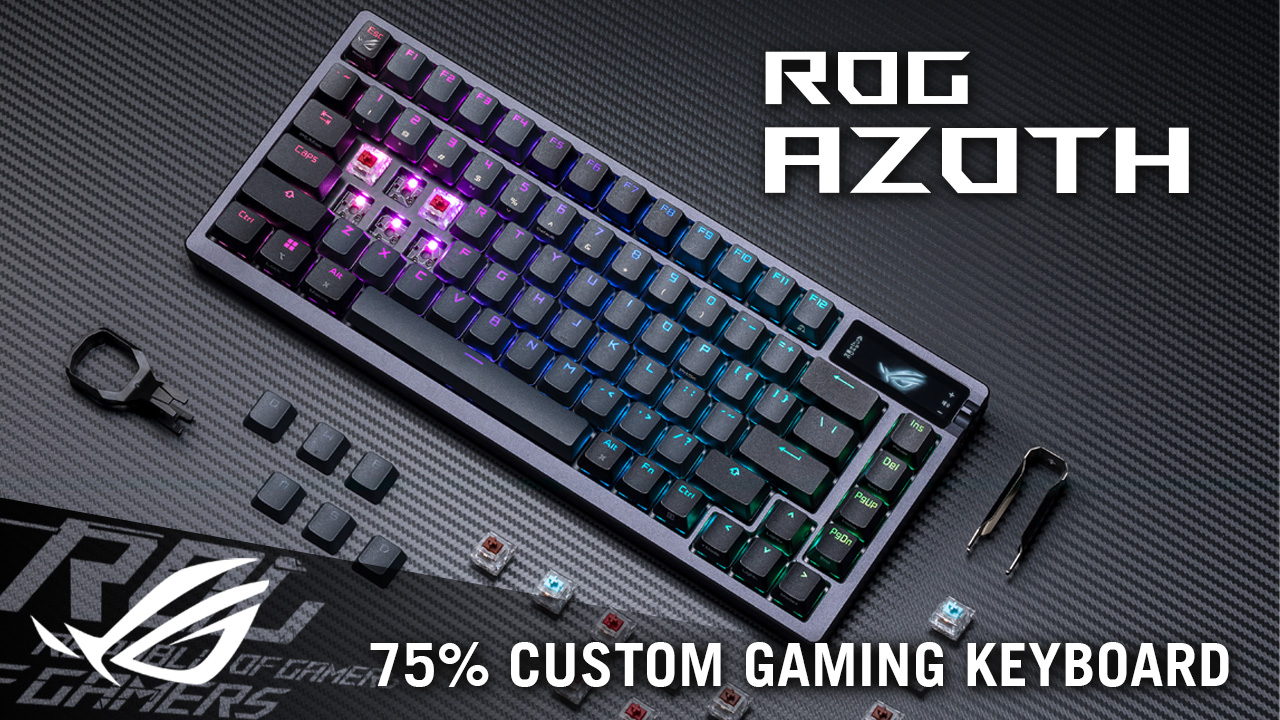
Asus ROG Azoth - Premium wireless gaming
The ROG Azoth is what you get if you want a premium wireless gaming keyboard and don't mind paying for it.
Wireless performance is flawless. 2.4GHz connection with 1000Hz polling feels identical to wired. Battery life is insane—like 1800 hours (75 days) with RGB off. Even with RGB on, you're looking at 300+ hours.
Build quality is exceptional. All-aluminum CNC chassis, gasket mount, layers of sound-dampening foam. It feels expensive because it is expensive. The typing experience is buttery smooth.
It comes with ROG's NX mechanical switches (your choice of linear, tactile, or clicky). They're pre-lubed and sound great. Hot-swappable if you want to experiment.
The OLED screen on the side is actually useful—shows battery, caps lock, connection status, custom images. Not gimmicky like I expected.
75% layout with a volume knob that feels premium and precise. All the little details are dialed in.
Software is typical Asus Armoury Crate (bloated but functional). Once you set it up, you rarely need to open it.
The catch? It's $200, and it doesn't have Hall Effect switches. You're paying for luxury wireless, not cutting-edge gaming tech.
👑 Premium wireless option: Best battery life in class → See Amazon pricing
✅ Pros:
- Exceptional build quality
- 1800-hour battery life (insane)
- Perfect wireless performance
- Premium typing feel
- OLED screen actually useful
- Hot-swappable switches
❌ Cons:
- Expensive ($190-250)
- No Hall Effect or Rapid Trigger
- Armoury Crate software is bloated
- Expensive for what it is
3. Gamakay X NaughShark NS68

Gamakay NS68 - Budget Hall Effect champion
The NS68 is genuinely shocking value. Hall Effect switches with Rapid Trigger for under $100 seemed too good to be true, but it's legit.
The Hall Effect implementation works. Adjustable actuation, Rapid Trigger, all the competitive features you'd expect. In actual gaming, the response feels noticeably faster than standard mechanical switches.
Build quality is budget but functional. Plastic case, but it doesn't feel flimsy. Gasket-mounted so it has some acoustic dampening. The switches are smooth out of the box.
It's a 65% layout, which is compact but keeps arrow keys. Good middle ground if 60% feels too cramped.
Tri-mode connectivity: 2.4GHz wireless, Bluetooth, or wired USB-C. Wireless performance is solid with minimal latency. Battery life is decent—about 100 hours with RGB off.
The software is clunky and not super intuitive, but once you configure it, you don't need to touch it much.
For $40, this brings Hall Effect technology to people who can't afford $200+ keyboards. That's genuinely impressive.
💰 Best budget Hall Effect keyboard
Get It on Amazon →✅ Pros:
- Hall Effect under $100 (wild value)
- Rapid Trigger works well
- Tri-mode connectivity
- 65% layout is practical
- Hot-swappable switches
- Good battery life
❌ Cons:
- Build quality is budget
- Software is clunky
- Keycaps feel cheap
- RGB is mediocre
4. Wooting 80HE

Wooting 80HE - Competitive gaming focus
Wooting pioneered analog Hall Effect keyboards for gaming, and the 80HE represents the peak of their technology.
The Hall Effect implementation is the most advanced I've tested. Actuation range from 0.1mm to 4mm, dual-stage actuation (one key, two functions based on pressure), and the smoothest Rapid Trigger implementation available.
Wooting's "Tachyon" mode claims sub-0.1ms latency, which is marketing but the keyboard does feel incredibly responsive. In competitive FPS, it genuinely gives an edge.
Build quality is excellent. TKL aluminum chassis, nice weight, good stabilizers. Typing feel is smooth and consistent.
The software (Wootility) is the best in the business. Deep customization, per-key actuation adjustment, analog profiles for different games. It's powerful without being overwhelming.
It's wired-only, which is fine for competitive gaming where you want zero battery anxiety.
At $199, it's expensive but justified if you're serious about competitive gaming and want every possible advantage.
🎯 Best for competitive FPS: Industry-leading response → Check Amazon deals
✅ Pros:
- Best Hall Effect implementation
- Adjustable 0.1-4mm actuation
- Dual-stage actuation
- Excellent software (Wootility)
- Perfect for competitive gaming
- Hot-swappable switches
❌ Cons:
- Wired only (no wireless)
- Expensive at $199
- TKL only (no full-size option)
- Overkill for casual gaming
5. Logitech G515 LIGHTSPEED TKL

Logitech G515 - Low-profile legend
The G515 is for people who want a solid gaming keyboard without Hall Effect complexity or premium pricing.
It's a low-profile mechanical keyboard, which means it's thinner than traditional keyboards. The shorter key travel (3.2mm vs 4mm) makes it feel snappier without being twitchy.
Logitech's GL switches (choice of linear, tactile, or clicky) are smooth and consistent. Pre-lubed, minimal wobble, good sound. Not the absolute best switches, but very reliable.
Wireless performance is classic Logitech LIGHTSPEED—flawless 1ms latency, rock-solid connection. Battery lasts 36 hours with RGB on, way longer with it off.
Build quality is typical Logitech: solid, functional, nothing fancy. Plastic chassis but well-designed. Comfortable low-profile typing experience.
The software (G Hub) is Logitech's standard suite. It works, has all the features you need, but it's not exciting.
At $139, it's the "safe" pick. Not cutting-edge tech, just a well-made wireless gaming keyboard from a reliable brand.
🛡️ Best reliable traditional keyboard
View on Amazon →✅ Pros:
- Low-profile design is comfortable
- Excellent wireless performance
- Reliable Logitech quality
- Good battery life
- Simple, works well
- TKL layout
❌ Cons:
- No Hall Effect or advanced features
- Not hot-swappable
- G Hub software is meh
- Nothing exceptional, just good
6. SteelSeries Apex Pro TKL Wireless

SteelSeries Apex Pro - Premium magnetic switches
The Apex Pro TKL Wireless uses SteelSeries' OmniPoint 2.0 magnetic switches (they rebranded them from "optical" to hop on the magnetic trend—same tech, new name).
Adjustable actuation from 0.2mm to 3.8mm works smoothly. Rapid Trigger implementation is solid, dual-actuation lets you map two functions per key. All the competitive features are here.
Build quality is premium. Aluminum top plate, solid construction, nice weight distribution. The OLED screen is functional for showing settings and customization info.
Wireless performance is excellent with 1000Hz polling. Battery lasts 40+ hours with RGB on.
SteelSeries GG software is actually good—clean interface, powerful customization, not too bloated.
The catch? It's $200 for features you can get in the NuPhy or Wooting for less money. You're paying extra for the SteelSeries brand and premium build.
⚡ Premium alternative: SteelSeries quality + magnetic switches → See Amazon pricing
✅ Pros:
- Magnetic switches work great
- Adjustable actuation (0.2-3.8mm)
- Premium build quality
- Good wireless performance
- SteelSeries GG software is solid
- OLED screen useful
❌ Cons:
- Competes with cheaper alternatives
- Battery life could be better
- You're paying for the brand
💡 Gaming Keyboard Tips You Won't Find in Reviews
Hall Effect has a learning curve. Rapid Trigger feels weird at first. Your muscle memory will be off for a few days. Stick with it—the benefits show up once you adjust.
Try different actuation points for different games. FPS games benefit from shallow actuation (0.4-1mm). MMOs and strategy games work better with deeper actuation (1.5-2mm) to avoid accidental presses.
RGB drains batteries faster than you think. If battery life matters, turn RGB off or set it to static low brightness. You'll triple your battery life.
Wrist rests are worth buying separately. Most included wrist rests suck. Get a quality wooden or memory foam one from Amazon for $20-30.
Hot-swappable matters more than you think. Even if you're not into custom keyboards now, being able to replace broken switches or try new ones without soldering is huge.
Stabilizers make or break typing feel. Good stabilizers mean spacebar, shift, and enter keys don't rattle. Check reviews specifically mentioning stabilizer quality.
TKL gives you way more mouse space. If you play low-sensitivity FPS games and need room for big mouse swipes, TKL is essential. Full-size keyboards push your mouse too far right.
Wireless keyboards need firmware updates. When you get a wireless keyboard, immediately check for firmware updates. They often improve latency and battery life.
Don't trust manufacturer latency claims. "Sub-1ms response time" is marketing. Look for independent reviews testing actual latency.
Amazon return policies save you. Buy, test for a week. If the switches feel bad or Rapid Trigger isn't useful to you, return it. No shame in finding what works.
📊 Quick Comparison Table
| Model | Price | Switches | Wireless | Best For |
|---|---|---|---|---|
| NuPhy Field75 HE | $160-170 | Hall Effect | Yes | Overall best |
| Asus ROG Azoth | $190-250 | Mechanical | Yes | Premium wireless |
| Gamakay NS68 | $35-65 | Hall Effect | Yes | Budget HE |
| Wooting 80HE | $199 | Hall Effect | No | Competitive |
| Logitech G515 | $140-160 | Low-profile | Yes | Reliable pick |
| SteelSeries Apex Pro | $150-200 | Magnetic | Yes | Premium brand |
Which Gaming Keyboard Should You Actually Buy?
After months of testing and thousands of hours gaming on these keyboards, here's my honest take:
Best overall: NuPhy Field75 HE → Check Amazon Price
Best wireless premium: Asus ROG Azoth → Check Amazon Price
Best budget Hall Effect: Gamakay NS68 → Check Amazon Price
Best competitive: Wooting 80HE → Check Amazon Price
Best traditional: Logitech G515 → Check Amazon Price
Look, Hall Effect keyboards with Rapid Trigger are genuinely useful for competitive gaming. If you play FPS games seriously, the responsiveness difference is real. But if you're playing single-player games or casual multiplayer? A good traditional mechanical keyboard works just fine.
The NuPhy Field75 HE at $169 is the sweet spot—Hall Effect tech without breaking the bank, wireless without sacrificing performance, and build quality that feels premium. It's what I'd buy if I was starting fresh today.
If you're on a tight budget, the Gamakay NS68 at $89 is absurd value. You're getting cutting-edge gaming tech for less than most "gaming" keyboards with basic mechanical switches.
And if you just want something reliable that works? The Logitech G515 won't blow your mind, but it'll never disappoint you either.
Don't overthink it. Pick based on your budget and gaming style. Any of these will make you happy.
Now go click some heads (or whatever kids do in games these days).


No comments:
Post a Comment