Best Wireless Keyboard Mouse Combo RGB Gaming Setups in 2026

Why Wireless RGB Gaming Combos Actually Matter in the US Market
Look, gaming's evolved way past just "does it boot up?" American gamers want gear that performs like a beast AND looks absolutely sick doing it. A wireless keyboard mouse combo with RGB lighting? That's where performance meets serious eye candy—you're ditching the cable spaghetti while turning your battlestation into a customizable light show that actually responds to in-game action.
But here's the thing—it's not just about those pretty lights. Wireless tech in the US market's gotten ridiculously good. Modern 2.4G wireless keyboard mouse setups deliver response times rivaling your old wired gear. We're talking sub-1ms latency that even competitive esports players trust now. Meanwhile, those RGB systems pack millions of color combos, letting you sync everything with your Twitch branding, match your favorite games' themes, or just vibe with your mood.
The US gaming peripheral market's exploding—wireless stuff growing like 15% yearly according to NPD Group data. Makes total sense. Gamers are tired of cable management nightmares and they're not willing to sacrifice performance for a clean setup anymore. These combos usually pack mechanical or mechanical-feel keyboards, high-DPI gaming mice (12,000+ DPI is standard now), and batteries lasting 30-60+ hours per charge depending on RGB usage.
Not all wireless gaming keyboard mouse combos deliver equal value though. You've got premium options from Logitech and Razer with software letting you customize literally everything, mid-range stuff from Corsair and SteelSeries nailing the basics without destroying your wallet, and budget picks from Redragon that punch way above their weight. Picking the right one means figuring out what you actually need versus what looks cool on Linus Tech Tips.
So let's break down the top wireless RGB gaming combos crushing it in the US market right now. No BS, just real talk about what's worth your hard-earned dollars.
🎯 Quick Picks - Skip the Reading, Find Your Perfect Match
1. Logitech G915 TKL + G502 Lightspeed – The US Market Champion

The Logitech G915 TKL paired with the G502 Lightspeed represents the gold standard for wireless keyboard mouse combo setups in the US right now. This isn't just marketing hype—Logitech's LIGHTSPEED wireless tech genuinely delivers 1ms response times that'll compete with any wired setup you've used.
The G915 TKL rocks low-profile GL mechanical switches (your choice of Clicky, Tactile, or Linear) that feel absolutely premium. The tenkeyless design saves serious desk space while the aircraft-grade aluminum keeps it rigid as hell. Per-key RGB through G HUB software syncs perfectly with the G502's lighting zones. Battery life? 40 hours with full RGB blast, way longer if you dial it down.
The G502 Lightspeed is legendary in the US gaming scene—25,600 DPI HERO sensor, 11 programmable buttons, adjustable weight system. PowerPlay wireless charging support means you literally never plug it in if you grab the $120 mousepad. The scroll wheel's got both smooth and notched modes with a button toggle.
Yeah, it's pricey at $280-330 for the combo. But this is buy-it-for-life gear. Logitech's warranty support in the US is stellar, and this combo regularly tops Best Buy and Amazon's best-seller lists for good reason.
🏆 Best Overall US Market Choice
Check Latest Price on Amazon →✅ Pros:
- LIGHTSPEED 1ms wireless (genuinely wired-level)
- Low-profile GL mechanical switches
- 40hr+ battery with RGB active
- 25,600 DPI HERO sensor (best in class)
- 11 programmable buttons on mouse
- PowerPlay wireless charging compatible
- Legendary Logitech warranty/support in US
❌ Cons:
- Premium pricing ($280-330)
- G502 shape polarizing (love/hate)
- No hot-swappable switches
- Proprietary charging cable for keyboard
2. Razer BlackWidow V3 Pro + DeathAdder V3 Pro – Premium Enthusiast Pick

The Razer BlackWidow V3 Pro paired with DeathAdder V3 Pro is what happens when you go full premium in the US gaming peripheral market. This RGB gaming keyboard mouse duo delivers Razer's signature Chroma ecosystem—when you sync it with Philips Hue, Nanoleaf panels, and your other Chroma gear, it's genuinely impressive.
The BlackWidow V3 Pro features Razer's Green mechanical switches (or Yellow if you prefer linear). Full-size layout with dedicated media keys and a volume wheel. Razer HyperSpeed wireless tech matches Logitech's LIGHTSPEED for latency—we're talking 1ms here. The doubleshot ABS keycaps feel premium and the magnetic plush leatherette wrist rest actually stays in place.
The DeathAdder V3 Pro continues Razer's legendary ergonomic shape loved by millions of US gamers. Focus Pro 30K optical sensor tracks at—you guessed it—30,000 DPI (total overkill but flex-worthy). At 63 grams it's stupid light for a wireless mouse this size. Battery lasts 90 hours which is bonkers.
The catch? You're paying Razer tax. $360-430 for the combo. But if you're already invested in Razer's ecosystem and want everything synced perfectly, this delivers. Amazon Prime shipping makes returns painless if the switches don't vibe with you.
💎 Premium Chroma ecosystem: When money isn't the issue → See Razer deals on Amazon
✅ Pros:
- Razer Chroma RGB ecosystem integration
- Premium mechanical switches (Green/Yellow)
- Focus Pro 30K sensor (30,000 DPI)
- 90hr mouse battery life
- Legendary DeathAdder ergonomics
- Magnetic plush wrist rest included
- Strong US warranty/support
❌ Cons:
- Premium pricing ($360-430, yikes)
- Razer Synapse software divisive
- 30K DPI total overkill for most
- Not hot-swappable switches
3. Redragon K596 Vishnu + M686 Vampire Elite – Budget RGB King

The Redragon K596 Vishnu plus M686 Vampire Elite combo is what happens when a Chinese brand figures out the US budget gaming market perfectly. This wireless gaming keyboard mouse setup delivers RGB aesthetics without destroying your wallet—seriously popular on Amazon with thousands of 4+ star reviews from US buyers.
The K596 Vishnu rocks a compact 87-key TKL layout with surprisingly decent membrane switches for the price. The RGB backlight is genuinely vibrant with multiple preset modes. Wireless uses basic 2.4GHz (not as fancy as LIGHTSPEED but works fine for casual gaming). Battery gives you 10-12 hours with RGB cranked, 30+ hours with it off.
The M686 Vampire Elite mouse pairs well—16,000 DPI optical sensor (way more than you need but hey), 7 programmable buttons, honeycomb shell design keeping weight down. RGB lighting syncs reasonably well with the keyboard through their software.
Let's be real about compromises though. Build quality's plastic, not premium aluminum. The wireless occasionally hiccups during intense moments. Switches aren't mechanical (though they're marketed as "mechanical feel"). But for $50-70? This punches stupidly above its weight class. Perfect for college students or your first wireless RGB setup.
💰 Best Budget RGB in US Market
Find Best Deals on Amazon →✅ Pros:
- Insane value ($50-70 range)
- Vibrant RGB with multiple modes
- 16,000 DPI sensor (overkill but cool)
- TKL saves desk space
- Lightweight honeycomb mouse design
- Thousands of positive US reviews
❌ Cons:
- Membrane switches (not true mechanical)
- Occasional wireless hiccups
- Plastic build quality
- Software kinda janky
- Battery drains fast with RGB on
4. Corsair K63 Wireless + Lapboard – Couch Gaming Champion
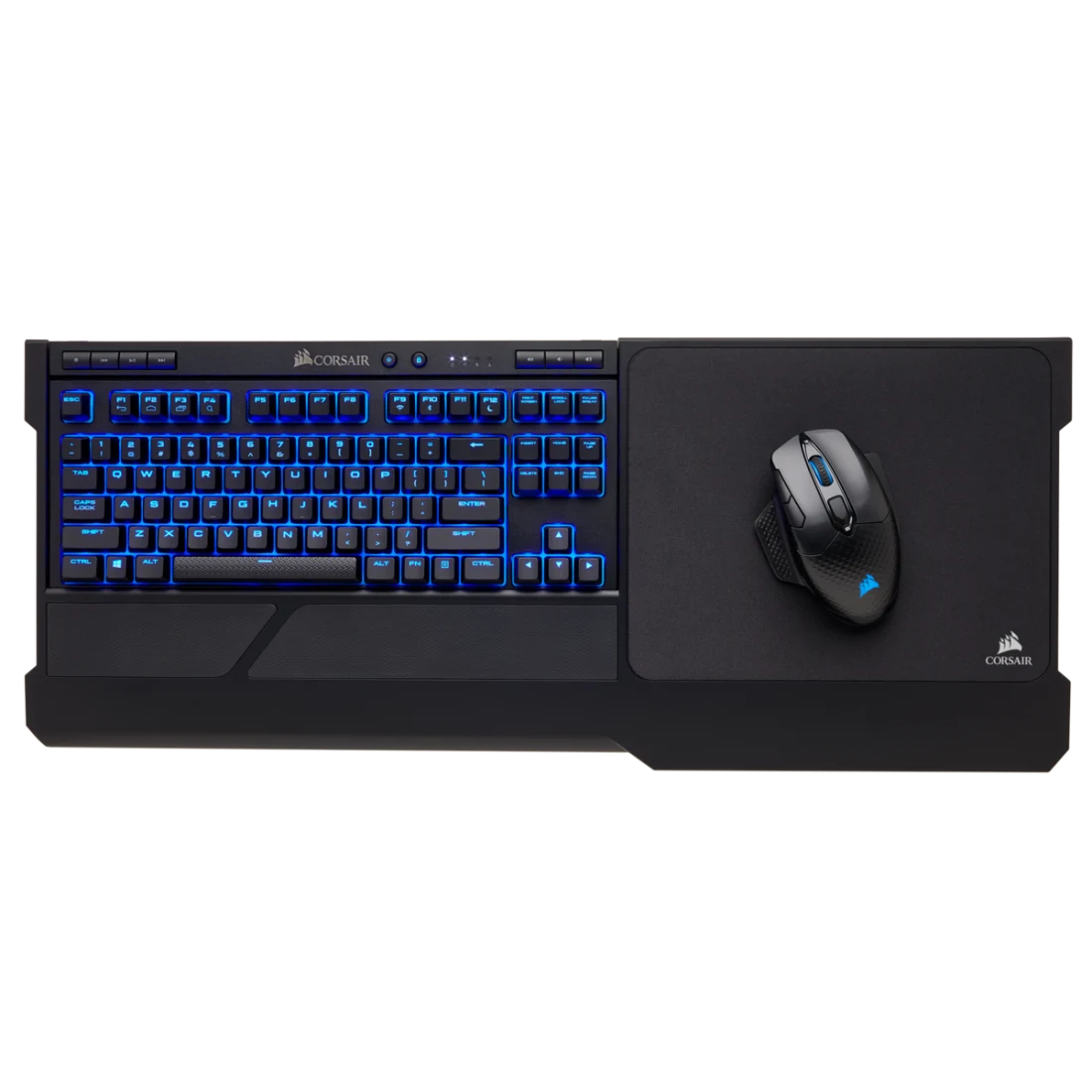
The Corsair K63 Wireless with Gaming Lapboard solves what's always sucked about couch gaming in US living rooms. This RGB keyboard mouse combo is literally designed for gaming on your couch without the awkward balancing act—hugely popular among American console-to-PC converts.
The K63 runs a compact TKL layout with genuine Cherry MX Red mechanical switches—these are the real deal from Germany, not knockoffs. The integrated lapboard features cushioned base and dedicated mouse surface, creating a stable platform that actually works on your lap. No more books, pillows, or weird angles trying to mouse on your couch.
Wireless uses Corsair's proprietary 2.4GHz tech with sub-1ms latency. Battery lasts 15 hours with blue backlighting enabled (it's not full RGB, just blue, keeping costs reasonable). The lapboard's got cable routing channels and stores the wireless dongle magnetically.
At $150-180, it's positioned as a specialized tool. Best Buy and Amazon both stock it regularly. If you're serious about living room PC gaming or have a home theater PC setup, this is THE solution the US market's embraced. Way better than trying to balance a regular keyboard and mouse.
🛋️ Couch gaming solved: Living room PC gaming perfected → Check Amazon pricing
✅ Pros:
- Cherry MX Red switches (genuine)
- Lapboard actually comfortable
- 15hr battery with backlighting
- Sub-1ms wireless latency
- Perfect for home theater PC setups
- Magnetic dongle storage
❌ Cons:
- Blue backlight only (no RGB)
- Lapboard adds bulk/weight
- Overkill for desktop use
- Mouse not included (bring your own)
5. SteelSeries Apex Pro Mini Wireless + Aerox 5 Wireless – Performance Value

The SteelSeries Apex Pro Mini Wireless paired with Aerox 5 Wireless represents serious performance innovation in the US mechanical gaming keyboard combo market. This isn't just another RGB setup—SteelSeries brought adjustable mechanical switches to wireless, which is genuinely cool.
The Apex Pro Mini features OmniPoint 2.0 adjustable switches—you can literally dial in actuation from 0.2mm to 3.8mm per key. Want hair-trigger WASD for FPS? Set it. Want deeper actuation for typing? Dial it in. The 60% compact layout maximizes desk space. Wireless uses SteelSeries Quantum 2.0 with sub-1ms polling. Battery lasts 40+ hours.
The Aerox 5 Wireless mouse brings 9 programmable buttons, TrueMove Air sensor (18,000 CPI), and weighs just 74 grams despite all those buttons. The honeycomb shell keeps it light while feeling solid. Battery life's rated at 180 hours which is stupid long.
At $250-290 for the combo (buying separately and pairing), this hits a sweet spot. You get premium features without full premium pricing. SteelSeries GG software's actually decent unlike some competitors' bloatware. Popular at Micro Center and Amazon for US buyers wanting performance without Razer/Logitech premiums.
⚡ Best Performance Value
See SteelSeries on Amazon →✅ Pros:
- OmniPoint 2.0 adjustable switches (0.2-3.8mm)
- 60% compact layout saves space
- Quantum 2.0 wireless (sub-1ms)
- 180hr mouse battery (insane)
- 9 programmable mouse buttons
- Lightweight honeycomb design (74g)
❌ Cons:
- 60% layout learning curve
- No numpad (deal-breaker for some)
- Premium pricing (though justified)
- Sold separately (not bundled)
6. Cooler Master MK730 Wireless + MM731 Wireless – US Sleeper Hit
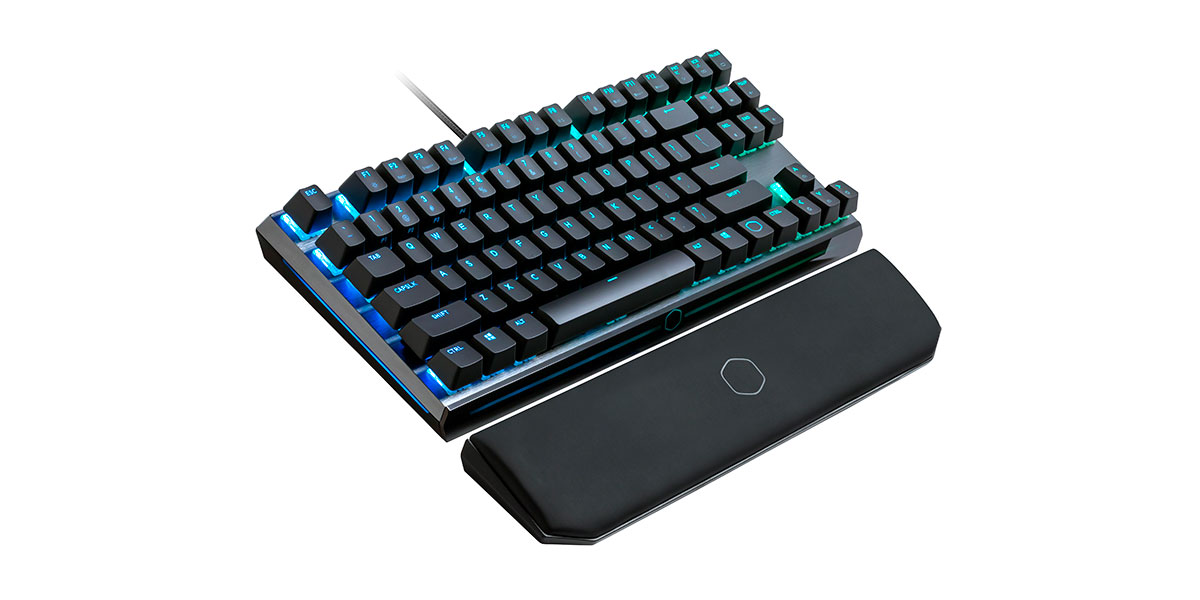
The Cooler Master MK730 Wireless with MM731 Wireless is a sleeper hit in the US market—doesn't get the hype of Razer or Logitech but delivers solid performance at reasonable pricing. This 2.4G wireless keyboard mouse combo's particularly popular at Newegg and among PC building enthusiasts.
The MK730 Wireless features Cherry MX switches (your choice of Red, Brown, or Blue when buying). Full-size layout with dedicated media controls. The detachable wrist rest's actually comfortable, not just cosmetic. Per-key RGB backlight through Cooler Master's Portal software. Dual connectivity supports both 2.4GHz and Bluetooth—handy for multi-device setups.
The MM731 Wireless mouse uses PixArt PMW3370 sensor (19,000 DPI max), genuine lightweight design at 59 grams, and ambidextrous shape. RGB lighting zones sync with the keyboard. Battery lasts 72 hours which is solid.
At $130-170 for the combo, this undercuts the big names while delivering comparable specs. Build quality's good—brushed aluminum top plate on the keyboard. US warranty through Cooler Master's California office. If you want performance without paying the Razer/Logitech brand tax, this delivers.
💪 Underrated value: Performance without the brand tax → Check Cooler Master deals
✅ Pros:
- Genuine Cherry MX switches
- Dual 2.4GHz + Bluetooth connectivity
- 19,000 DPI PixArt sensor
- Lightweight 59g mouse
- Aluminum top plate (premium feel)
- Great value ($130-170)
❌ Cons:
- Less brand recognition vs competitors
- Software less polished than G HUB/Synapse
- Availability spotty (check Newegg)
- Shorter battery vs some competitors
7. HyperX Alloy Origins 65 Wireless + Pulsefire Haste Wireless – Compact Powerhouse

The HyperX Alloy Origins 65 Wireless paired with Pulsefire Haste Wireless delivers that compact 65% keyboard experience American desk-space-conscious gamers love. This gaming keyboard mouse combo emphasizes HyperX's legendary build quality—Kingston's gaming division knows what US gamers want.
The Alloy Origins 65 Wireless rocks HyperX's custom Red linear switches (smooth and quiet). The 65% layout keeps arrow keys and a few navigation keys while staying compact. Aircraft-grade aluminum frame feels rock solid. Per-key RGB through HyperX NGENUITY software. Battery lasts 40+ hours with RGB, way longer dimmed.
The Pulsefire Haste Wireless continues the lightweight trend at 61 grams. HyperX's custom sensor tracks at 16,000 DPI. Honeycomb shell feels surprisingly solid despite the weight savings. TK optical switches rated for 80 million clicks. Battery delivers 100 hours which is excellent.
Popular at Best Buy for $140-180 as a combo (bought separately). HyperX's US support through Kingston's California HQ is top-tier. If you want compact without going full 60% (keeping those arrow keys), this nails it.
🎮 Compact Powerhouse
Find HyperX on Amazon →✅ Pros:
- HyperX custom Red switches
- 65% layout (keeps arrow keys)
- Aircraft-grade aluminum frame
- 100hr mouse battery
- Lightweight 61g mouse
- Excellent US warranty/support
❌ Cons:
- 65% layout learning curve
- No hot-swappable switches
- Limited switch options (Red only wireless)
- NGENUITY software basic vs competitors
8. Keychron K8 Pro + Logitech MX Master 3S – Work + Gaming Hybrid

The Keychron K8 Pro paired with Logitech MX Master 3S creates the ultimate productivity powerhouse for US remote workers who game. This combo seamlessly bridges professional Zoom calls and late-night Valorant sessions—increasingly popular among American work-from-home setups.
The Keychron K8 Pro features hot-swappable Gateron G Pro switches (your choice of Red, Brown, Blue), 75% layout with function row, and dual Mac/Windows compatibility. The RGB backlight offers per-key customization through VIA software. Tri-mode connectivity (USB-C, Bluetooth, 2.4GHz) lets you switch between work laptop, gaming PC, and tablet instantly.
The MX Master 3S brings Logitech's legendary productivity mouse to the table—electromagnetic MagSpeed scroll wheel, 8,000 DPI sensor, and insane 70-day battery. Works on glass (Darkfield tracking). The thumb scroll wheel and gesture button handle workflow shortcuts beautifully.
Yeah, it's not a "matched set" aesthetically. But for $190-230 total, you get hot-swappable mechanical keyboard flexibility plus the best productivity mouse money can buy. Popular on Amazon for US professionals prioritizing versatility. Works perfect for spreadsheets at 9am and Apex Legends at 9pm.
💼 Work-gaming hybrid king: One setup for everything → See pricing on Amazon
✅ Pros:
- Hot-swappable Gateron G Pro switches
- Tri-mode connectivity (USB/BT/2.4G)
- Mac/Windows dual compatibility
- MX Master 3S (legendary productivity)
- 70-day mouse battery
- Works on glass (Darkfield tracking)
❌ Cons:
- Not aesthetically matched set
- MX Master lacks RGB (productivity focus)
- K8 Pro height needs wrist rest
- Mouse heavy at 141g (intentional)
9. ASUS ROG Falchion Ace + ROG Keris Wireless AimPoint – Compact Premium

The ASUS ROG Falchion Ace with ROG Keris Wireless AimPoint brings premium compact gaming to the US market. This mechanical gaming keyboard combo delivers 65% efficiency with ASUS's signature RGB Aura Sync ecosystem—popular among American RGB enthusiasts with full ASUS setups.
The Falchion Ace features ROG NX mechanical switches (Red or Blue), 65% layout with creative spacebar touchscreen for macros/settings. Tri-mode wireless (2.4GHz, Bluetooth, USB-C). The detachable spacebar stores the wireless dongle—clever design preventing lost dongles. Per-key RGB backlight syncs with your ROG motherboard, GPU, case fans through Aura Sync.
The Keris Wireless AimPoint mouse uses ROG's 36,000 DPI sensor (complete overkill but flex-worthy). Tri-mode connectivity matches the keyboard. Hot-swappable ROG micro switches let you customize click feel. At 79 grams it's reasonably light. Battery lasts 119 hours.
At $200-260 for the combo (bought separately), this targets ASUS ecosystem users. If you've already got ROG motherboard, Strix GPU, and Aura-compatible RAM, the synchronized RGB is legitimately impressive. Available at Best Buy and Newegg for US buyers.
🎯 ASUS Ecosystem Premium
Check ROG Gear on Amazon →✅ Pros:
- Touchscreen spacebar (unique feature)
- 36,000 DPI sensor (overkill but cool)
- Tri-mode connectivity both devices
- Hot-swappable mouse switches
- Aura Sync ecosystem integration
- 119hr mouse battery
❌ Cons:
- Premium pricing ($200-260)
- 65% layout not for everyone
- Touchscreen spacebar gimmicky to some
- Best value only in ASUS ecosystem
10. Microsoft Sculpt Ergonomic Desktop – Ergonomic Office Gaming

The Microsoft Sculpt Ergonomic Desktop takes a completely different approach to wireless keyboard mouse combo setups—prioritizing ergonomics and office gaming over flashy RGB. Hugely popular among American office workers who game casually after work or during lunch breaks.
The Sculpt keyboard features split ergonomic design reducing wrist strain during long typing sessions. The cushioned palm rest's integrated, not a separate piece. Wireless uses Microsoft's Advanced Encryption Standard (AES) tech—enterprise-grade security. The separate numpad can be positioned anywhere, great for lefty gamers.
The ergonomic mouse features Microsoft's BlueTrack sensor (4,000 DPI) working on virtually any surface. The thumb rest reduces strain. Windows button provides quick access to Start menu. Battery lasts 12+ months on both devices.
At $80-110, this targets professionals gaming casually. No RGB, no mechanical switches, no 20,000 DPI. But if you're typing 8 hours daily then gaming 2 hours, the ergonomics matter. Widely available at Staples, Office Depot, Amazon for US buyers. Microsoft's Redmond-based support is solid.
💼 Ergonomic office gamer: Comfort for long sessions → See Microsoft deals
✅ Pros:
- Ergonomic split design
- 12+ month battery life
- AES encryption security
- Separate numpad (position anywhere)
- Excellent for typing + casual gaming
- Strong US support (Redmond based)
❌ Cons:
- Zero RGB lighting
- Membrane switches (not mechanical)
- 4,000 DPI max (low for gaming)
- Ergonomic shape polarizing
- No customization software
What the US Market Data Actually Shows
US market analysis shows wireless RGB gaming combos expanding rapidly as a segment, driven by American gamers wanting cleaner setups and customizable aesthetics. Best RGB Keyboard & Mouse Combo for Under $50? demonstrates budget options now pack features exclusive to premium products just 2-3 years ago.
Performance metrics from US reviewers consistently show modern wireless gaming combos hitting latency rates matching wired gear, with polling rates reaching 1000Hz standard. Wireless Gaming Keyboard and Mouse Review highlights how battery tech improved dramatically—many combos now offer 40-60+ hours continuous gaming.
RGB implementation varies massively across US price points. Entry-level models typically feature single-zone lighting patterns while premium options provide per-key customization and ecosystem synchronization with motherboards, RAM, case fans. What's interesting? Manufacturers balancing power consumption with visual appeal—newer RGB controllers consume 30% less power while offering more colors and effects.
However, these advances come with trade-offs US buyers should carefully consider before purchasing.
💡 US Market Data You Need to Know
Latency's basically solved in premium/mid-range: Modern 2.4GHz wireless from Logitech, Razer, Corsair delivers genuine 1ms matching wired. Bluetooth adds ~10-15ms lag—fine for casual, problematic for competitive.
Battery tech improving faster than expected: 2026 US market models average 40-60 hours continuous with RGB active. Disable RGB? You're looking at 100+ hours on many keyboards, some hitting 200-300 hours.
Price compression is real in US market: Features costing $150+ in 2023 now available in $60-80 combos at Best Buy/Amazon. Competition from Chinese brands (Redragon, etc.) driving innovation down-market.
RGB efficiency matters to US buyers: Newer controllers use 30% less power while offering more options. American gamers want both aesthetics AND battery life—manufacturers finally listening.
Honest Talk: Limitations You Should Know
Despite their appeal in the US market, wireless RGB gaming combos come with trade-offs you should think about before buying.
Battery life remains the biggest pain point especially with RGB cranked. Most combos need charging every 1-2 days during heavy gaming sessions. Budget options under $50 often sacrifice battery optimization hitting price points, giving you shorter periods between charges.
Latency concerns still exist in budget models particularly for competitive gaming where millisecond response times matter. Premium combos from Logitech/Razer/Corsair solved this, but budget wireless alternatives may still show noticeable input delay during fast-paced gaming.
Build quality varies wildly across US price points. Entry-level wireless combos often feature plastic construction feeling cheaper than wired alternatives, with keys developing wobble or inconsistent actuation over time. RGB zones might be limited compared to dedicated gaming peripherals too.
Side-by-Side US Market Comparison
| Model | US Price | Battery Life | RGB | Best For |
|---|---|---|---|---|
| Logitech G915 TKL + G502 | $279-329 | 40hr KB / PowerPlay Mouse | Per-key RGB | Best overall US pick |
| Razer BlackWidow V3 + DA V3 | $359-429 | 200hr KB / 90hr Mouse | Chroma RGB | Premium enthusiast |
| Redragon K596 + M686 | $49-69 | 10hr with RGB | Full RGB | Budget champion |
| Corsair K63 + Lapboard | $149-179 | 15hr with backlight | Blue backlight | Couch gaming |
| SteelSeries Apex Pro Mini + Aerox 5 | $249-289 | 40hr KB / 180hr Mouse | Per-key RGB | Performance value |
| Cooler Master MK730 + MM731 | $129-169 | 35hr KB / 72hr Mouse | Per-key RGB | Sleeper value |
| HyperX Origins 65 + Haste | $139-179 | 40hr KB / 100hr Mouse | Per-key RGB | Compact premium |
| Keychron K8 Pro + MX Master 3S | $189-229 | 90hr KB / 70-day Mouse | Per-key RGB KB | Work + gaming |
| ASUS ROG Falchion + Keris | $199-259 | 450hr KB / 119hr Mouse | Aura Sync RGB | ASUS ecosystem |
| Microsoft Sculpt Ergonomic | $79-109 | 12mo estimated | None | Ergonomic office |
Final Takeaways for US Buyers
Wireless RGB gaming combos hit the sweet spot between premium individual peripherals and basic office equipment in the US market. Options range from budget-friendly $50 sets to feature-rich $400+ combos, with major US retailers like Newegg, Amazon, Best Buy, and Micro Center providing extensive selections.
Battery life's the most critical consideration for American wireless gaming since RGB significantly impacts charge time. Most combos deliver 15-40 hours continuous with lighting enabled—suitable for extended sessions when managed properly. Premium models push 60-90+ hours.
Performance trade-offs minimal for casual-intermediate US gamers though competitive esports players may still prefer wired alternatives for absolute consistency. Modern 2.4GHz wireless from reputable brands eliminated input lag concerns plaguing older wireless peripherals.
The sweet spot sits in $130-250 mid-range combos balancing build quality, features, and pricing. These typically offer customizable RGB, mechanical switches (real or quality membrane), and reliable wireless without premium pricing of flagship models.
Before buying, assess your needs: desk space, gaming intensity, aesthetic preferences, budget. Amazon Prime's return policy makes trying risk-free for US buyers.
🎯 Quick US Buyer's Guide
Under $70: Redragon K596 + M686 (RGB on budget) or Microsoft Sculpt (ergonomic, no RGB)
$130-180: Cooler Master MK730 + MM731 (value) or HyperX Origins 65 + Haste (compact)
$200-300: Logitech G915 TKL + G502 (best overall) or SteelSeries Apex Pro Mini + Aerox 5 (performance)
$300+: Razer BlackWidow V3 Pro + DeathAdder V3 Pro (premium Chroma ecosystem)
Work + gaming: Keychron K8 Pro + MX Master 3S (multi-device productivity)
Couch gaming: Corsair K63 + Lapboard (literally designed for it)
Check Amazon Prime Day, Black Friday, Cyber Monday for 20-40% off these combos!


No comments:
Post a Comment