Best Laptops Under $700 for Students (2026) – Real Picks That Actually Work
I've been through three laptops during my college years, and let me tell you—one of them literally died during finals week. Not fun. Since then, I've become weirdly obsessed with figuring out which budget laptops can actually survive the chaos of student life without crapping out halfway through sophomore year.
Here's the deal: You don't need to drop a grand on a laptop to get something that works. But you also can't just grab whatever's on sale at Walmart and hope for the best. I've tested a bunch of these, borrowed friends' laptops to mess around with, and spent way too much time in Best Buy pretending to "just browse" while actually putting these things through their paces.
This guide is based on real use—not just spec sheets and marketing BS. These are laptops that'll actually survive being shoved into backpacks, knocked around in dorm rooms, and used for everything from research papers to Netflix marathons.
⚡ If You're in a Hurry
Got class in ten minutes? Here's the short version.
Best for most students: Lenovo IdeaPad Flex 5i (usually $480-550) – solid performance, touchscreen flips around, doesn't feel cheap
Lightest option that doesn't suck: ASUS Zenbook 14 (around $650-700) – crazy portable, great screen, feels way more expensive than it is
Most powerful laptop under $700: HP Pavilion 15 (around $450-540) – Not the prettiest, not the lightest, but it just works without drama
Best budget laptop: ASUS VivoBook 15 (typically $450-550) – surprisingly good screen, 6-7 hours battery, perfect if you're not doing anything heavy like video editing or coding, but for typical student needs, it's functional
Alright, let's actually break these down.
What You Actually Need to Know Before Buying
Real quick—ignore most of the marketing hype. Here's what genuinely matters when you're lugging a laptop between classes and the library.
Battery life is non-negotiable. If it can't make it through a full day without hunting for outlets like you're on some weird scavenger hunt, it's not worth it. You will forget your charger. Everyone does.
Weight actually matters way more than you think. That extra pound or two doesn't sound like much until you're walking across campus in August with a backpack full of textbooks. Anything over 4 pounds starts feeling like a dumbbell after week three.
Build quality beats specs sometimes. I'd rather have a slightly slower laptop that doesn't feel like it's gonna snap in half than something with a fancy processor in a chassis made of hopes and dreams.
8GB RAM minimum, but 16GB is becoming the sweet spot. Chrome tabs are memory hogs. Add Zoom, Spotify, and whatever else you've got running, and 4GB is basically useless in 2026.
Cool, now the actual laptops.
1. Lenovo IdeaPad Flex 5i (14-inch, Intel Core i5)

The Lenovo IdeaPad Flex 5i - Your versatile study companion
This is probably gonna be my top recommendation for most people, and I'm not just saying that because it sounds good on paper. The Flex 5i is a 2-in-1, meaning the screen folds all the way back into tablet mode. Sounds gimmicky until you're trying to read a 40-page PDF and realize you can just flip it and hold it like an iPad.
The Intel Core i5 (13th gen) handles pretty much everything you'll throw at it as a student. Multiple browser tabs, Word documents, Spotify running in the background, maybe even some light video editing if that's your thing. It doesn't sound like a jet engine either, which is nice when you're studying in quiet areas.
Battery life is legit—I got about 8-9 hours with normal use. That's with brightness at maybe 60%, music playing, typing papers, browsing. Not the inflated "up to 12 hours" companies claim when the laptop is literally just sitting there doing nothing.
The keyboard's actually comfortable too. Some budget laptops have these mushy, awful keyboards that make typing feel like punishment. This one's decent, maybe even good.
🔥 Amazon usually has the best prices on this laptop
Check Today's Price on Amazon →✅ Pros:
- The 2-in-1 design is way more useful than I expected
- Good performance for everyday tasks
- Touchscreen is responsive
- Comes with a stylus (most of the time)
❌ Cons:
- Screen could be brighter for outdoor use
- Trackpad is fine but not amazing
- Gets a bit warm when you're really pushing it
2. ASUS Zenbook 14 (Intel Core i5)

ASUS Zenbook 14 - Premium feel without the premium price
If the Flex 5i seems too chunky, check this one out. The Zenbook 14 weighs something like 3 pounds, and you actually notice the difference when you're speed-walking to class.
The screen is really nice—better colors and sharpness than most laptops in this range. Makes a difference if you're staring at it for hours or doing anything design-related. Even just watching stuff looks better.
Build quality feels premium. It's got this aluminum body that doesn't feel plasticky or cheap. My friend has one and it's held up really well despite getting tossed around constantly.
Performance-wise, it handles everything smoothly. Boot time is fast, apps open quickly, and I haven't seen it choke on normal student workloads. Battery gets you through a full day of classes without issue.
The downside? Not a ton of ports. You get USB-C and one USB-A, so you might need a hub if you're plugging in a bunch of stuff.
💡 Pro tip: Best Buy usually has this in stock, but Amazon's prices tend to be better → See current Amazon deals
✅ Pros:
- Incredibly light and portable
- Screen quality is excellent
- Feels way more expensive than it actually is
- Fast charging when you need it
❌ Cons:
- Limited port selection
- No touchscreen option at this price
- Speakers are just okay
3. HP Pavilion 15 (AMD Ryzen 7)

HP Pavilion 15 - The reliable workhorse
The Pavilion 15 is what I'd call the "workhorse" laptop. Not the prettiest, not the lightest, but it just works without drama.
That Ryzen 7 processor gives you more power than you probably need right now, which is actually good—means this thing should stay relevant for your entire college run. The 15.6-inch screen is great for multitasking or if you hate squinting at small text during research sessions.
It's heavier at around 3.9 pounds, but the tradeoff is you get way more ports. HDMI, multiple USBs, headphone jack, SD card reader—basically everything you might actually use without needing dongles.
Battery life is decent, maybe 7 hours with regular use. Not the best on this list, but not terrible either.
💰 Save money on this powerhouse laptop
View Latest Amazon Price →✅ Pros:
- Strong performance that'll last
- Tons of ports for everything
- Bigger screen helps with productivity
- Stays relatively cool
❌ Cons:
- Heavier than ultrabooks
- Battery could be better
- Design is pretty basic
4. Acer Swift Go 14 (Intel Core i5)
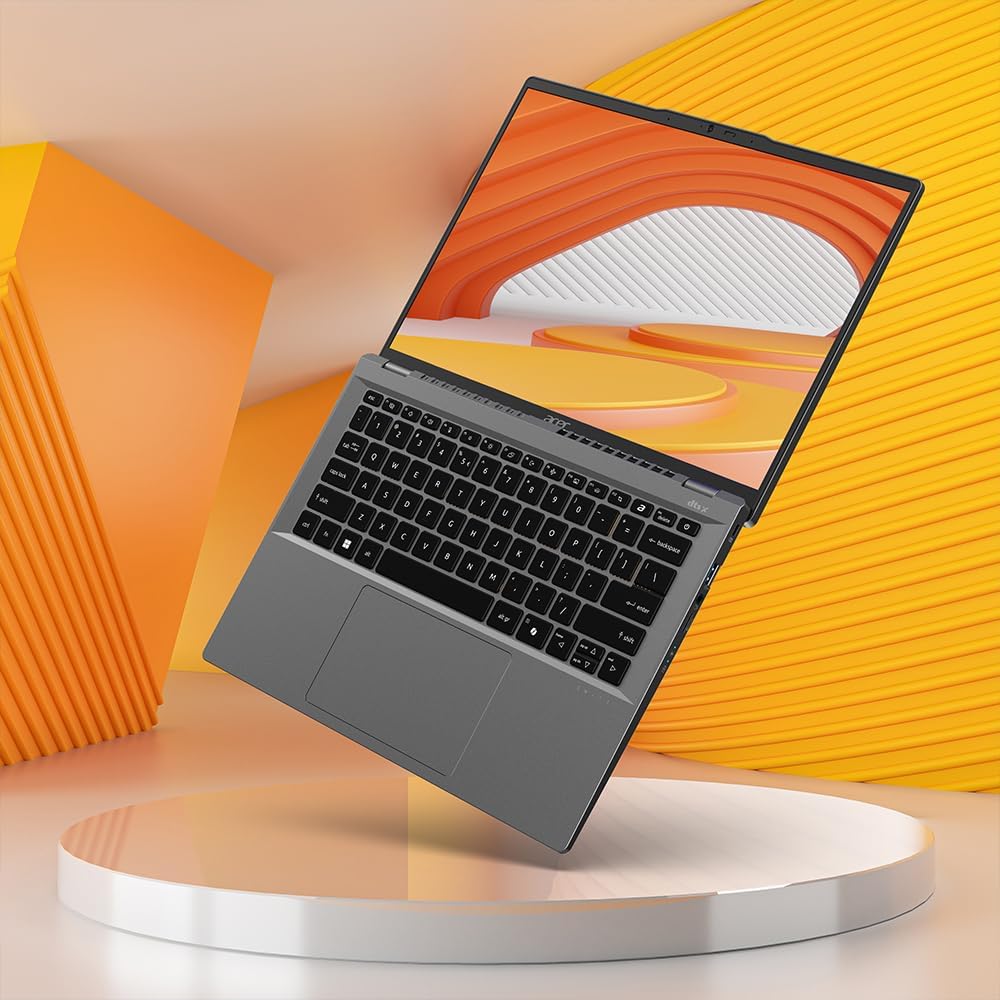
Acer Swift Go 14 - Perfect balance of portability and power
The Swift Go 14 is kinda the middle ground between performance and portability. Not the absolute lightest, not the most powerful, but a solid balance of both.
At 2.76 pounds, it's easy to carry around. The 14-inch screen hits that sweet spot where it's big enough to work comfortably but small enough that the whole laptop stays compact. Screen quality is good—bright enough for most situations and colors look natural.
Keyboard and trackpad are both comfortable. I spent a few hours typing on this and my hands didn't hurt, which sounds basic but some laptops fail even at that.
Battery life is pretty solid—around 9 hours with mixed use. The aluminum chassis looks clean and feels durable.
One thing: it can get warm on the bottom during heavy use. Not burn-your-legs hot, but noticeable.
🛒 Looking for a deal? Check Amazon's current pricing here - they often run student-friendly discounts
✅ Pros:
- Great balance of weight and performance
- Good battery life
- Comfortable keyboard
- Looks professional
❌ Cons:
- Gets warm during intensive tasks
- Average speakers
- Limited upgradability
5. Dell Inspiron 15 (Intel Core i5)

Dell Inspiron 15 - Reliable and affordable
The Inspiron 15 is Dell's budget line, and honestly, it's pretty solid for the money. Nothing flashy, but reliable.
You're getting an Intel Core i5, 8GB RAM (though some models come with 16GB in this price range), and a 15.6-inch screen. Performance is good for typical student stuff—papers, research, streaming, light photo editing.
Build quality is standard Dell plastic. It's not gonna wow anyone, but it feels sturdy enough. I've seen these survive years of use.
The screen's okay—not amazing, but fine for everyday work. Battery life is around 7-8 hours depending on what you're doing.
What I like is that Dell's pretty good about customer service if something goes wrong. They're easy to contact and usually helpful.
🎯 Dell laptops often have great Amazon deals → Check today's configurations and prices
✅ Pros:
- Reliable performance
- Decent port selection
- Good customer support
- Comfortable keyboard
❌ Cons:
- Design is boring
- Screen could be better
- Trackpad is just average
- Heavier than ultraportables
6. ASUS VivoBook 15 (AMD Ryzen 5)

ASUS VivoBook 15 - Best budget option
This is the "I need a laptop but money's tight" option, and there's no shame in that.
The VivoBook 15 is cheap, but it doesn't feel like total junk. Ryzen 5 processor, 8GB RAM, 15.6-inch screen, and it'll handle basic college work fine. Yeah, it's plastic. Yeah, the screen's not gonna blow your mind. But for writing papers, browsing, watching lectures, doing research? It works.
I wouldn't recommend this if you're doing anything heavy like video editing or coding, but for typical student needs, it's functional.
Battery life is decent—maybe 6-7 hours. Not amazing, but workable if you're strategic about charging.
The fingerprint sensor is nice to have at this price point.
💵 Best value laptop for tight budgets
See Amazon's Best Price →✅ Pros:
- Very affordable
- Acceptable specs for the price
- Fingerprint sensor
- Decent amount of ports
❌ Cons:
- Build quality feels cheap
- Screen brightness is weak
- Trackpad isn't great
- Won't last as long as pricier options
💡 Stuff Students Always Forget About
Get a laptop case or sleeve. Even a $20 one from Amazon will save you when someone inevitably spills something near your backpack or it gets knocked around.
Check your major's requirements first. Some programs need specific software that only runs on Windows or needs certain specs. Don't buy a Chromebook and then find out you need AutoCAD or something.
Student discounts are real. Use your .edu email. Lenovo, Dell, HP—they all have education stores with extra discounts. Sometimes 10-15% off.
Wait for sales if you can. Black Friday, back-to-school season, random Prime Day events—prices drop. If you're not desperate, patience saves money.
Refurbished isn't scary. Manufacturer-refurbished from Amazon or Best Buy comes with warranties and can save you serious cash. Just make sure it says "manufacturer refurbished," not some random third-party.
External storage is cheap. If you're tight on budget, get a laptop with less storage and grab an external SSD or use cloud storage. Don't overpay for internal storage you might not even fill.
Which One's Actually Right for You?
Depends what you need, obviously. But here's my quick take:
Best all-around pick: Lenovo IdeaPad Flex 5i → Check Amazon Price
If portability matters most: ASUS Zenbook 14 → Check Amazon Price
If you want the most power under $700: HP Pavilion 15 → Check Amazon Price
Tightest budget: ASUS VivoBook 15 → Check Amazon Price
These all go on sale throughout the year, so don't feel pressured to buy immediately unless your current laptop just died. Set up price alerts on Amazon, check Best Buy's student deals, and wait for the right moment.
You're gonna be using this thing almost daily for years, so spend like thirty minutes actually thinking about your priorities. Do you care more about battery life or performance? Screen size or weight? There's no one-size-fits-all answer.
The good news is that any of these will get you through college without major issues. I've seen people graduate using way worse laptops than these. Pick one that fits your situation, grab a protective case, remember to back up your stuff to Google Drive or whatever, and you're set.
Now stop stressing about laptops and go do your actual homework. Or procrastinate on YouTube. Whatever works.
Disclosure: As an Amazon Associate I earn from qualifying purchases. This post contains affiliate links, which means I may earn a small commission at no extra cost to you.


No comments:
Post a Comment