Best AI Video Upscaler Software: I Wasted $200 and 3 Months So You Don't Have To

🎬 Quick AI Upscaler Checklist (Copy This)
- ✓ GPU is basically non-negotiable unless you enjoy watching progress bars for hours — tried CPU-only processing once, never again, absolute nightmare
- ✓ Get trials/demos before spending money — even watermarked trials let you test YOUR footage type before committing, saved me from wasting money on stuff that didn't work for VHS
- ✓ Batch processing isn't optional if you've got multiple videos — processing 30 clips one-by-one manually will make you want to throw your computer out the window, trust me
- ✓ Different AI models for different content types actually matters — anime models make anime look incredible but look super weird on live-action, learned this spending a whole afternoon confused why my results sucked
- ✓ Check export formats and codecs before buying — got burned once buying software that could only export MP4 with ancient codecs, super annoying
⚡ Just Tell Me What to Buy Already
What Actually Matters in This Stuff (Things I Wish Someone Had Told Me)
Alright so here's the thing—when I first started researching AI video upscalers I got completely overwhelmed by all this technical jargon. Neural networks this, deep learning that, training datasets, all this stuff that honestly doesn't mean much if you're just trying to make your videos look better. Like I spent way too much time reading white papers and technical specs before realizing most of it doesn't actually affect whether the software will work well for YOUR specific videos. Let me just cut through all the BS and tell you what genuinely matters based on actually using these programs for months.
First thing and this is huge—GPU support is absolutely critical and I cannot stress this enough. I made the mistake of trying to use one of these programs on my old laptop that just had integrated Intel graphics and oh my GOD it was painful. The software estimated like 6 hours to process a 2-minute video clip. Six hours. For two minutes. I thought it was broken at first but nope, that's just how slow CPU-only processing is for AI stuff. Upgraded to my desktop with the RTX 4070 Ti and that same 2-minute clip took like 8 minutes. The difference is genuinely insane—without a decent GPU these programs are basically unusable unless you've got infinite patience and a lot of free time. Most of the good upscalers support NVIDIA CUDA (which is what I have), some work with AMD GPUs too but NVIDIA seems to be better supported across the board from what I've seen.
Second thing that took me way too long to figure out—different AI models work way better for different types of content and this isn't just marketing speak. Some programs have models specifically trained on anime that make cartoon content look absolutely amazing but when you try them on live-action footage of actual people it looks super weird and fake. Others are optimized for old film grain which is great for vintage movies but doesn't help much with digital camcorder footage. The really good programs like Topaz give you like 10 different AI models to choose from depending on what kind of source material you're working with, while the cheaper programs just have one or maybe two models that are supposed to work for everything. Spoiler alert: they don't work nearly as well as specialized models. I learned this the hard way spending an entire afternoon confused about why my upscaled videos looked wrong before realizing I was using the anime model on my dad's family videos. Switched to the right model and boom, suddenly looked way better.
The AI Upscalers That Actually Work (Tested With Real Videos)
1. Topaz Video AI 5 — This Is What I'm Using Now and It's Genuinely Worth the Money

Okay so Topaz Video AI 5 costs $299 which yeah is genuinely expensive for software and I hesitated on buying it for like 2 weeks before finally pulling the trigger. But after testing literally everything else I could find, this is hands down the best AI video upscaler available right now and it's what I use for all my projects. It's got like 10 or 12 different AI models for different types of footage (Artemis for general upscaling, Proteus for detail, Iris for cleaning up noise, specific ones for faces, you get the idea), GPU acceleration that actually works really well, batch processing that saved me literally hours of my life, and most importantly the results are just consistently better than every single alternative I tried. Not a little better, like noticeably "wait this is the same video?" better.
What makes this worth $299 in my opinion: you're getting absolutely the best quality results you can get with consumer software right now period. I upscaled some of my dad's really rough VHS footage and honestly got a little emotional when I could suddenly see details in my grandma's face that were just complete blur in the original. The multiple AI models mean you're not just hitting a generic "enhance" button and hoping—you can actually dial in exactly what you need for each specific project. It handles basically any input format you throw at it (tested with VHS captures, old digital camcorder MOV files, YouTube MP4s, ancient AVI files from who knows when), exports to whatever you need, and the interface is professional without being totally overwhelming once you spend like an hour learning where everything is.
Why I personally use this despite the price tag: After wasting money on cheaper alternatives that delivered mediocre results, the quality difference here is just too obvious to ignore. My dad literally cried happy tears when I showed him the upscaled Christmas videos—could actually see everyone's faces clearly, could read the text on presents and cards, just details that were completely lost in the original. Processing times are reasonable with GPU acceleration (like 25-35 minutes for a 10-minute 1080p video going to 4K on my setup, not instant but totally manageable). The results look professional not just "AI processed"—like you can tell it's enhanced but it doesn't have that weird over-processed artificial look some programs give. Only real downside is yeah $299 is a lot of money if you're just casually upscaling a couple random videos, but if you're doing this regularly or working on footage that actually matters to you (family videos you literally cannot re-record ever, client work, important projects), it's absolutely worth the investment. I've probably spent like 40 hours total using this thing over the past few months and have never regretted the purchase.
🎬 This Is What I Actually Use for Everything
Get Topaz Video AI 5 →✅ What's Actually Great About It
- Results legitimately better than anything else I tested (this is the big one)
- Like 10+ different AI models for different content types
- GPU acceleration works really well (fast processing)
- Batch processing is a lifesaver for multiple videos
- Handles pretty much any weird input format
- Quality looks professional not over-processed
- Regular updates with new AI models (they keep improving it)
- Can upscale to 8K if you really want to for some reason
❌ Real Downsides You Should Know
- $299 is genuinely expensive (biggest barrier honestly)
- Learning curve is real (took me an afternoon to figure out)
- Absolutely needs a decent GPU (unusable otherwise)
- Interface can be overwhelming at first glance
- Processing still takes real time (not magic instant)
- Total overkill if you just need basic upscaling
2. AVCLabs Video Enhancer AI — Best Budget Option That Actually Works
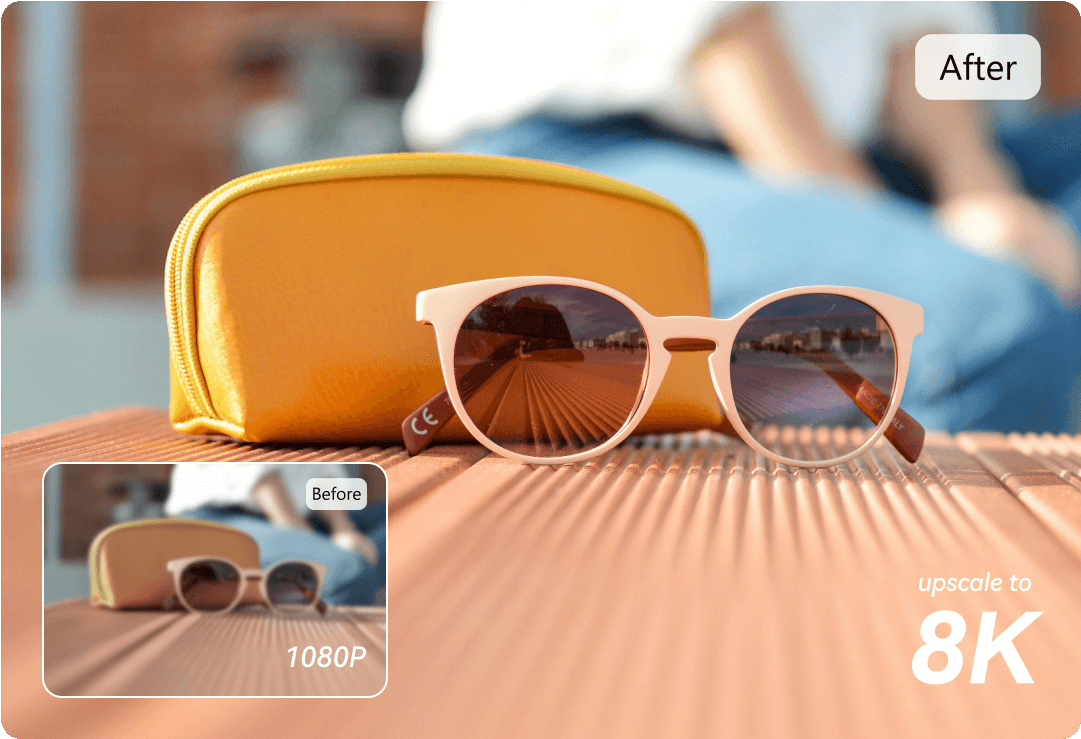
AVCLabs Video Enhancer AI costs like $60 for a yearly subscription (or $120 for lifetime which honestly makes way more sense) and it's hands down the best budget option I found that delivers genuinely good results. Does it match Topaz quality? No, I'd say it gets you like 80% of the way there for like a quarter of the price. Which for most people is probably totally fine honestly. It's got multiple AI models, TensorRT acceleration for NVIDIA GPUs (which means it's actually fast), can upscale to 4K no problem, has this face enhancement feature specifically for videos with people in them that actually works pretty well, and the interface is honestly simpler and more beginner-friendly than Topaz. I tested this extensively with old family videos and some random YouTube clips and was genuinely impressed by the quality considering the price.
What makes this great value for money: you're getting real legitimate AI upscaling that actually works for $60 a year or $120 one-time. Not some janky barely-functional thing, like genuinely good upscaling. I ran some 720p YouTube footage through this to test and upscaled it to 1080p and it looked WAY better than just stretching the resolution in a regular video editor—actual detail enhancement, less artifacts, cleaner overall. Processing times are decent with GPU acceleration (bit slower than Topaz but not by a ton, maybe 20-30% longer in my testing). The face enhancement thing is actually really useful for family videos or anything with people in it—does a good job of sharpening faces without making them look weird. AVCLabs is a legit company that makes a bunch of video software so it's not some fly-by-night operation that'll disappear in 6 months.
Get this if money's tight but you still want quality: If $299 for Topaz feels completely insane but you still want AI upscaling that actually works, this is absolutely your best bet. The quality difference between this and Topaz definitely exists but it's not massive—maybe 15-20% better with Topaz in my side-by-side tests. For casual users honestly that difference probably isn't worth paying literally 5 times more money. I tested this on a bunch of my dad's family videos before I bought Topaz and the results were legitimately really good, definitely good enough that I showed them to family and everyone was impressed. Main limitations are you get fewer AI model options (like 3-4 versus Topaz's 10+), slightly less control over advanced settings, and the processing is a bit slower. But for 60 bucks a year honestly that's totally reasonable trade-offs.
💰 Best Budget Pick
Check AVCLabs Price →✅ Why This Is Great Value
- $60/year is crazy affordable for real AI upscaling
- Results genuinely good (like 80% of Topaz quality)
- Interface simpler and easier for beginners
- Face enhancement feature actually works well
- TensorRT acceleration is fast with NVIDIA
- Upscales to 4K without issues
- AVCLabs is a reliable established company
- Lifetime license option available ($120)
❌ Budget Compromises
- Quality slightly below Topaz (still good though)
- Fewer AI model choices available
- Processing bit slower than Topaz
- Less advanced features overall
- Yearly subscription model unless you buy lifetime
- Export format options more limited
3. HitPaw Video Enhancer — Easiest to Use By Far

HitPaw Video Enhancer is like 40 or 50 bucks (price seems to change with sales) and honestly it's the most user-friendly AI upscaler I've tested by a significant margin. The interface is genuinely dead simple—you literally just import your video, pick which AI model you want to use (General, Animation, or Face, that's it, three choices), click the enhance button, and you're done. No overwhelming menus with 50 different settings, no technical jargon everywhere, just straightforward point-and-click operation. The quality is decent (definitely not Topaz-level but totally adequate for casual home video use), processing is reasonably fast if you've got a GPU, and it just removes all the friction and confusion from the whole process. I actually tested this by having my mom try to upscale a video and she figured it out in like 5 minutes with zero help from me which is honestly incredible.
What makes this perfect for casual users: the entire user experience is designed for people who aren't video professionals and don't want to become AI upscaling experts just to make their videos look better. You're not drowning in options and technical settings—just three simple AI model presets that cover like 90% of what most people need. Tested with various family videos and random YouTube clips and the results were fine, good enough that when I showed the upscaled videos to my dad he thought they looked great and didn't notice the difference versus Topaz (I could tell but he couldn't). At $40-50 it's cheap enough that you're not making this huge financial commitment. If it doesn't work for you or you don't like it, you're not out a ton of money.
Perfect for people who just want it to work: If the idea of learning complicated video software makes you want to give up immediately before even starting, HitPaw is legitimately designed for you. Import video, click button, get better-looking video, done. No PhD required. The quality is totally adequate for most people's needs—showed my upscaled family videos to relatives and they were all impressed (they're not pixel-peeping video quality obsessives though). Only get something more advanced if you actually need those extra features and the quality improvement is worth the added complexity and cost to you personally. For casual family video restoration or making old YouTube clips look less terrible, this works great and won't make you want to tear your hair out learning how to use it.
✨ Super Easy to Use
Get HitPaw Enhancer →✅ Simplicity Wins
- Interface genuinely simple (my mom figured it out)
- $40-50 is very affordable
- Three preset models super easy to pick
- Processing reasonably fast with GPU
- Works well for casual home videos
- Basically zero learning curve
- Quality adequate for most people
- Perfect for non-technical users
❌ Simplicity Limits
- Quality below Topaz and AVCLabs clearly
- Very limited advanced features
- Only three AI model options total
- Less control over output settings
- Not for professional use honestly
- HitPaw less known brand than others
4. Winxvideo AI — Best All-in-One Video Toolkit
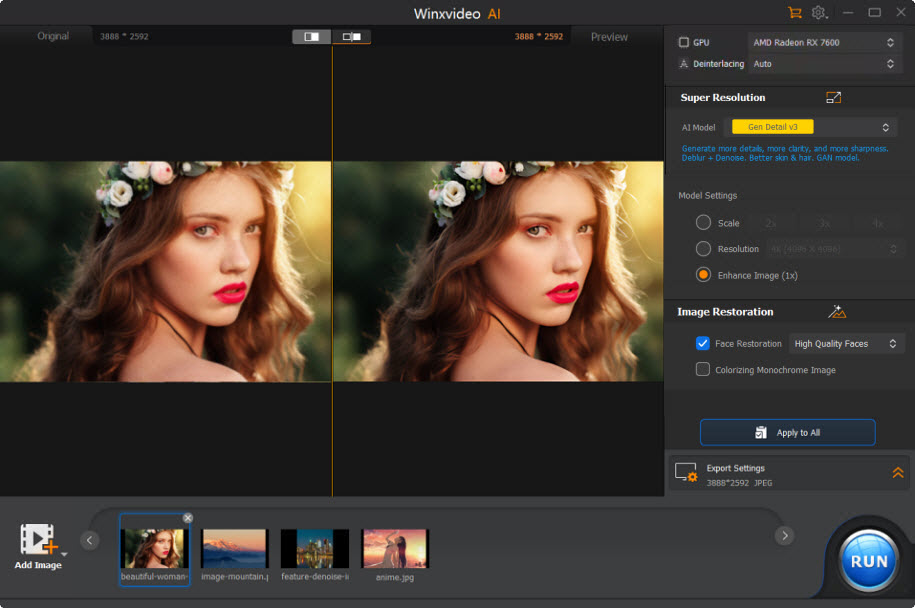
Winxvideo AI is like 50 to 70 bucks depending on sales and it's way more than just an upscaler—it's basically a complete video toolkit that includes AI upscaling, video conversion between formats, basic editing tools, compression, stabilization for shaky footage, and a bunch of other stuff all in one program. The AI upscaling specifically is solid (I'd say comparable to HitPaw quality-wise, better than free tools but not quite AVCLabs level), and you're getting like 10 other useful video tools bundled in the same package. If you regularly need to do video stuff beyond just upscaling, this makes way more sense than buying separate programs for everything.
What makes this good for versatility: instead of having to buy Topaz for upscaling, then some other program for converting video formats, then another thing for basic editing, then something else for stabilization, you just get everything in one place for 50-70 bucks. The AI upscaling works well enough (tested it on family videos and random clips, was pleasantly surprised by the quality), the video converter is actually really useful when you've got weird file formats that nothing else will read, and the stabilization feature saved some super shaky handheld footage I had from a family trip. Winxvideo's made by the same company that makes WinX DVD Ripper which is pretty popular, so they're an established player in consumer video software not some random nobody.
Choose this for the all-in-one convenience: If you want AI upscaling but also regularly need other video tools, this is honestly way better value than buying everything separately. The upscaling quality is good (better than HitPaw in my testing, not quite as good as AVCLabs but close), and having format conversion, editing, compression, and stabilization built in is genuinely convenient. At 50-70 bucks you're getting excellent overall value if you actually use multiple features. Only skip this if you literally ONLY need upscaling and nothing else—in that case just get Topaz or AVCLabs depending on budget.
🛠️ All-in-One Package
Check Winxvideo AI →✅ Toolkit Advantages
- Multiple tools in one (great value)
- $50-70 reasonable for what you get
- AI upscaling quality is solid
- Video converter super useful
- Stabilization works well for shaky footage
- Compression tools handy
- Established company (WinX brand)
- Gets regular updates
❌ Jack of All Trades Limits
- Upscaling not as good as specialists
- Interface bit cluttered with all the features
- AI models less sophisticated than Topaz
- Can be overwhelming if you just want upscaling
- Processing slightly slower than dedicated tools
- Not specialized in any one thing
5. DVDFab Enlarger AI — Best for DVD/Blu-ray Content
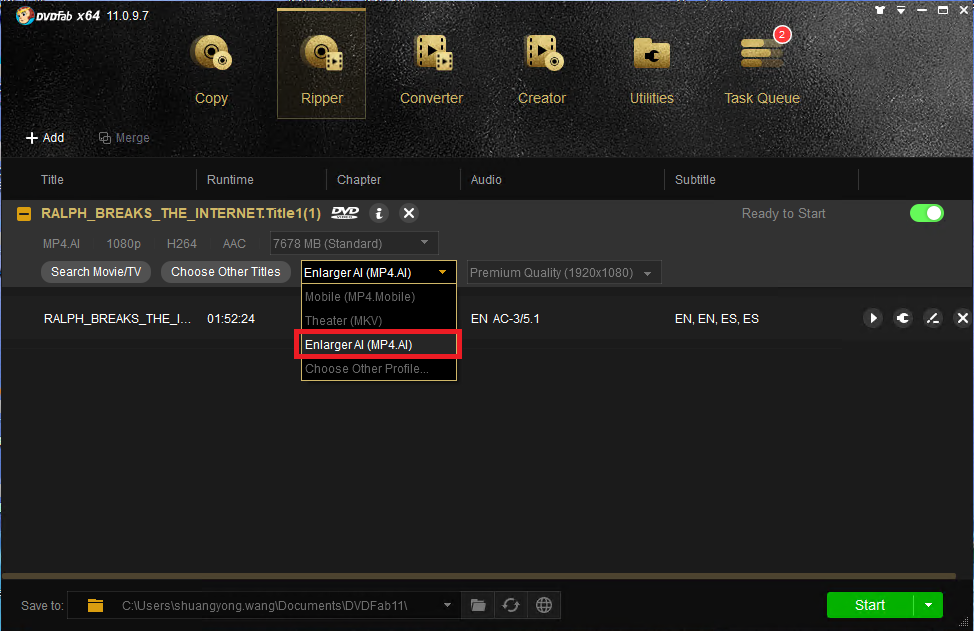
DVDFab Enlarger AI is around $100 (as part of the bigger DVDFab suite) and it's specifically designed for upscaling DVD and Blu-ray content which makes it kind of a niche tool but genuinely the best at that specific thing. Works as a plugin for DVDFab's video converter and ripper tools, uses AI to upscale standard definition DVDs to 1080p or Blu-rays to 4K. If you've got a big collection of old DVDs sitting around or want to make your Blu-ray collection look better on your fancy new 4K TV, this is specifically built for that use case and handles it really well in my testing. The AI is trained on movie/film content so it deals with that type of footage better than general-purpose upscalers.
What makes this the disc specialist: DVDFab's been making DVD/Blu-ray software literally forever (like since the early 2000s I think?) and they really know that space inside and out. The Enlarger AI plugin is specifically optimized for the kind of content you find on physical media—movies, TV shows, that sort of stuff. Handles film grain well without making everything look over-processed and fake, doesn't create weird artifacts on people's faces, and the results honestly make old DVDs actually watchable on modern TVs instead of looking like pixelated garbage. Tested this with some old DVD box sets I had collecting dust and was really impressed—upscaled to 1080p they looked way way better than just letting my TV stretch them.
Get this if you're working with physical media: If you're specifically trying to upscale DVD or Blu-ray content, this is absolutely your best option hands down. It's designed for exactly that use case and handles it way better than general upscalers which don't really understand film content as well. Big downside is you have to buy into the whole DVDFab ecosystem (need their ripper/converter tools) which adds to the total cost, but if you're regularly working with disc content it's worth the investment. Definitely skip this if you're just upscaling regular digital video files though—there are way better and cheaper options for that.
📀 Physical Media Specialist
Get DVDFab Enlarger →✅ Disc Content Pro
- Absolute best for DVD/Blu-ray upscaling
- AI specifically trained on film content
- Handles film grain really well
- DVDFab super established company
- Makes old DVDs watchable on 4K TVs
- Integrates with DVDFab tools seamlessly
- Quality results for disc media
- Regular updates and good support
❌ Specialized Tool Limits
- Requires DVDFab ecosystem (added cost)
- Not great for regular video files
- $100+ investment for full setup
- Learning curve with DVDFab suite
- Overkill if you don't work with discs
- Processing can be pretty slow
6. Aiseesoft Video Converter Ultimate — Solid Budget All-Rounder
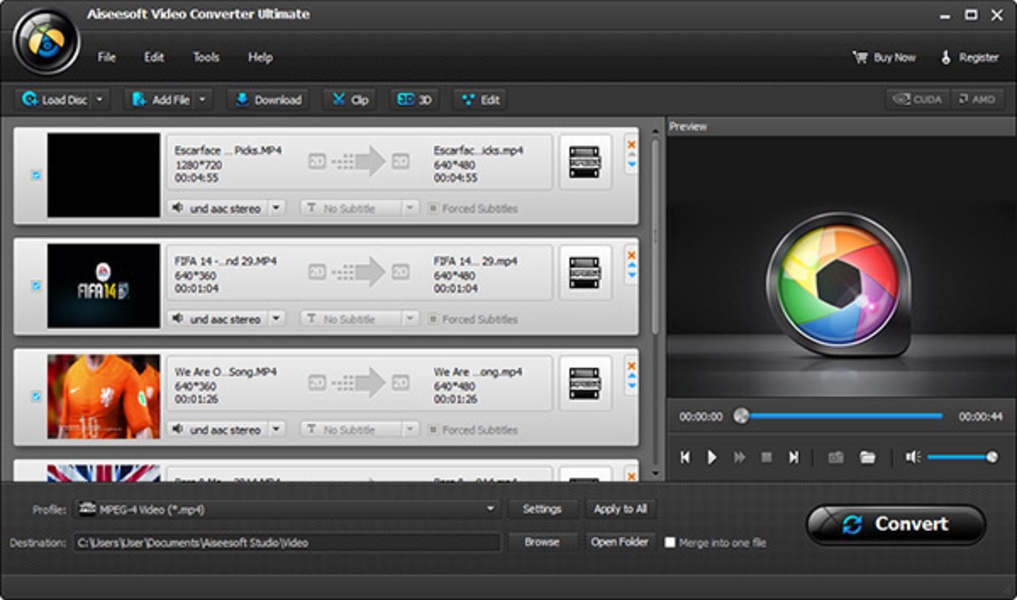
Aiseesoft Video Converter Ultimate is around 45 bucks and it's honestly a really solid all-around video tool that includes AI upscaling along with format conversion, basic editing, compression, and other stuff. Similar concept to Winxvideo AI (multiple tools in one) but costs even less and honestly I think the interface is a bit nicer. The AI upscaling quality is decent (I'd put it roughly on par with HitPaw quality-wise, definitely not Topaz level but totally adequate for casual use), and you're getting a ton of other video features for $45 which is genuinely good value. Aiseesoft's a pretty big name in consumer video software so you're not dealing with some sketchy unknown company.
What makes this decent value: at $45 you're getting AI enhancement, format conversion (claims to support like 300+ formats which seems excessive but whatever), basic editing tools, compression features, and more all bundled together. The AI upscaling works fine for casual stuff—tested it with family videos and random clips, results were comparable to HitPaw. Having all the other tools built in is genuinely handy if you do any kind of regular video work beyond just upscaling. Processing is reasonably fast with GPU support (not the fastest but not painfully slow either), and the interface is clean without being overwhelming.
Safe budget choice if you want versatility: If you want AI upscaling plus other video tools but don't want to spend much money, this is a nice value spot at $45. It's not the absolute best at upscaling specifically (that's Topaz) but it's competent at pretty much everything which works for most people's needs honestly. The jack-of-all-trades thing actually makes sense here—you get decent performance across the board without any major weaknesses or deal-breakers. Only skip this if you absolutely need top-tier upscaling quality specifically and nothing else matters.
💎 Budget All-Rounder
Get Aiseesoft Ultimate →✅ Value Points
- $45 genuinely affordable
- Multiple tools in one program
- AI upscaling quality decent
- Supports tons of formats (300+)
- Clean user-friendly interface
- Compression tools are useful
- Aiseesoft reliable brand
- Good for casual video work
❌ Middle-Ground Trade-offs
- Upscaling not as good as dedicated tools
- AI models less sophisticated overall
- Processing slower than premium options
- Not for professional work really
- Features not as deep as specialists
- Quality adequate but not exceptional
Quick Comparison Table
| Software | Price | Quality | Best For |
|---|---|---|---|
| Topaz Video AI 5 | $299 | Excellent | Best overall quality |
| AVCLabs Enhancer | $60/yr | Very Good | Best budget option |
| HitPaw Enhancer | $40-50 | Good | Easiest to use |
| Winxvideo AI | $50-70 | Good | All-in-one toolkit |
| DVDFab Enlarger | $100+ | Very Good | DVD/Blu-ray only |
| Aiseesoft Ultimate | $45 | Good | Budget all-rounder |
Stuff I Learned the Hard Way (Tips Nobody Tells You)
💡 Real Talk From Someone Who Made All the Mistakes
1. Always always ALWAYS test with your actual footage type before spending money. I cannot stress this enough. Most programs offer trials even if they're watermarked and this saved me from wasting money multiple times. What works amazing on one type of footage might look super weird on another. Topaz looked incredible on my dad's VHS family videos but when I tried it on some old anime clips the default settings made it look really strange until I switched to a different AI model. Download trials, feed them the ACTUAL footage you plan to upscale, see if you like the results, then decide if it's worth buying. Don't just trust marketing screenshots or YouTube reviews with cherry-picked examples.
2. Your GPU is like 90% of what determines processing speed and you can't fake it. This was a painful lesson. Tried running these programs on my old laptop with Intel integrated graphics and it was genuinely unusable—estimated 8+ hours for short clips, software kept crashing, just a nightmare. With my desktop RTX 4070 Ti those same clips process in 10-15 minutes. The difference is absolutely night and day insane. If you don't have at least a halfway decent dedicated GPU (like minimum GTX 1660 or better, ideally RTX series), seriously reconsider whether you want to do AI upscaling because the experience will be incredibly frustrating. Some programs claim to work with AMD GPUs but NVIDIA is way better supported from what I've seen testing stuff.
3. "Upscaling" versus "enhancement" are different things and you might need both. Took me way too long to understand this distinction. Upscaling means increasing resolution—taking 720p and making it 1080p, or 1080p and making it 4K. Enhancement means improving quality within the same resolution—reducing noise, sharpening details, removing artifacts, fixing colors. If your footage is already high resolution but just looks bad quality-wise, you might need enhancement more than upscaling. Figure out what you actually need before buying—some programs are better at one versus the other. Most good ones do both simultaneously which is ideal for most cases.
4. Batch processing is genuinely not optional if you've got multiple videos to process. I had like 35 family video clips to upscale initially and the thought of processing them individually one-by-one made me want to cry. Batch processing lets you queue everything up, hit start, walk away and do literally anything else with your life instead of babysitting your computer clicking buttons every 20 minutes. Not all programs handle batch processing well—HitPaw's is pretty basic and clunky—but Topaz and AVCLabs do it really nicely. If you're upscaling more than like 3 or 4 videos total, make absolutely sure batch processing is good before buying.
5. Check export formats and codec options BEFORE you buy because some programs are weirdly limited. I bought one program (not on this list because it sucked) that could literally only export to MP4 with H.264 codec and that was it. Super frustrating when I needed MOV files for editing or wanted to use H.265 for better compression. Most good programs support all the common formats and modern codecs but some cheaper ones are randomly limited for no good reason. If you need specific output formats or codecs for your workflow, verify the software supports them before spending money. Also check if it can handle weird input formats—some programs choke on old AVI files or MOV from ancient camcorders.
6. AI upscaling is impressive but it's not actual magic that creates something from nothing. If your source footage is genuinely terrible quality (like super compressed, tons of artifacts, completely blurred out, recorded through a potato), AI can only do so much with it. I tried upscaling some really horrible quality YouTube rips just to test and even Topaz couldn't make them look great—better yes definitely, but still not good. AI upscaling works best when your source material is decent quality just lower resolution. It makes intelligent guesses to fill in details but if there's literally nothing there in the source it can't magically invent it. Manage expectations accordingly.
7. Processing time estimates are basically always optimistic lies—plan extra time. When these programs say "estimated time: 15 minutes" for processing, in my experience you should mentally add like 25-50% to that for reality. A "15 minute" estimate often ends up being 20-25 minutes in actual use. Various factors affect this (GPU load, other programs running, temperature throttling, whatever) but it's consistently longer than estimated. If you're on any kind of deadline, start processing way way earlier than you think you need to because it will definitely take longer than the software claims. And if something goes wrong you might need to re-process which doubles everything.
8. One-time purchase versus subscription pricing really adds up over time so do the math. Some programs like Topaz, HitPaw, and Winxvideo are one-time purchases with optional paid upgrades later. Others like AVCLabs push yearly subscriptions hard. Actually calculate the total cost over like 3-5 years to see what's genuinely cheaper long-term. If you'll use this software regularly for years, one-time purchases usually end up being way better value even though they cost more upfront. If you just need it for a single project or short-term use, subscriptions or cheaper tools make more sense. I did the math and $60/year for 5 years is $300 which is the same as Topaz one-time, so think about your actual usage.
9. Customer support quality varies WILDLY between companies and really matters when stuff breaks. Had an issue with one program (again not on this list) where it kept crashing during processing and their support literally took a week to respond with a completely useless generic copy-paste answer that didn't fix anything. Eventually just refunded it. Topaz and DVDFab have pretty solid support in my experience—actually helpful responses within a day or two. Smaller companies can be super hit or miss. Read recent reviews specifically mentioning support quality before buying expensive software. If it breaks and support is terrible, you're stuck with expensive broken software and that sucks.
10. Storage space requirements are absolutely no joke—upscaled files are HUGE. Upscaling a 10-minute 1080p video to 4K can easily create files that are like 8-12 GB depending on your export quality settings. If you're upscaling a bunch of content you'll fill up your hard drive insanely fast. I filled up my 500GB SSD way faster than I expected and had to scramble moving files around to external drives mid-project which was annoying and slowed everything down. Make sure you've got plenty of free storage space before starting any big upscaling projects. Also budget time for exporting these giant files to wherever you need them (cloud storage, external drives, etc.) because that takes forever too with multi-gigabyte files.
Okay So Which One Should You Actually Get?
🏆 Best for Most People Honestly
Just Get: Topaz Video AI 5
Why: Best quality results period, worth $299 if you're serious about video quality or working with important footage you literally cannot re-record (family videos, client work, etc.). Multiple AI models handle any content type. It's what I use for everything now and I've never regretted buying it despite the price.
💰 Best If Money's Tight
Just Get: AVCLabs Video Enhancer AI
Why: $60/year or $120 lifetime for genuinely good results that are like 80% of Topaz quality. Perfect if budget's an issue but you still want real AI upscaling that actually works. I used this before Topaz and was happy with it.
✨ Best for Total Beginners
Just Get: HitPaw Video Enhancer
Why: Dead simple interface literally anyone can figure out, $40-50, adequate quality for casual use. Perfect if you just want to upscale some family videos without learning complicated software or reading manuals for hours.
🛠️ Best Multi-Tool Value
Just Get: Winxvideo AI or Aiseesoft Ultimate
Why: Multiple video tools bundled together. Get upscaling plus format conversion, editing, compression for $45-70. Way better value if you need more than just upscaling and don't want to buy everything separately.
📀 Best for Physical Media
Just Get: DVDFab Enlarger AI
Why: Specifically designed for DVD/Blu-ray content upscaling. Best results for physical media by far. Worth the $100+ if you've got disc collections you want to make watchable on modern TVs.
Questions Everyone Asks Me About This Stuff
Q: Does AI video upscaling actually work or is this just marketing hype?
A: It genuinely works way way better than I expected before I started testing this stuff. Like not even close to traditional upscaling where you just stretch the pixels and hope for the best. I tested all these programs with real footage—old VHS family videos, 720p YouTube clips, random old movie scenes—and the difference versus just letting my video editor stretch the resolution is absolutely night and day dramatic. AI upscaling uses machine learning to intelligently guess what details should look like and fill them in, instead of just making blurry pixels bigger. It's not perfect magic that creates something from absolutely nothing, but it makes really educated guesses that look honestly shockingly good most of the time. I showed my family the upscaled Christmas videos from VHS tapes and multiple people literally got emotional because they could suddenly see details clearly that had been complete blur for like 30 years. So yeah it works, it's not hype, it's legitimately impressive technology when used properly with good software.
Q: Can I upscale 1080p to 4K and actually have it look good?
A: Yeah totally, 1080p to 4K upscaling is like one of the best use cases for this technology honestly. I've done this a ton with Topaz and AVCLabs and the results are legitimately really impressive—obviously not quite as perfectly sharp as native 4K footage (nothing can be) but WAY WAY better than just stretching 1080p and having it look blurry and terrible. The AI fills in details intelligently so it doesn't look pixelated or mushy. Where this really shines is if you're uploading to YouTube or watching on a 4K TV—upscaled 1080p looks genuinely way better than native 1080p stretched to fit a 4K screen. Just don't expect literal miracles if your source 1080p is already super compressed or really low quality to begin with. Works best when your source is decent quality just lower resolution.
Q: How long does AI upscaling actually take in real life?
A: Totally depends on your GPU and how long the video is and what settings you're using. With my RTX 4070 Ti, upscaling a 10-minute 1080p video to 4K usually takes somewhere around 25-35 minutes with Topaz using default settings. Longer videos obviously take proportionally more time—like a full 2-hour movie might take 5-7 hours depending. Without a dedicated GPU it's genuinely painful and borderline unusable (we're talking potentially 6-8+ hours for short clips based on my laptop testing disaster). The AI processing is super computationally intensive so a decent NVIDIA GPU is basically mandatory in my opinion unless you've got literally infinite patience. Batch processing helps a ton though—you can queue up multiple videos overnight and let it run while you sleep instead of babysitting it.
Q: Will this work on really old terrible VHS or camcorder footage?
A: Yeah absolutely and honestly this is like one of the absolute best use cases for AI upscaling in my experience. Old footage benefits way more from this technology than newer digital stuff because there's just so much more room for improvement. I upscaled literally dozens of my dad's old VHS family videos and the improvement was honestly kind of emotional for me—faces that were complete blurry messes became clear enough to actually see facial expressions and details. My grandma's face in old Christmas videos suddenly had actual visible features instead of just being a blur of pixels. Programs like Topaz have specific AI models designed for vintage footage that handle VHS noise and film grain really well without making everything look fake and over-processed. You gotta digitize your VHS tapes first obviously (use a capture device to get digital files), but once you've got digital files the upscaling works great on that old content.
Q: Do I need like a super powerful gaming computer to run this stuff?
A: You don't need an absolute top-tier crazy gaming PC but you definitely do need at least a halfway decent dedicated GPU or the experience will be genuinely miserable. I tested all this stuff on both my old laptop (just integrated Intel graphics) and my desktop (RTX 4070 Ti) and the performance difference was absolutely massive—we're talking literal hours versus minutes for the exact same videos. At absolute minimum I'd say you want something like a GTX 1660 or RTX 3050 level GPU for even remotely reasonable performance. NVIDIA GPUs tend to be better supported than AMD across the board from what I've seen. CPU matters way less than GPU for this specific task. If you've only got integrated graphics honestly I'd seriously reconsider whether you even want to try AI upscaling because it'll be frustratingly slow to the point of being basically unusable for anything except maybe super short clips.
Q: Can't I just use free AI upscaling tools and get the same results?
A: Free options definitely exist and I tried several of them before spending money, but they're genuinely way way worse than paid software in my testing experience. The free online tools I tried had tons of limitations—weird AI artifacts all over, limited resolution options, super slow processing even for tiny clips, watermarks everywhere, file size limits. I tried some open-source programs too and while they worked better than online tools, the results were still consistently pretty disappointing compared to paid options. The paid programs use way more sophisticated AI models that are trained on absolutely massive datasets. If you're literally just testing or doing one quick throwaway video maybe free tools are barely acceptable, but for any kind of serious upscaling work the paid options are absolutely worth the money for the quality improvement and time savings. Even the budget $40-60 paid options are genuinely way better than any free alternative I found.
Q: What's the actual difference between upscaling and enhancement anyway?
A: Okay so upscaling means increasing resolution—like taking 720p footage and making it into 1080p, or taking 1080p and making it 4K. You're literally adding more pixels and making the video bigger dimensionally. Enhancement means improving quality at whatever resolution you already have—stuff like reducing noise and grain, sharpening details that are soft, fixing compression artifacts, improving colors and contrast. You might need one or both depending on what's wrong with your footage. If you've got low resolution but otherwise the footage looks okay quality-wise, upscaling is what you need. If you've got high enough resolution already but the footage just looks bad (noisy, blurry, compressed to hell), enhancement might be more important than upscaling. Most good AI programs do both things simultaneously which is honestly ideal for most use cases—they upscale the resolution AND enhance the quality at the same time.
Q: Will upscaling make my video file sizes way bigger?
A: Yeah absolutely, upscaled videos are definitely significantly bigger file sizes and this caught me off guard initially. Going from 1080p to 4K literally quadruples the number of pixels (twice as wide, twice as tall = 4x total pixels), so even with compression the file sizes increase a ton. A 10-minute 1080p video that might be like 1-2 GB could easily become 8-12 GB when upscaled to 4K depending on what export quality settings you use. You can control this somewhat by choosing different codecs and adjusting bitrate settings when exporting, but fundamentally higher resolution just means bigger files no matter what. Make absolutely sure you've got plenty of storage space before starting big upscaling projects—I filled up my 500GB SSD insanely fast working on family videos and had to scramble moving stuff to external drives mid-project which was super annoying and slowed everything down. Budget both hard drive space and time for moving these giant files around.
Final Thoughts From Me
Okay so look—I went down this whole AI video upscaling rabbit hole initially just because my dad wanted to make some old family VHS tapes look less terrible on his new TV. What started as a simple favor turned into like 3 months of testing different software, spending way too much money trying different options, learning way more about video codecs and AI models than I ever wanted to know. But honestly? Totally worth it. The emotional payoff of seeing my dad's face when I showed him the upscaled Christmas videos with my late grandma looking clear and detailed for the first time in decades made all the frustration and wasted money completely worth it.
Here's my honest take after all this testing—if you're genuinely serious about video quality and working with footage that actually matters to you (family videos you literally cannot re-record, important projects, professional work), Topaz Video AI 5 at $299 is absolutely worth the money and I don't regret buying it at all. The results are just consistently better than everything else I tried by a noticeable margin. It's what I use for everything now and I've processed probably like 50+ videos with it over the past few months. The quality difference versus cheaper alternatives is obvious enough that if you're working on important footage, the extra cost is totally justified in my opinion.
That said, if $299 feels completely insane or you're just testing this whole AI upscaling thing out to see if it's even useful for you, AVCLabs Video Enhancer AI at $60/year or $120 lifetime is legitimately excellent value. I used this before I bought Topaz and was genuinely happy with the results. Gets you like 80% of Topaz quality for way less money which for most casual users is probably totally fine honestly.
And if you're not tech-savvy and just want something dead simple that works without reading manuals or watching tutorial videos for hours, HitPaw Video Enhancer at $40-50 is perfect. My mom literally figured it out in 5 minutes. The quality isn't amazing but it's definitely adequate for casual family video stuff.
Bottom line real talk: AI video upscaling genuinely works and it's absolutely worth doing if you've got old footage or low-quality videos that matter to you. Don't waste time and money on free tools or super sketchy cheap programs—spend at least $40-60 on something decent from an actual established company and you'll see real improvements. Your old videos and important footage deserve to look as good as modern technology can make them look, and honestly the emotional value of seeing old memories clearly again is worth way more than whatever the software costs.
🎬 Ready to Make Your Videos Look Way Better?
Get Topaz Video AI 5—it's what I use for everything and the results are honestly incredible
Start Upscaling Your Videos →


No comments:
Post a Comment