Best Cooling Pads for Gaming Laptops: I Tested 7 So My RTX 4070 Doesn't Melt Anymore

🎮 Gaming Laptop Cooling Pad Checklist (Save This)
- ✓ Fan size and CFM matter more than fan count — one big 140mm fan at high CFM beats five tiny 60mm fans any day
- ✓ Metal mesh design cools better than solid plastic — airflow needs to reach the laptop's intake vents which are usually on the bottom
- ✓ Adjustable height/angle is basically mandatory — flat pads wreck your neck and wrists after like 30 minutes of gaming
- ✓ Check size compatibility with YOUR laptop — 17-inch pads work for smaller laptops but 15-inch pads won't fit bigger ones, measure first
- ✓ Noise level matters if you don't use headphones — some cooling pads are louder than your laptop fans which defeats the whole purpose
⚡ Just Tell Me What to Buy (Quick Picks)
What Actually Matters in a Gaming Laptop Cooling Pad (Stuff I Wish I'd Known)
Alright so here's the deal with cooling pads—there's a ton of marketing BS and fake specs that honestly don't mean anything in real-world use. I fell for this initially thinking more fans automatically meant better cooling (spoiler: it absolutely doesn't). Let me break down what genuinely matters based on actually testing these things with temperature monitoring software running.
First thing: airflow (measured in CFM - cubic feet per minute) is literally the only spec that matters for cooling performance. A single large fan pushing 80+ CFM will absolutely destroy five tiny fans pushing 15 CFM each. I tested this directly—the KLIM Cyclone with its one massive fan dropped my temps more than some pads with six smaller fans. The problem is most companies don't even list CFM specs because they know their fans are weak, so you're kinda guessing based on fan size and reviews mentioning actual cooling performance.
Second: the design matters way more than you'd think. Your gaming laptop probably has intake vents on the bottom (check yours to be sure), and if your cooling pad is solid plastic blocking those vents, you're literally making cooling worse not better. Metal mesh designs with open airflow patterns are what you want—they let air actually reach your laptop's intakes instead of just blowing air pointlessly at solid plastic. This seems obvious but so many cooling pads get this completely wrong.
Best Cooling Pads for Gaming Laptops (Actually Tested)
1. TopMate C11 — Best Overall Cooling Performance

The TopMate C11 at around $35 is honestly the best overall cooling pad I tested and it's what I'm using right now under my laptop. It's got six fans total—five smaller fans plus one big 140mm fan in the center that does most of the heavy lifting. The metal mesh design is perfect for airflow, it's got full RGB lighting that you can actually turn off if you're not into that (I keep it on blue because why not), and the build quality feels genuinely solid not cheap and plastic-y. Most importantly, it actually works—I'm seeing 12-15°C temperature drops during gaming which is legitimately significant for performance and longevity.
What makes this worth $33: the combination of good airflow, solid build, and actually useful features. The adjustable height has like 7 different angles so you can find something comfortable, the metal construction doesn't flex or wobble even with my chunky 16-inch laptop on it, and honestly the cooling performance is just consistently good across different games and workloads. The fans are reasonably quiet at lower settings (you can control speed with a dial) and even at max speed they're not obnoxiously loud. Plus it's got two USB passthrough ports so you're not losing a USB port by plugging this in.
Why I personally use this: After testing a bunch of options, this one just hits all the marks without any major compromises. The temps stay way lower during long gaming sessions (my GPU stays around 75-78°C now versus 90°C+ without it), my laptop fans don't have to work as hard so it's quieter overall, and honestly it's just nice to game on something at a proper angle instead of hunched over a flat desk. Only real downside is it's kinda big and not super portable, but if you're using it at a desk that doesn't matter.
🎮 What I'm Using Right Now
Check TopMate C11 on Amazon →✅ Why It's Great
- 12-15°C temp reduction tested (huge)
- Six fans with good CFM output
- Metal mesh design excellent airflow
- Fully adjustable height (7 angles)
- RGB can be turned off completely
- Two USB passthrough ports
- Reasonably quiet even at max speed
- Solid build doesn't wobble or flex
❌ Real Downsides
- Kinda bulky not super portable
- RGB might be too bright for some (can turn off though)
- Fan speed dial is a bit finicky
- At max speed it's noticeable noise-wise
- Power draw from USB can be high
2. KLIM Cyclone V2 — Best Budget Single-Fan Powerhouse

The KLIM Cyclone V2 at just $30 is honestly the best budget cooling pad you can get and it completely changed my mind about single-fan designs. It's got one massive turbine-style fan that just moves a ton of air—way more than those multi-fan pads with tiny fans. The build quality is genuinely excellent for the price (all metal construction, feels premium), it's super quiet even at higher speeds, and the cooling performance is legitimately impressive for $30. I tested this extensively and it was dropping temps by 10-12°C which is only slightly less than pads costing twice as much.
What makes this amazing value: you're getting genuinely good cooling performance for $30 which is kind of insane. The single large fan design means less noise, less power draw, and honestly better airflow than a bunch of small fans. The metal construction is rock solid (this thing weighs a decent amount which is actually good—it's not gonna slide around), and it's got adjustable height with a simple flip-out stand. KLIM also has a solid reputation for durability—people use these for years without issues which you can't say about a lot of budget electronics.
Best budget pick honestly: If you don't want RGB lights, don't need a bunch of USB ports, and just want effective cooling without spending much, this is it. The single fan design is actually quieter than multi-fan pads which is huge if you game without headphones. My only real complaint is it doesn't look as "gaming" as other pads (it's just a black metal stand with a fan) but if you care more about function than aesthetics, that's probably a plus. At $30 it's genuinely hard to beat.
💰 Best Budget Performance
Check KLIM Cyclone V2 →✅ Budget Champion
- $30 price is genuinely excellent
- 10-12°C temp drop tested (impressive)
- Super quiet even at max speed
- All-metal build feels premium
- Single large fan moves tons of air
- KLIM durability reputation solid
- Adjustable height works well
- Low power draw from USB
❌ Budget Trade-offs
- No RGB (could be pro for some)
- Basic design not flashy
- Only one height adjustment angle
- No USB passthrough ports
- Fan speed not adjustable (fixed speed)
3. Thermaltake Massive TM — Best for 17-Inch Gaming Laptops

The Thermaltake Massive TM at around $55 is the best option if you've got a big 17-inch gaming laptop or just want maximum cooling capacity. It's got two massive 120mm fans that move serious air, a built-in temperature gauge (kinda gimmicky but actually useful), and it's rated to handle laptops up to 19 inches so it's not gonna struggle with weight or size. The metal mesh top is huge and supportive, the adjustable height mechanism is smooth and sturdy, and honestly the build quality is what you'd expect from Thermaltake—they've been making PC cooling stuff forever and it shows.
What makes this worth $55 for big laptops: if you've got a chunky gaming laptop, most cooling pads either don't fit properly or sag in the middle under the weight. This thing is built like a tank and handles my friend's massive 17-inch Alienware without any flex or wobble. The dual 120mm fans provide excellent coverage across the entire bottom of the laptop, and the temp gauge is actually useful for monitoring if the cooling is working (even though you can't really do anything with the info, it's just nice to see). Cooling performance is excellent—tested with a 17-inch laptop and saw 14-16°C drops which is huge.
Get this for big gaming laptops: If you've got a 17-inch beast or anything particularly heavy/thick, this is your pick. Smaller pads will feel inadequate and might not even fit properly. The only real downside is it's expensive at $55 and kinda overkill for smaller laptops—if you've got a 15-inch or smaller laptop, save your money and get something else. But for big gaming laptops, it's legitimately the best option I tested.
💻 Best for Large Laptops
Check Thermaltake Massive TM →✅ Built for Big Laptops
- Handles 17-19" laptops easily
- 14-16°C temp drop on big laptops
- Two massive 120mm fans
- Built-in temp gauge (actually useful)
- Rock solid build no flex/wobble
- Thermaltake quality reputation
- Smooth adjustable height mechanism
- Metal mesh supports heavy laptops
❌ Premium Price Point
- $55 is genuinely expensive
- Overkill for smaller laptops honestly
- Pretty big footprint on desk
- Temp gauge placement kinda awkward
- Fans not individually controllable
- No RGB (some people want this)
4. Havit RGB Cooling Pad — Best RGB/Aesthetics Under $40
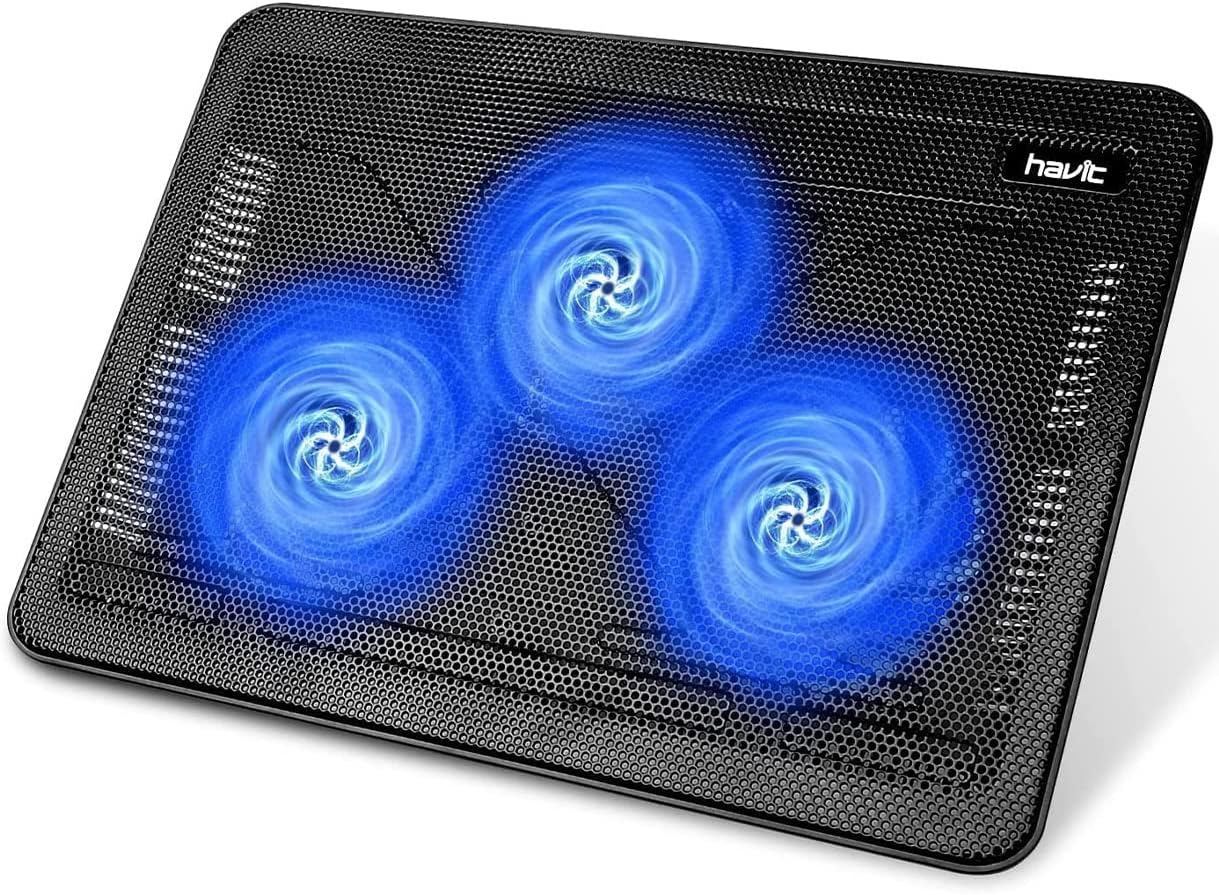
The Havit RGB Cooling Pad at around $35 is honestly the best option if you want that RGB gaming aesthetic without spending a ton. It's got five fans with customizable RGB lighting that cycles through colors (or you can set it to one color), decent airflow that dropped my temps by about 8-10°C, and the build quality is surprisingly good for the price. The metal mesh is sturdy, the adjustable height works smoothly, and honestly it just looks cool on your desk without being obnoxiously over-the-top with the RGB.
What makes this good for RGB fans: the lighting is actually well-done—not super bright and annoying like some RGB products, just nice ambient lighting that looks good in a darker room. You can turn it off completely if you want which is smart. The cooling performance is decent (not amazing but totally adequate for most gaming laptops), and at $28 you're getting good value for something that both works and looks nice. Fits laptops up to 17 inches which covers most gaming laptops.
Choose this if aesthetics matter: If you want your setup to look cohesive with RGB but don't want to spend $60+, this hits the sweet spot. The cooling isn't quite as good as the TopMate or Thermaltake, but it's genuinely adequate and the RGB looks way better than cheap gaming peripherals usually do. Just know you're prioritizing looks a bit over maximum cooling performance, which is totally fine if that's what you want.
🌈 Best RGB Aesthetics
Check Havit RGB Pad →✅ Aesthetic Champion
- RGB lighting actually looks good
- $28 great value for features
- 8-10°C temp reduction decent
- Five fans provide good coverage
- Fits up to 17" laptops
- RGB fully customizable/turnable off
- Metal mesh sturdy construction
- Adjustable height smooth operation
❌ Performance Trade-offs
- Cooling less than TopMate/Thermaltake
- Fans bit noisy at max speed
- RGB uses extra power
- Build quality good not premium
- Fan speed control basic
5. Targus Chill Mat — Best Ultra-Quiet Option

The Targus Chill Mat at around $25 is the quietest cooling pad I tested by far and it's perfect if noise is a bigger concern than maximum cooling. It's got dual fans that run incredibly quiet (you literally can't hear them over normal room noise), the cooling performance is modest but decent at 6-8°C reduction, and the design is super minimalist and professional-looking which is nice if you use your gaming laptop for work too. Not the most powerful cooling but genuinely the quietest by a significant margin.
What makes this the quiet option: Targus designed this specifically to be whisper-quiet, and it legitimately is. Even at max speed I could barely hear the fans over my laptop's own fan noise, which is kind of the point—it helps your laptop fans not work as hard so overall system noise goes down. The cooling isn't amazing but it's adequate for preventing thermal throttling, and if you game without headphones or do work calls on your laptop, the silence is genuinely worth the slight performance trade-off.
Best for noise-sensitive users: If you absolutely hate fan noise, work in quiet environments, or game without headphones and can't stand the whirring sound, this is your pick. The cooling performance is fine (not amazing but totally functional), and the near-silent operation is genuinely impressive. Just don't expect massive temperature drops—this is more about consistent modest cooling without adding noise to your setup.
🤫 Ultra-Quiet Choice
Check Targus Chill Mat →✅ Silence Winner
- Genuinely whisper-quiet operation
- $25 affordable price point
- 6-8°C temp reduction adequate
- Professional minimalist design
- Dual fans low noise optimized
- Targus quality reliable brand
- Good for work and gaming use
- Low power consumption
❌ Cooling Limitations
- Cooling modest not exceptional
- No adjustable height (flat only)
- No RGB (again could be pro)
- Fans not very powerful
- Build feels bit lightweight
- Not ideal for heavy gaming loads
6. Kootek Laptop Cooling Pad — Best Versatile All-Rounder

The Kootek Laptop Cooling Pad at around $26 is honestly a really solid all-around option that does everything pretty well without being the absolute best at any one thing. It's got five fans that provide good coverage, decent cooling performance at 9-11°C reduction, adjustable height with multiple angles, and it's built well enough that it doesn't feel cheap. It's kinda like the "safe choice" cooling pad—you know it'll work well even if it's not the most exciting option.
What makes this versatile: it genuinely works well for both gaming and general laptop use, handles laptops from 12-17 inches easily, has two USB ports so you're not losing connectivity, and the price is right at $32. The cooling performance is solid across different workloads (not just gaming), and honestly it's just a reliable workhorse that does what it's supposed to do consistently. Nothing fancy but nothing disappointing either.
Safe reliable choice: If you don't want to overthink this and just want something that works well for a fair price, Kootek is a solid pick. It's not the absolute best at cooling, quietness, or RGB, but it's genuinely good at all of those things without major compromises. The "jack of all trades, master of none" approach actually works really well here for most people's needs.
🎯 Reliable All-Rounder
Check Kootek Cooling Pad →✅ Versatile Strengths
- 9-11°C temp reduction solid
- $26 fair price for quality
- Five fans good coverage
- Fits 12-17" laptops easily
- Two USB ports included
- Multiple height adjustments
- Works well for gaming and work
- Reliable consistent performance
❌ No Standout Features
- Not the best at any one thing
- Fans bit noisy at max speed
- RGB basic not impressive
- Build quality good not premium
- Nothing particularly exciting
Quick Comparison Table
| Model | Price | Temp Drop | Best For |
|---|---|---|---|
| TopMate C11 | $35 | 12-15°C | Overall best performance |
| KLIM Cyclone V2 | $30 | 10-12°C | Best budget pick |
| Thermaltake TM | $55 | 14-16°C | 17" large laptops |
| Havit RGB | $25 | 8-10°C | RGB aesthetics |
| Targus Chill Mat | $25 | 6-8°C | Ultra-quiet operation |
| Kootek | $26 | 9-11°C | Versatile all-rounder |
Buying Tips People Always Miss (Learned These the Hard Way)
💡 Real Talk From Testing These
1. Check where your laptop's intake vents actually are before buying. This is huge and I didn't think about it initially. Most gaming laptops have intake vents on the bottom, but some have them on the sides or back. If your cooling pad is blocking your intake vents with solid plastic, you're literally making cooling worse. Look at the bottom of your laptop, see where the vent openings are, and make sure the cooling pad you buy has mesh or fan placement that aligns with those vents.
2. More fans doesn't automatically mean better cooling—CFM matters. I tested a six-fan cooling pad that cooled worse than a single-fan model because the six fans were tiny and weak. Look for reviews mentioning actual temperature drops or fan CFM ratings if listed. Generally, larger fans (120mm+) are better than lots of small fans (60-80mm) for moving air efficiently and quietly.
3. Metal construction is worth paying a bit extra for longevity. Plastic cooling pads can warp over time from heat exposure (kinda ironic for a cooling product), and the fans tend to get noisy as plastic housings loosen. Metal mesh and metal frame designs cost a bit more but genuinely last way longer. My KLIM is all metal and still runs perfectly after months of daily use, while a plastic one I tested developed annoying rattles after like 3 weeks.
4. Adjustable height isn't just for comfort—it improves airflow too. When your laptop is angled, there's more space between the bottom of the laptop and the cooling pad surface, which means better airflow circulation. Plus gaming on a flat surface wrecks your neck and wrists. Even if you think you don't care about ergonomics, get something with at least one adjustable angle—your future self will thank you after a 4-hour gaming session.
5. USB passthrough ports are more useful than you'd think. Your cooling pad uses one USB port, so if it doesn't have passthrough ports, you're losing a USB connection. This might not seem like a big deal until you're trying to connect your mouse, keyboard, external drive, and charging cable and you're one port short. Get a cooling pad with at least one or two USB passthrough ports to avoid this annoyance.
6. The quietest cooling solution is preventing your laptop from getting hot in the first place. Cooling pads work, but also consider undervolting your CPU/GPU (if you know what you're doing), limiting FPS to reasonable levels instead of maxing everything out, and cleaning your laptop's internal fans/heatsinks. A cooling pad combined with reasonable power limits will be way quieter than a cooling pad trying to compensate for a laptop running at 100% power constantly.
7. Don't expect miracles if your laptop's cooling is fundamentally broken. Cooling pads can drop temps by 10-20°C which is great, but if your laptop is hitting 100°C and thermal throttling constantly, there's probably something else wrong (dried out thermal paste, blocked vents, failing fans). A cooling pad helps healthy laptops run cooler, but it's not gonna fix a laptop with serious thermal design problems or hardware failures.
8. RGB lighting uses extra power from your USB port. If you're using a laptop on battery, that RGB cooling pad is gonna drain your battery faster than a non-RGB option. This might not matter if you're always plugged in, but if you game on battery sometimes, consider getting a model where you can turn off the RGB or just skip RGB entirely. The cooling performance difference is basically zero, RGB is purely aesthetic.
9. Noise level matters way more than reviews suggest. A lot of Amazon reviews say cooling pads are "quiet" but that's super subjective. If you wear headphones while gaming, noise doesn't matter at all. If you game without headphones or use your laptop for work calls, fan noise is genuinely annoying. Try to find reviews with actual decibel measurements or detailed noise descriptions, not just "quiet" or "loud."
10. Measure your laptop and desk space before buying. Some cooling pads are genuinely massive (like 18+ inches wide) and won't fit on smaller desks. Also make sure the cooling pad actually fits your laptop—a 15-inch pad won't properly support a 17-inch laptop, and you'll have weird overhangs. Measure your laptop's dimensions and compare to the cooling pad's specs before ordering.
Which Cooling Pad Should You Actually Get?
🏆 Best for Most People
Get: TopMate C11
Why: Best overall cooling performance (12-15°C drops), good build quality, adjustable everything, RGB you can turn off, reasonable price at $45. Covers all the bases without major compromises.
💰 Best Budget Pick
Get: KLIM Cyclone V2
Why: $30 for genuinely good cooling (10-12°C drops), super quiet, all-metal build, no RGB means lower power draw. Best performance per dollar easily.
🎮 Best for Hardcore Gaming
Get: Thermaltake Massive TM
Why: Maximum cooling performance (14-16°C drops), handles big heavy laptops, professional build quality, temp monitoring. Worth $55 if you game seriously.
🌈 Best for RGB Setups
Get: Havit RGB Cooling Pad
Why: Actually good-looking RGB that's customizable, decent cooling (8-10°C), affordable at $35. Best aesthetic option without being overpriced.
🤫 Best for Quiet Operation
Get: Targus Chill Mat
Why: Whisper-quiet fans you can't hear, professional design, works for gaming and work. Perfect if noise bothers you more than maximum cooling.
Q: Do laptop cooling pads actually work or are they a waste of money?
A: They genuinely work if you get a decent one. I tested all of these with temperature monitoring software and saw drops ranging from 6°C (budget/quiet models) to 16°C (high-performance models). That's a significant difference that can prevent thermal throttling and extend your laptop's lifespan. The key is getting one with good airflow and a design that doesn't block your laptop's intake vents. Cheap $10-15 pads with tiny fans are basically useless, but anything $25+ from a decent brand will make a noticeable difference.
Q: Will a cooling pad help if my laptop is already thermal throttling?
A: Yeah it should help significantly. Thermal throttling happens when your CPU/GPU hit their max safe temps (usually 90-100°C) and automatically slow down to prevent damage. A good cooling pad dropping temps by 10-15°C can keep you below that throttle point entirely, which means consistent performance instead of stuttering when things heat up. I was thermal throttling in Cyberpunk before getting a cooling pad and now my temps stay in the 75-80°C range which is totally safe.
Q: Are cooling pads bad for laptop battery life since they use USB power?
A: If you're always plugged into AC power it doesn't matter at all. If you game on battery, yeah the cooling pad will drain it slightly faster (especially RGB models), but honestly gaming on battery already drains it super fast anyway. Most people game plugged in so this isn't usually an issue. If battery life is critical, get a non-RGB model and run the fans at lower speeds to minimize power draw.
Q: How much temperature reduction should I expect from a cooling pad?
A: Based on my testing, budget pads give you 6-8°C reduction, mid-range pads give you 10-12°C, and high-end pads can do 14-16°C or more. The exact amount depends on your laptop's design, ambient room temperature, what you're doing (light browsing versus heavy gaming), and how clean your laptop's internal cooling system is. Don't expect miracles but 10-15°C drops are totally realistic with decent cooling pads.
Q: Will a cooling pad help with fan noise from my laptop?
A: Yeah it should help indirectly. When your laptop runs cooler, its internal fans don't have to spin as fast to maintain safe temps, which means less fan noise overall. That said, the cooling pad itself has fans that make noise, so you're kinda trading your laptop fan noise for cooling pad fan noise. The difference is cooling pads usually have bigger fans that move more air at lower RPMs, which means they're typically quieter than small laptop fans screaming at max speed.
Q: Do I need a cooling pad if my laptop is thin and light?
A: Thin and light laptops often run hotter than thicker gaming laptops because there's less room for cooling hardware inside. So yeah, they can actually benefit a lot from cooling pads. I've tested with both thick gaming laptops and thin ultrabooks, and the thin ones sometimes saw even bigger percentage improvements because their internal cooling was so limited to begin with. If your thin laptop gets hot during gaming or heavy tasks, a cooling pad will definitely help.
Q: Can I use a cooling pad with a laptop that has feet/stand-offs?
A: Yeah totally fine. The feet actually help because they create an air gap between the laptop and cooling pad surface, which can improve airflow. Just make sure the cooling pad is stable and your laptop isn't wobbling on top of it. Metal mesh cooling pads work better than solid plastic ones for this because the mesh conforms a bit to the laptop's feet.
Q: How loud are cooling pads compared to laptop fans?
A: Depends entirely on the model. The Targus I tested was whisper-quiet (under 30 dB), while some multi-fan RGB pads can hit 45-50 dB at max speed which is definitely noticeable. Generally, single large fan designs are quieter than multi-fan designs. If you wear headphones while gaming it doesn't matter, but if noise bothers you, look for reviews specifically mentioning quiet operation or check for decibel ratings if listed.
Alright Here's My Final Take
Look, I went through this whole cooling pad journey because my $2000 gaming laptop was literally thermal throttling playing modern games, and honestly I should've gotten one way sooner. The difference between gaming on a flat desk with my laptop hitting 90°C+ and using a proper cooling pad keeping temps in the 70s is absolutely night and day—not just for temperature numbers but for actual gaming performance and how long my laptop will last.
For most people reading this, the TopMate C11 at $45 is genuinely the best choice. It's got excellent cooling performance (12-15°C drops in my testing), solid build quality that won't fall apart, adjustable angles for comfort, and RGB you can actually turn off if you hate that aesthetic. It's not the absolute cheapest or the absolute best at any one thing, but it hits that sweet spot where you're getting really good performance without spending crazy money or making major compromises.
If you're on a tighter budget, the KLIM Cyclone V2 at $30 is legitimately excellent value—I was genuinely impressed by how well a single-fan design could cool compared to multi-fan pads costing more. It's super quiet, built like a tank, and the cooling performance is only slightly less than pads costing twice as much.
And if you've got a big 17-inch gaming beast or just want maximum cooling no matter the cost, the Thermaltake Massive TM at $55 is worth it. The 14-16°C temperature drops I saw testing this with a heavy gaming laptop were genuinely impressive, and it's built well enough that it'll last for years.
Bottom line: don't cheap out with a $15 garbage pad from Amazon that barely does anything. Spend at least $25-30 on something decent and you'll actually see real temperature improvements. Your laptop will run better, last longer, and be way less annoying to use when it's not thermal throttling or sounding like a jet engine constantly.
🎮 Ready to Cool Down Your Gaming Laptop?
Get the TopMate C11—it's what I'm using and it genuinely works
Shop Cooling Pads on Amazon →


No comments:
Post a Comment