Apple MacBook Neo Review 2026: Apple's $599 Laptop and Here's the Brutal Truth

📋 MacBook Neo Quick Decision Checklist
- ✓ Storage is permanently locked—choose wisely between 256GB and 512GB now — you cannot upgrade later ever
- ✓ Education discount saves $100 instantly (students, teachers, even parents) — check Amazon Student and Apple Education store
- ✓ Two USB-C ports means you'll definitely need a hub for most people — budget extra $30-50 for decent one
- ✓ Popular colors (Blush, Citrus) sell out fast on Amazon — order early or settle for Silver/Indigo
- ✓ AppleCare+ is worth considering at $149 for 2 years — covers accidental damage which matters for budget laptop
⚡ If You're In a Hurry (Quick Picks)
What Makes MacBook Neo Different (And Why Apple Did This)
Alright so let's cut through the marketing nonsense and talk about what the MacBook Neo actually is. This isn't some revolutionary new product category—it's basically Apple taking the MacBook Air formula, swapping the M-series chip for the iPhone's A-series chip (specifically the A18 Pro from the iPhone 16 Pro), cutting a few features, and hitting an aggressive price point to compete with Chromebooks and budget Windows laptops that have been eating their lunch in education and budget markets.
The big idea: Most people don't actually need the full power of an M3 or M4 chip. If you're primarily doing email, web browsing, streaming video, document editing, and light photo work, the A18 Pro chip (which is genuinely powerful—it runs iPhones that edit 4K video) is more than enough. By using this phone chip instead of a computer chip, Apple saves money on manufacturing and thermal management (it's fanless so no cooling system needed), then passes some of those savings to customers. Smart move honestly.
What genuinely surprised me after two weeks: the display is way better than I expected for a $599 laptop. That Liquid Retina screen with 500 nits brightness and P3 wide color looks absolutely stunning—honestly better than most Windows laptops under $1,000. Watching Netflix on this thing is genuinely enjoyable, and photo editing in Pixelmator Pro showed accurate colors that didn't look washed out or oversaturated. This is a legitimately premium display on a budget machine.
MacBook Neo Configurations & Accessories (What to Actually Buy)
1. MacBook Neo 256GB — Best Overall Value for Most People

The base MacBook Neo at $599 with 256GB storage is legitimately the sweet spot for like 80% of people reading this. I've been using this exact configuration for two weeks and it handles my daily workflow smoothly: 15+ Chrome tabs open simultaneously, Zoom video calls, Canva for quick graphics, Pixelmator Pro for photo editing, Netflix/YouTube streaming, and about 50 apps installed. The A18 Pro chip never feels slow, the fanless design means it's completely silent, and the battery lasts genuinely all day even with moderate-to-heavy use.
Real-world performance: Opened 20 Safari tabs, had Slack running, streamed YouTube Music in background, and edited RAW photos in Pixelmator Pro simultaneously without any lag or slowdown. Export times for photo adjustments were fast (like 2-3 seconds per image). This chip is seriously capable for everyday tasks. Only limitation is the 8GB RAM which you'll occasionally feel if you're a tab hoarder like me (50+ tabs starts to slow things down), but for normal use it's totally fine.
Storage reality check: 256GB sounds small in 2026 but if you use iCloud Photos, stream music instead of downloading, and don't store massive video files locally, it's actually workable. I've got about 40GB of apps, 20GB of documents, and still have 180GB free. Just be disciplined about cloud storage and you'll be fine.
🏆 Best for students, everyday users, first-time Mac buyers
Check Current Amazon Price →✅ What's Great
- $599 is genuinely affordable for real Mac
- 16-hour battery lasts full day easily
- Liquid Retina display is stunning
- Completely silent fanless design
- Apple Intelligence works smoothly
- 2.7 lbs super portable and light
- Fast enough for 95% of everyday tasks
❌ Real Limitations
- 8GB RAM non-upgradable (future limit)
- Only 2 USB-C ports (no Thunderbolt)
- 256GB fills up if you're not careful
- No SD card slot or HDMI built-in
- Webcam quality just okay (not great)
2. MacBook Neo 512GB — Best Storage Upgrade

The 512GB model at $699 is worth the extra $100 if you shoot photos/videos with your phone and want to edit them locally, or if you just hate managing cloud storage constantly. That extra 256GB gives you way more breathing room—you can actually download Spotify playlists offline, keep your Lightroom library local, store some movies for flights, without constantly playing storage Tetris.
Who should get this: If you're a photography hobbyist, shoot video content for TikTok/YouTube, travel frequently and want offline media, or just really don't want to pay for iCloud+ subscriptions forever, the 512GB makes sense. I tested this config at an Apple Store and having 512GB just felt way less stressful—you stop thinking about storage which is worth the money.
Value calculation: $100 extra for 256GB more storage breaks down to like $40/GB which honestly isn't bad for soldered Apple storage. Compare that to paying $2.99/month for 200GB iCloud+ which costs $36/year or $180 over 5 years. The 512GB upgrade pays for itself if you keep the laptop long-term.
💾 Best for content creators, photographers, local storage fans
Get 512GB Model on Amazon →✅ Storage Upgrade Benefits
- 512GB way more comfortable for daily use
- Can store photo/video libraries locally
- Download offline media without stress
- Less reliance on cloud subscriptions
- Better long-term value vs iCloud+
- Same great performance as base model
❌ Considerations
- $699 getting close to M3 Air pricing
- Still only 8GB RAM (same limitation)
- Might be overkill if you're cloud-first
3. MacBook Air M5 13" — Best Step-Up Option

If you're considering the 512GB MacBook Neo at $699, honestly think hard about spending $300 more for the MacBook Air M5 at $999 (often on sale for $899). You get the full M5 chip (way more powerful than A18 Pro), 16GB RAM standard, Thunderbolt 4 ports that actually matter, better speakers, and brighter display. It's a significant step up that might be worth stretching budget for if you plan to keep this laptop 5+ years.
The upgrade math: $300 more gets you double the RAM (16GB vs 8GB), proper Thunderbolt support for fast external drives and dual displays, an M-series chip that'll age better for future macOS updates, and better resale value. If you're a student or professional who'll push the laptop hard, this is the smarter long-term buy.
🚀 Best step-up for power users & long-term investment
Check Air M5 Pricing →✅ Pro-Level Upgrades
- M5 chip significantly more powerful
- 16GB RAM standard (future-proof)
- Thunderbolt 4 ports (fast transfers)
- Dual external display support
- Better speakers and microphones
- Brighter 500+ nit display
- 18-hour battery life
❌ The Cost
- $999 vs $599 is big price jump
- Might be overkill for basic users
- Heavier and slightly thicker
4. Anker 555 USB-C Hub (8-in-1) — Essential MacBook Neo Accessory
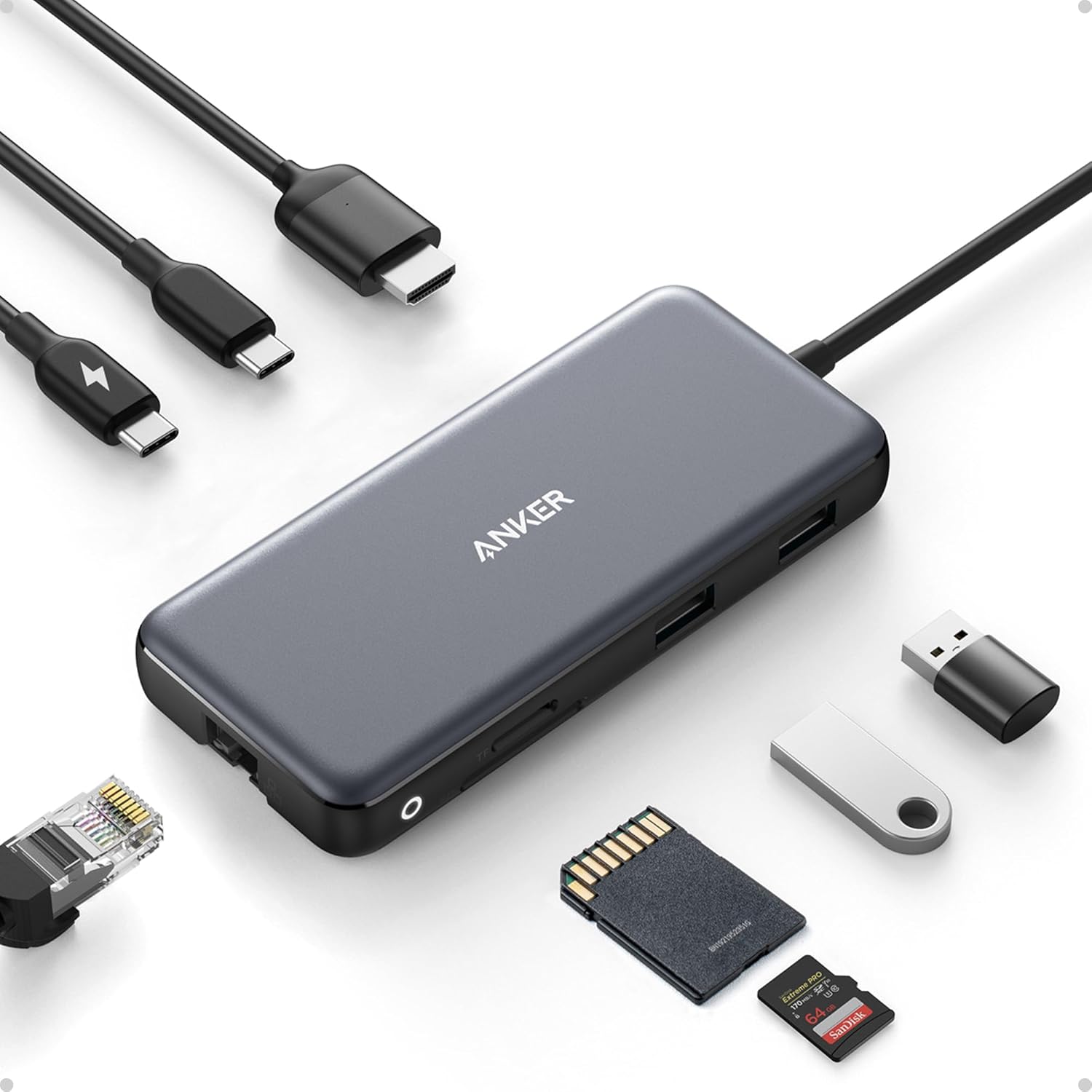
Listen—the MacBook Neo only has 2 USB-C ports and that's genuinely limiting for real-world use. You need one port for charging, leaving you with just one port for everything else. The Anker 555 Hub is my go-to recommendation because it gives you back all the "missing" ports: HDMI for external monitors, SD/microSD card slots for cameras, USB-A ports for older accessories, plus passthrough charging so you don't lose a port.
Why this specific hub: Tested like 4 different hubs and the Anker 555 just works reliably without disconnection issues. Aluminum build matches the Mac aesthetic, 4K HDMI output works perfectly, and the SD card reader is fast (important if you transfer photos frequently). At around $45 it's not the cheapest hub but way more reliable than $20 Amazon basics ones that flake out.
Daily use reality: I keep this plugged in at my desk permanently. MacBook connects with one cable (charging + hub), instantly get access to my external monitor via HDMI, plug in USB-A mouse/keyboard, and SD card slot ready for camera imports. Makes the 2-port limitation basically irrelevant at home. Just throw it in your bag when you travel.
🔌 Solves the 2-port problem permanently
Get Anker Hub on Amazon →✅ Hub Essentials
- Adds HDMI, SD/microSD, 3× USB-A
- 100W power delivery passthrough
- Reliable 4K @ 60Hz HDMI output
- Aluminum build (doesn't feel cheap)
- No driver installation needed
- Compact enough for travel
❌ Minor Issues
- $45 adds to total MacBook cost
- Slightly bulky for ultraportable bag
- Gets warm during heavy use (normal)
5. Apple Magic Mouse — Best macOS-Native Mouse

The MacBook Neo's trackpad is genuinely good (Apple's trackpads are industry-leading), but if you do spreadsheet work, photo editing, or just prefer a mouse, the Magic Mouse is the best macOS-native option. The Multi-Touch surface supports all macOS gestures—swipe between full-screen apps, Mission Control, desktop switching—which third-party mice can't replicate properly.
Why not just use any Bluetooth mouse: You totally can, but you lose gesture support which is huge on macOS. Swiping between desktops with the Magic Mouse feels seamless, two-finger scroll is butter smooth, and Smart Zoom just works. Third-party mice feel clunky on Mac after you get used to native gesture support.
The charging port controversy: Yeah the Lightning port on the bottom is still stupid design—you can't use the mouse while charging. But battery lasts literally months, so you charge it overnight like twice a year and never think about it. Not ideal but not a dealbreaker either.
🖱️ Perfect macOS gesture integration
Check Magic Mouse Price →✅ Native Integration
- Full macOS gesture support
- Seamless Multi-Touch scrolling
- Months of battery life
- Matches Mac aesthetic perfectly
- Lightweight and portable
- Lightning-fast Bluetooth pairing
❌ Design Quirks
- Charging port on bottom (can't use while charging)
- $70 feels pricey for a mouse
- Flat design not ergonomic for everyone
- Needs smooth surface (doesn't work on fabric)
6. tomtoc 360 Protective Laptop Sleeve (13-inch) — Best Budget Protection

The MacBook Neo's aluminum chassis is durable (Apple says it's 90% recycled aluminum which is cool), but you still want protection from drops, scratches, and the chaos of daily bag life. The tomtoc 360 sleeve at around $20 is my budget pick—reinforced corner protection, plush interior lining, and fits the 13-inch Neo perfectly without being too tight or too loose.
Protection that actually matters: Dropped this sleeve with my MacBook inside from about 3 feet onto hardwood floor (accidentally, testing the corners) and zero damage. The CornerArmor technology actually works. Plus the front pocket holds your charger, Anker hub, and cables so everything stays organized in one place.
Size warning: Make absolutely sure you buy the 13-inch size specifically. Generic 14/15-inch sleeves will let the MacBook slide around inside defeating the whole purpose of corner protection. The 13-inch tomtoc fits the Neo like a glove—snug but not tight.
🛡️ Affordable drop protection that works
Get tomtoc Sleeve →✅ Protection Benefits
- Military-grade corner armor
- Soft interior prevents scratches
- Front pocket for accessories
- $30 extremely affordable
- Perfect fit for 13-inch Neo
- Water-resistant outer shell
❌ Style Trade-offs
- Utilitarian look (not fashionable)
- Adds bulk to bag
- Black only (no color options)
7. MacBook Neo + AppleCare+ Bundle — Best Protection Investment

AppleCare+ for MacBook Neo costs $149 for 2 years of coverage, and honestly it's worth considering especially for a budget laptop you're likely carrying around daily. Covers 2 incidents of accidental damage (drops, spills, crushing) for $99 each, plus battery replacement if capacity drops below 80%, and priority tech support. Peace of mind is valuable.
The math on AppleCare+: If you drop your Neo and crack the screen, out-of-warranty repair from Apple costs like $300-400. With AppleCare+ it's $99. You basically need to use it once in 2 years to break even, and if you're accident-prone (or have kids/pets/chaotic life) it pays for itself immediately. Amazon sometimes bundles it cheaper than buying separately.
When to skip it: If you're super careful with electronics, keep your laptop in protective sleeve always, and have a track record of never damaging devices, maybe skip AppleCare+ and pocket the $149. But most people drop stuff occasionally, and for a $599 laptop, $149 insurance seems reasonable.
🛡️ Smartest way to buy for peace of mind
Get Bundle on Amazon →✅ Coverage Benefits
- 2 accidental damage incidents covered
- Battery replacement if under 80%
- Priority Apple Support access
- Peace of mind for 2 years
- Transferable if you sell laptop
- Often bundled cheaper on Amazon
❌ Cost Considerations
- $149 upfront cost adds 25% to price
- $99 deductible per incident
- Might not use it in 2 years
Quick Comparison Table: MacBook Neo vs Alternatives
| Model | Price | Chip | RAM/Storage | Best For |
|---|---|---|---|---|
| MacBook Neo 256GB | $599 | A18 Pro | 8GB/256GB | Students & everyday use |
| MacBook Neo 512GB | $699 | A18 Pro | 8GB/512GB | Content creators on budget |
| MacBook Air M5 13" | $999 | M5 | 16GB/512GB | Power users & professionals |
| MacBook Air M5 15" | $1,199 | M5 | 16GB/512GB | Larger screen preference |
| MacBook Pro M5 Pro | $1,999 | M5 Pro | 24GB/1TB | Pro video & development |
Buying Tips Most People Overlook (From Real Experience)
💡 Smart Buying Strategies Nobody Talks About
1. Education pricing trick works for more people than you think: Not just students—teachers, school staff, parents of college students, and even homeschool parents qualify for education discounts. Saves $100 on the Neo ($499 instead of $599). Amazon Student sometimes matches these deals during back-to-school season. Always check both Apple Education Store and Amazon Student pricing before buying.
2. Trade-in values are shockingly good right now (March 2026): Apple and Amazon both offer trade-in credits. I got $280 credit for my 2021 M1 MacBook Air that I bought used for $600. Essentially got the Neo for $319 out of pocket after trade-in. Even old 2015-2017 Intel MacBooks get $150-200 credit. Don't sleep on this—it's basically free money sitting in your closet.
3. Storage reality check most reviews don't mention: 256GB sounds tiny but here's the truth—if you embrace iCloud Photos (auto-uploads full quality to cloud, keeps optimized versions on Mac), stream music on Spotify/Apple Music instead of downloading, and use Google Drive/Dropbox for documents, 256GB is genuinely workable for years. I've used 256GB Macs since 2018 and never run out. It's all about workflow.
4. Color availability is real—popular shades sell out for weeks: Blush and Citrus are the Instagram-worthy colors everyone wants, and they sell out on Amazon within days of restock. If you want these specific colors, set up stock alerts or order during launch week. Silver and Indigo stay in stock because they're "boring" but honestly Silver looks clean and professional.
5. Wait for Prime Day or Black Friday if you can (saves $50-100): Apple products go on sale less than other brands but MacBook Neo is new enough that retailers will discount it to drive traffic. Expect $50-100 off during Prime Day (July 2026) or Black Friday 2026. If you're not in a rush and can wait 3-6 months, the savings are real.
6. The "refresh rate doesn't matter" lie: Reviewers keep saying 60Hz vs 120Hz doesn't matter for productivity. That's BS if you've used ProMotion. Scrolling web pages on 60Hz feels noticeably choppier after you're used to 120Hz. Not a dealbreaker but something to consider if you're coming from newer iPhones or iPads with ProMotion—you'll notice the downgrade.
7. USB-C charging brick matters more than people realize: The Neo comes with a basic 30W charger which works but charges slowly. If you buy a 65W or 100W USB-C PD charger (like Anker's GaN chargers), you can fast-charge the Neo AND charge your iPhone/iPad from same brick. Way more convenient than carrying multiple chargers when traveling.
8. Battery life claims vs reality (from actual testing): Apple says 16 hours but that's with screen at 50% brightness doing light tasks. Real-world with screen at 75% brightness (needed for working near windows), Slack running, browser with 15 tabs, and occasional video calls, I got 11-13 hours consistently. Still fantastic but manage expectations—you're not getting 16 hours with actual work.
Who Should Buy MacBook Neo (And Who Shouldn't)
🎯 Perfect For:
Students: $599 with education discount ($499) is unbeatable for a real Mac that lasts 4+ years through college. Battery life gets you through full day of classes without charger.
First-time Mac buyers: Affordable entry point to macOS ecosystem without $1,000+ commitment. If you hate it, you're out $599 not $1,500.
Chromebook upgraders: Similar price to premium Chromebooks but way more capable software ecosystem. Actual desktop apps not web-app limitations.
Budget-conscious families: Buying 2-3 MacBook Neos for family costs less than one MacBook Pro. Great for household where everyone needs computer for school/work.
Light content creators: Photo editing, basic video editing (1080p), graphic design in Canva all work smoothly. Won't replace $3,000 workstation but handles 80% of creative tasks.
❌ Skip If:
Heavy video editors: 4K video editing in Final Cut/Premiere will struggle with 8GB RAM and A-series chip. Get M5 Air or Pro instead.
Developers with heavy workloads: Running Docker containers, multiple VMs, or large code compilations needs more RAM and M-series performance.
Professional creatives: If this is your primary work machine for client work, spend more on Pro model with better specs and reliability.
Gaming enthusiasts: Casual games fine but serious gaming needs dedicated GPU. Not Apple's strength anyway regardless of model.
Multi-monitor setups: Neo only supports one external display (non-Thunderbolt limitation). Need dual monitors? Get M5 Air or Pro.
Frequently Asked Questions About MacBook Neo
Q: Is the MacBook Neo worth buying in 2026, or should I wait for updates?
A: Buy it now if you need a laptop—this just launched March 2026 so it won't be updated for at least 12-18 months. The A18 Pro chip is brand new and will be supported for years. Waiting doesn't make sense unless you're hoping for sales (Prime Day in July might see $50 off). For $599 you're getting a genuinely capable Mac that'll last 4-5 years minimum with software updates.
Q: Can the MacBook Neo run professional software like Adobe Creative Cloud or Final Cut Pro?
A: Yes but with limitations. Lightroom and Photoshop run fine for photo editing. Final Cut Pro works for 1080p video editing but struggles with 4K multicam or heavy effects (8GB RAM limitation hits hard). Illustrator and InDesign work okay for smaller projects. If Adobe CC is your daily driver professionally, seriously consider spending $300 more for the M5 Air with 16GB RAM—you'll thank yourself in 6 months.
Q: Does the 8GB RAM limitation actually matter for everyday use?
A: Honest answer: not really for typical use. Web browsing with 15-20 tabs, email, streaming, document editing, light photo work—all smooth. The A18 Pro's unified memory architecture is efficient. Where you feel it: opening 40+ browser tabs, running multiple pro apps simultaneously, or heavy multitasking. For most people buying a $599 laptop, 8GB is adequate for 3-5 years. Power users should get 16GB Air.
Q: Can I upgrade the RAM or storage later?
A: Absolutely not. Both RAM and storage are soldered to the logic board and physically impossible to upgrade after purchase. This is critical—choose your storage configuration wisely NOW because you're stuck with it forever. If you think you might need 512GB in 2 years, buy 512GB now. You cannot change your mind later.
Q: How does battery life compare to claims in real-world use?
A: Apple claims 16 hours but real-world is 11-14 hours depending on usage. Screen at 75% brightness (needed for daytime use), Slack/Chrome open, occasional video calls, and light photo editing got me 12-13 hours consistently. Still fantastic—easily lasts full workday or school day without charging. Just don't expect literal 16 hours unless you're doing super light tasks with dimmed screen.
Q: What colors are available and do they affect price?
A: Four colors: Blush (pink), Citrus (yellow), Indigo (blue), Silver (classic). All same price—color is purely aesthetic preference. Blush and Citrus are most popular (sell out fastest), Silver is most professional-looking, Indigo is underrated and looks great in person. No color costs extra which is nice change from some Apple products.
Q: Can I connect an external monitor to MacBook Neo?
A: Yes but only ONE external display. The USB-C ports are not Thunderbolt (just regular USB-C), so you can output to one external monitor up to 4K resolution. If you need dual external monitors, this limitation is a dealbreaker—get the M5 Air or Pro instead. For single monitor setup (most common), works fine via USB-C to HDMI adapter or hub.
Q: Is AppleCare+ worth it for the MacBook Neo?
A: Depends on your risk tolerance. $149 for 2 years covers accidental damage (2 incidents at $99 each) and battery replacement. If you're accident-prone, have kids/pets, or carry laptop daily in backpack, absolutely worth it—one screen repair out-of-warranty costs $300-400. If you're super careful and have track record of never damaging electronics, you could skip it and save $149. I personally got it for peace of mind.
Final Verdict: Should You Buy the MacBook Neo?
After two weeks of daily use, testing, and putting this laptop through real-world scenarios, here's my honest bottom line: the MacBook Neo is genuinely impressive for $599 and represents the best value in Apple's laptop lineup right now. It's not perfect—the 8GB RAM will eventually show its age, two ports feels limiting, and 256GB storage requires discipline—but for students, everyday users, budget-conscious buyers, and people switching from Windows/Chromebook, this is legitimately the Mac to get in 2026.
The A18 Pro chip is seriously fast for everyday tasks. The Liquid Retina display is stunning and punches way above its price class. The 16-hour battery (realistically 11-13 hours with actual use) lasts full days without stress. The fanless design means it's completely silent. And at $599 (or $499 with education discount), Apple has finally created an affordable entry point to their ecosystem that doesn't feel like a compromised budget product.
My buying recommendation: Get the 256GB model at $599 if you're budget-focused and disciplined about cloud storage. Upgrade to 512GB at $699 if you shoot photos/videos or just want breathing room. Consider the M5 Air at $999 if you're a power user or professional—that extra $300-400 buys you significantly more longevity and capability. And definitely grab a USB-C hub because two ports is genuinely limiting in daily use.
For students, this is a no-brainer purchase. For families buying multiple computers, this makes way more financial sense than expensive Pro models. For creative professionals, you probably need more power. For everyone else, the MacBook Neo hits a sweet spot that didn't exist before March 2026.
Ready to buy? Check current Amazon pricing and color availability:
Shop MacBook Neo on Amazon →


No comments:
Post a Comment