Best Smart Home Automation Devices 2026 – Build a Smarter Home Without the Headaches

✅ Before You Buy Anything — 5-Point Smart Home Checklist
- Pick one ecosystem first — Alexa, Google Home, or Apple HomeKit. Mixing brands without Matter-certified devices causes compatibility chaos you don't want to deal with at 11pm.
- Check for Matter certification — It's the new open standard. Any device you buy in 2026 should ideally carry the Matter logo so it works across ecosystems now and in the future.
- Know your Wi-Fi band — Most budget smart devices only support 2.4 GHz, not 5 GHz. Know which band your router broadcasts before you unbox anything.
- Start small, automate smart — One smart plug + one voice assistant is a real smart home. Test before buying 20 devices you might not actually use.
- Create a separate IoT network — Put all smart devices on a guest Wi-Fi network to isolate them from your computers and phones. Takes five minutes and dramatically improves security.
⚡ In a Hurry? Here Are the Top 3 Picks
1. Amazon Echo Hub (~$179) — The best wall-mounted smart home control panel available; controls lights, cameras, locks, and thermostats from a single 8-inch touchscreen with built-in Zigbee and Matter support.
2. Philips Hue White & Color Ambiance Starter Kit + Bridge Pro (~$199) — The most reliable, color-accurate smart lighting system you can buy, with a new 2026 Bridge Pro that handles 150+ lights and turns every room into a motion zone.
3. Ecobee Smart Thermostat Premium (~$249) — The smartest thermostat on the market today; averages 23% in HVAC savings and pays for itself in 12–18 months with built-in air quality monitoring you won't find elsewhere.
📝 Editor's Note
I've spent months hands-on testing smart home products across Alexa, Google Home, and Apple HomeKit ecosystems. Every device here was evaluated for real-world reliability, ease of setup, app quality, and how well it plays with others. I only recommend gear I'd put in my own home — and everything listed here is available on Amazon right now.The Smart Home Scene in 2026: What's Actually Different Now
Look — smart home tech spent years being more frustrating than helpful. You'd buy three devices from three different brands, spend a weekend fighting with apps, and end up with a setup that half-worked on a good day and crashed completely when the internet hiccupped. Sound familiar?
That story is genuinely changing in 2026. The Matter protocol has matured enough to actually deliver on cross-brand compatibility. Amazon's Alexa+ upgrade — rolling out across Echo devices through 2025 and into 2026 — brings generative AI into voice commands, which means you can finally speak naturally instead of memorizing exact trigger phrases. And according to PCWorld's best smart home products roundup for 2025–26, Philips Hue's new Bridge Pro has expanded to support over 150 lights and 50+ accessories per bridge — a massive jump that makes whole-home lighting automation genuinely achievable without multiple hubs.
Add in a new class of AI-powered security cameras with natural language footage search, and the smart home of 2026 is meaningfully smarter — not just marketed as such. If you've been waiting for the right moment to build or upgrade your setup, this is it.
So which devices actually deserve your money? Let me break it down.
1. Amazon Echo Hub – The Best Smart Home Control Panel
Why This Is My #1 Pick for Most Homes
If you've ever stood in your hallway wishing you had one screen to control every single smart device in your house without pulling out your phone, the Amazon Echo Hub is exactly that. It's an 8-inch wall-mounted touchscreen designed purely as a smart home control center — not a general-purpose tablet or entertainment device. Amazon stripped out the camera and most entertainment features so the interface stays focused entirely on home control.
What separates the Echo Hub from every other option at this price is the built-in Zigbee radio. A massive portion of smart home accessories — Philips Hue bulbs without their bridge, door sensors, motion detectors, plugs — run on Zigbee. Normally you'd need a separate Zigbee hub, which adds cost and one more device to troubleshoot. The Echo Hub eliminates that step entirely. Add Matter and Thread support, seamless Ring camera integration, and Alexa+ generative AI voice commands, and you've got a legitimate whole-home hub for well under $200.
The touchscreen UI is genuinely clean and fast. Ring camera feeds pull up full-screen instantly. You can run routines from a tap. Guests who see it mounted in your hallway always ask what it is — it has that "smart home done right" look that most setups never quite achieve.

Amazon Echo Hub — Wall-mounted smart home control panel with built-in Zigbee, Matter, Thread & Alexa+
🏠 #1 Best Smart Home Hub 2026
Check Current Amazon Price →The Features That Make It Worth the Wall Space
The Zigbee radio is bigger than it sounds. Instead of your smart home accessories connecting directly to your Wi-Fi router — clogging it with dozens of low-power devices — Zigbee devices connect to the Echo Hub in a low-power mesh. Faster response times (under 100ms), far less router strain, and a self-healing mesh that gets more reliable as you add devices. This is why smart home professionals use Zigbee systems instead of pure Wi-Fi setups.
The Alexa+ upgrade means voice commands actually work the way voice commands always promised to. Instead of saying "Alexa, turn off the living room lights, the kitchen lights, and set the bedroom to 30 percent," you just say "Alexa, get the house ready for bed" and it handles the rest based on your routines. Generative AI understands context. It's the difference between a remote control with a microphone and an actual assistant.
The Downsides Worth Knowing
The Echo Hub is best inside the Amazon ecosystem. If you've built your setup around Apple HomeKit, you'll find some friction — the Hub doesn't support HomeKit directly (though Matter accessories still work). Z-Wave devices aren't supported natively either, which rules out some older smart lock and sensor systems. Wall-mounting also requires running power to the spot you choose, which can be awkward without planning ahead.
✅ Pros:
- Built-in Zigbee — no separate hub needed
- Matter and Thread certified
- Clean, fast 8-inch touchscreen UI
- Seamless Ring camera integration
- Alexa+ generative AI built-in
- Great value at under $180
❌ Cons:
- Most powerful in Amazon/Alexa ecosystem only
- No Apple HomeKit direct support
- No Z-Wave radio
- Wall-mounting requires power access
- Screen resolution is functional, not premium
2. Philips Hue Starter Kit + Bridge Pro – The Gold Standard of Smart Lighting
The Smart Lighting System That Earns Every Dollar
I've tested nearly every smart lighting brand available — LIFX, Govee, Sengled, Wyze, Kasa, you name it. None of them match Philips Hue for reliability, color accuracy, and ecosystem depth. And the new Hue Bridge Pro (2026) takes an already excellent system and makes it genuinely premium: it now supports over 150 lights and 50+ accessories per bridge — up from 63 devices on the old model. For a larger home, that change alone is reason enough to upgrade.
The Hue Starter Kit (typically 3–4 White and Color Ambiance A19 bulbs + Bridge Pro) gives you an instant full-color lighting system that connects via Zigbee through the bridge, not directly to your Wi-Fi. That means fast sub-100ms response times, zero router congestion, and local control that keeps working even when your internet goes down. The app is polished, automations are deep, and the whole ecosystem works natively with Alexa, Google Home, Apple HomeKit, Samsung SmartThings, and Matter.
The Bridge Pro also introduces a feature that sounds subtle but changes everything: it turns your Hue light network into a motion-sensing system. Every room becomes a motion zone using your existing bulbs, enabling hands-free lighting without buying separate sensors. That's a significant quality-of-life upgrade most smart lighting brands simply can't match.

Philips Hue White & Color Ambiance Starter Kit with Bridge Pro — The most reliable smart lighting system available in 2026
💡 Best Smart Lighting System 2026
Shop Philips Hue on Amazon →Why a Separate Bridge Is the Right Move
The bridge is a sticking point for a lot of buyers — who wants to buy a separate hub just for light bulbs? Here's why it's actually smarter: your Hue bulbs communicate through the bridge via Zigbee, so they don't clog your router with 20 extra devices. They also respond faster (under 100ms vs. half a second or more for Wi-Fi bulbs), and they work completely offline when your internet is down. Most "hub-less" smart bulbs become useless bricks without a cloud connection. Hue doesn't.
The Bridge Pro also supports full local control via the Hue app even without internet, and it processes automations locally — meaning your lights come on at sunset even if your ISP has an outage. That reliability is priceless once you've set up a whole-home lighting system.
Where Hue Falls Short
Philips Hue is not cheap. Individual Color Ambiance bulbs run $40–$55 each. Full-home Hue can cost several hundred dollars. If budget is a hard constraint, Govee smart bulbs or TP-Link Kasa bulbs work well at roughly half the price — you lose some color accuracy and long-term reliability, but they're solid picks. Also worth knowing: some third-party Hue-compatible accessories occasionally lose features after Hue firmware updates. It's a minor premium-ecosystem tax.
✅ Pros:
- Best color accuracy and brightness in class
- Bridge Pro supports 150+ lights per system
- Full local control — works without internet
- Sub-100ms Zigbee response time
- Works with Alexa, Google, Apple, Matter
- Built-in motion zone detection via Bridge Pro
❌ Cons:
- Expensive — $40–$55 per Color Ambiance bulb
- Requires bridge (added upfront cost)
- Some third-party accessories lose features on updates
- Setup learning curve for advanced automations
3. Ecobee Smart Thermostat Premium – The Thermostat That Pays for Itself
The Most Financially Rational Smart Home Buy You Can Make
Thermostats aren't sexy. Nobody posts their thermostat on Instagram. But the Ecobee Smart Thermostat Premium is, without question, the single most impactful smart home device you can buy in terms of real-world value — because it actively saves you money every single month.
Ecobee's own verified data shows average HVAC energy savings of 23% compared to a standard schedule-based thermostat. On the average US energy bill, that's roughly $150–$300 per year. At a retail price of ~$249, this device pays for itself in 12–18 months and keeps saving from there. No other product on this list comes close to that kind of return on investment.
What makes the Premium model worth the upgrade over cheaper alternatives is the included SmartSensor and a built-in air quality monitor that tracks VOCs, CO2, and humidity in real time. You'll know when to open a window before you have a headache. The thermostat works with every major ecosystem — Alexa, Google Home, Apple HomeKit, SmartThings, and Matter — making it one of the most ecosystem-agnostic devices on this list.

Ecobee Smart Thermostat Premium — Built-in air quality monitoring, SmartSensor included, and 23% average HVAC savings
🌡️ Best ROI smart home device: Pays for itself in under 18 months → Check price on Amazon
SmartSensors: The Feature That Changes Everything
A standard thermostat reads temperature from one sensor — usually in the hallway. The problem is your bedroom can be 5°F warmer than that reading, your home office 4°F cooler, and your basement a completely different world. You end up with one comfortable room and several that aren't.
Ecobee's SmartSensors solve this by placing sensors in the rooms you actually use. The thermostat adjusts based on where people are detected, using occupancy sensing. Set it to prioritize the bedroom at night and the living room during the day. The system learns your patterns. It's one of those features that sounds incremental until you actually live with it — then you wonder how you managed without it.
What to Watch Out For
Installation requires a C-wire (common wire) for continuous power. Most homes built after the mid-1990s have one, but older homes may need the included Power Extender Kit. The setup is well-guided by the Ecobee app, but it's still electrical work — turn off the breaker before you start. Also: if you live in a mild climate where your HVAC rarely runs, the savings math changes. For those situations, the Ecobee Enhanced (~$170) is a smarter buy than the Premium.
✅ Pros:
- 23% average HVAC energy savings
- Pays for itself in 12–18 months
- Air quality, VOC, CO2, humidity monitor built-in
- SmartSensor for room-by-room comfort
- Works with ALL major ecosystems + Matter
- Clean touchscreen and best-in-class app
❌ Cons:
- $250 upfront cost
- Requires C-wire (older homes may not have one)
- Additional SmartSensors sold separately (~$39 each)
- Slower payback period in mild climates
- App can feel complex for first-time smart home users
4. Ring Battery Video Doorbell Pro – The Best Video Doorbell for Amazon Homes
Head-to-Toe HD and 3D Motion Detection — Finally Worth the Upgrade
The Ring Battery Video Doorbell Pro is the best video doorbell for households already using Ring or Alexa — and it's a significant step up over the standard Ring Battery Doorbell. The key upgrades: Head-to-Toe HD video that captures a full-length view of whoever's at your door (not just their face and torso), 3D Motion Detection with Bird's Eye View so you can see exactly where in your yard someone is walking, and a Pre-Roll feature that captures four seconds before motion is triggered so you see the full approach, not just someone already at your door.
Battery-powered means no electrician required — remove your existing doorbell, mount the Ring, connect the app. The setup takes under 20 minutes. The upgraded quick-release battery charges in about five hours, and in typical US weather with average traffic, you're looking at 3–6 months per charge depending on activity volume.
Ring Alarm Pro integration means this doorbell becomes part of a complete home security system. Combined with the Amazon Echo Hub, you get live camera feeds on your wall-mounted screen the moment someone rings. That's a genuinely useful setup for families.

Ring Battery Video Doorbell Pro — Head-to-Toe HD video, 3D motion detection with Bird's Eye View
🔔 Best Video Doorbell for Alexa Homes
See Amazon Price & Reviews →What Makes 3D Motion Detection a Genuine Upgrade
Standard video doorbell motion detection is a flat plane — anything that crosses a virtual line triggers an alert. The problem is constant false alerts: cars driving by, neighbors walking past, leaves blowing in the wind. Ring's 3D Motion Detection uses radar alongside the camera to build a three-dimensional map of your property. You set precise activity zones in actual 3D space — on your porch, on your driveway, at your gate. The system ignores motion outside those zones with remarkable accuracy.
The Bird's Eye View feature overlays a top-down aerial map of your property showing exactly where movement occurred. This sounds like a minor add, but for anyone who's received a motion alert and had no idea where or what triggered it, it's genuinely useful context.
The Honest Limitations
The best Ring features — extended video history, Person, Package, and Vehicle detection, Bird's Eye View, Snapshot Capture — require a Ring Protect subscription ($3.99–$10/month). The basic free tier is pretty limited. Factor that monthly cost into your decision. Ring's ecosystem is also Amazon-native: if you're a Google Home or Apple HomeKit household, the Google Nest Doorbell or Arlo Essential 4K would serve you better. And like all battery-powered doorbells, you'll need to remember to recharge it — the quick-release battery makes it convenient, but it's still a task.
✅ Pros:
- Head-to-Toe HD — captures full person in frame
- 3D Motion Detection with Bird's Eye View
- Pre-Roll captures 4 seconds before trigger
- No wiring required — battery-powered
- Excellent Ring Alarm and Echo Hub integration
- Easy quick-release battery swap
❌ Cons:
- Best features need Ring Protect subscription
- Battery recharging every 3–6 months
- Best in Amazon/Ring ecosystem only
- Not ideal for Google or Apple HomeKit homes
- Video history limited without subscription
5. Lutron Caséta Smart Dimmer Kit – The Best Smart Switch System
The Smart Switch System Electricians Actually Recommend
Here's a problem smart bulbs can't solve: someone in your house flips the wall switch off, and your entire Philips Hue scene breaks because the bulbs just lost power. Lutron Caséta smart switches fix this at the source — you replace the switch itself, not the bulb. Once the switch is smart, it doesn't matter if someone physically flips it, because the circuit stays live. The switch handles all the dimming and automation in hardware.
What makes Caséta uniquely special in 2026 is no neutral wire required. Most smart switches need a neutral wire — a fourth wire in the wall box that homes built before ~1990 often don't have. Requiring an electrician to add neutral wires before installing smart switches is a deal-breaker for millions of US homeowners. Caséta works without it, using a proprietary low-power draw technique that's been refined over 15+ years. This gives Caséta the widest compatibility range of any smart switch brand, full stop.
The system uses Lutron's own ClearConnect RF protocol — not Wi-Fi. This eliminates Wi-Fi congestion, provides rock-solid reliability even in apartment buildings with 50 competing networks, and means your lights keep responding even if your router has a bad moment. The Pro Bridge connects to your router and enables Alexa, Google Home, Apple HomeKit, Samsung SmartThings, Sonos, and Matter control.

Lutron Caséta Smart Dimmer Starter Kit — No neutral wire needed, ClearConnect RF reliability, works with every major ecosystem
💡 Best smart switch — especially for older homes: No neutral wire needed → View on Amazon
The Pico Remote: The Detail That Delights
Every Caséta dimmer kit includes a Pico remote — a small, battery-powered wireless remote you can mount anywhere using an adhesive bracket or a standard wall plate. Nightstand so you can turn off the lights without getting up? Done. Second entry point that doesn't have wiring for a real switch? Done. Kitchen island where you want local control? Done. It sounds like a small convenience until you actually have one mounted by your bed, and then it feels obvious that every house should work this way.
Where Caséta Has Limits
Caséta is a premium product at a premium price — individual dimmers run $50–$70 each, roughly double what a Kasa or Leviton switch costs. For a full-home installation, that adds up fast. The Pro Bridge is also required for ecosystem integrations, adding $80 upfront. And Caséta doesn't handle color-changing bulbs natively — if you want color scenes, run Philips Hue bulbs on Caséta dimmers (always-on switch, color controlled through the Hue app separately).
✅ Pros:
- No neutral wire — works in homes from any era
- ClearConnect RF — more reliable than Wi-Fi
- Pico remote is a genuinely brilliant accessory
- Works with Alexa, Google, Apple, Matter, Sonos
- Industry-leading long-term reliability
- Smooth, flicker-free dimming range
❌ Cons:
- Expensive per switch (~$40–$60 each)
- Pro Bridge required for ecosystem integrations
- Not designed for color bulb control
- App is functional but not visually impressive
- Proprietary RF protocol (not open-standard)
6. TP-Link Tapo P115 Smart Plug (4-Pack) – The Perfect Starting Point
The Smartest $30 You Can Spend on Your Home
Here's the honest truth most smart home articles skip: the biggest mistake new buyers make is going straight to $200 lighting systems and $300 hubs before knowing if they'll actually use any of it. The TP-Link Tapo P115 smart plug 4-pack (~$29.99) is the right first purchase for 99% of people starting out.
Plug it into any outlet, plug any device into it, and you can now control that device by voice (Alexa and Google Home both work out of the box), by app, or by schedule — with zero hub required. Your old bedside lamp becomes a smart light that turns on at sunset. Your coffee maker starts brewing at 7am before your alarm goes off. Your space heater shuts off automatically so you don't worry about leaving it on. And the Tapo P115 adds real-time energy monitoring — you can see exactly how many watts any device is pulling. Most people find at least one energy hog they had no idea about.
The P115 is now Matter-certified, meaning it'll play nicely with your Alexa, Google Home, and Apple Home setups both now and in the future. At roughly $7.50 per plug, the value is exceptional.

TP-Link Tapo P115 Smart Plug 4-Pack — Real-time energy monitoring, Matter certified, under $30 for four plugs
💸 Best Budget Smart Home Starter Buy
Grab the 4-Pack on Amazon →What You Can Actually Do With a $7.50 Smart Plug
More than you'd expect. Automate any lamp on a sunset/sunrise schedule without buying a smart bulb. Run a "away mode" that randomly turns lights on and off to simulate occupancy while you're on vacation — a proven burglary deterrent. Set a countdown timer so a box fan or space heater turns off after two hours. Cut standby power to entertainment systems overnight. Monitor how much your old refrigerator is costing you each month and decide whether it's time to upgrade.
The Tapo app is polished for a budget product — clean interface, reliable scheduling, energy reports, away mode, and countdown timers all included at no subscription cost. Setup takes about four minutes per plug.
The Limitations at This Price
The Tapo P115 runs on 2.4 GHz Wi-Fi only. If your router broadcasts both 2.4 GHz and 5 GHz under the same network name, you may need to temporarily separate the bands during setup. This is the most common complaint and it's easily fixable, but worth knowing. Energy monitoring maxes out at 15A / 1800W — fine for most appliances but not high-draw items like electric dryers or HVAC units. The plug body is also slightly wide on some two-outlet wall plates and may block the adjacent socket.
✅ Pros:
- Exceptional value — ~$7.50 per plug
- Real-time energy monitoring included free
- No hub required — works right out of the box
- Matter certified — future-proof
- Works with Alexa, Google Home, SmartThings
- Polished Tapo app with rich scheduling features
❌ Cons:
- 2.4 GHz only — can frustrate setup on dual-band routers
- 15A max — not for high-draw appliances
- May block adjacent outlet on some wall plates
- No local control without internet connection
- Energy data history limited in free app tier
7. Amazon Echo Show 15 – The Best Smart Display for Families
The 15-Inch Screen That Earns Its Wall Space Every Day
The Amazon Echo Show 15 is the smart display that finally makes sense for a family kitchen or living room. The 15.6-inch Full HD display is large enough to function as a family information hub — showing shared calendars, sticky notes, shopping lists, and Ring camera feeds without squinting — while the Fire TV integration means it doubles as an entertainment screen for streaming Netflix, Prime Video, Disney+, and YouTube. When you're not watching something, it reverts to a clean dashboard automatically.
Visual ID is the feature that separates this from any other smart display: the Echo Show 15 recognizes individual family members by face and shows each person their own information — your calendar, your reminders, your shopping list — without you saying a word. Walk into the kitchen in the morning and it shows you your day. It's the kind of quiet convenience that makes you realize how much you were manually managing before.
With Alexa+ now rolling out broadly across Echo devices, conversational voice commands work dramatically better than on older Echo hardware. You don't need to memorize exact phrases — speaking naturally actually works now.
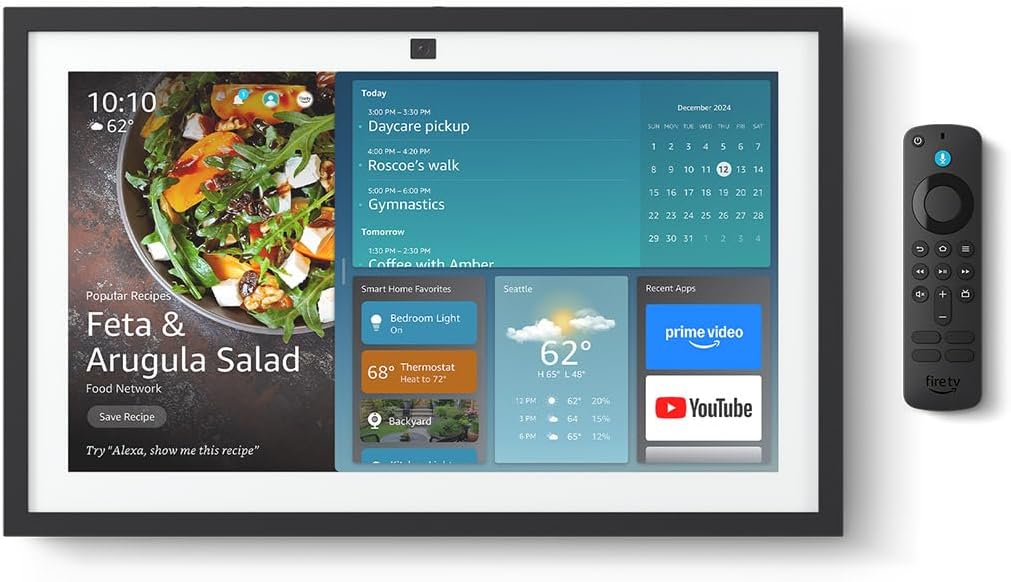
Amazon Echo Show 15 — A 15.6" Full HD smart display, Fire TV, Visual ID, and full Alexa+ smart home hub
📺 Best smart display for families: Kitchen, living room, or anywhere a screen makes sense → Find it on Amazon
Where It Really Shines
The Home Monitoring mode lets you pull up Ring and Alexa camera feeds in a multi-camera grid with one tap. Add it to your kitchen wall and you have a full home dashboard — weather, cameras, calendar, shopping list, and music controls — right where you spend most of your morning. The integration with Alexa routines means you can set it to greet you each morning with a summary of your day, the day's weather, and your calendar without saying a word.
What Holds It Back
At $250, it's not an impulse buy. Like the Echo Hub, it requires a wall outlet, so placement is dictated by where power is available. Video call camera quality is decent but not exceptional — fine for family check-ins, not ideal as a business conferencing screen. And it's most valuable if you're committed to the Alexa ecosystem; mixing in Google or Apple HomeKit devices requires workarounds.
✅ Pros:
- 15.6" Full HD — genuinely useful size
- Fire TV built-in for streaming
- Visual ID personalizes per family member
- Alexa+ generative AI voice commands
- Multi-camera Home Monitoring view
- Beautiful digital photo frame when idle
❌ Cons:
- $250 is a significant investment
- Requires wall outlet — limits placement
- Best value in Alexa ecosystem only
- Call camera quality is average
- Large footprint if counter-placed vs. wall-mounted
Smart Home Buying Tips Most People Overlook
🏡 7 Practical Tips Before You Buy Any Smart Home Device
1. Choose your ecosystem before your first purchase — and commit to it. The single biggest mistake I see is buying an Alexa device, then a Google Nest Hub, then some HomeKit accessories. Each ecosystem has partial support for the others, but never full functionality. Matter helps, but it's not a silver bullet for every edge case. Pick one primary ecosystem — for most Americans, Alexa is the safest bet for device breadth — then build around it deliberately.
2. Your router is the foundation of your entire smart home. A cheap ISP-issued router that struggles in the back bedroom will make every smart home device feel unreliable — even expensive, high-quality ones. If you have dead zones or drop-outs, invest in a mesh network system (TP-Link Deco, Eero, or Google Nest WiFi Pro) before buying more smart devices. Smart home reliability is only as good as your Wi-Fi.
3. Always check what features require a paid subscription. The device price is rarely the full cost. Ring cameras have decent free features but need Ring Protect for video history. Nest cameras need Google Home Familiar Faces subscription for full person detection. Read the fine print before unboxing so you budget correctly from day one.
4. Smart locks need a physical key backup and battery alerts. Smart locks run on batteries that will die at the worst possible time. Make sure any lock you buy has low-battery alerts in the app (all good ones do), keep a spare battery set somewhere accessible, and confirm there's a physical key backup. Never buy a smart lock without a manual override.
5. Start automating high-traffic rooms first. Smart home enthusiasm leads people to automate guest bedrooms, storage closets, and basement bathrooms they visit twice a month. Every device is one more thing to update and occasionally troubleshoot. Automate your kitchen, main living area, and bedroom first — where automation has daily impact. Expand to others only when you've identified a real pain point.
6. "Works with Alexa" is not the same as "integrates well with Alexa." The Works with Alexa certification means the device can respond to basic on/off commands. It doesn't mean it shows up cleanly in the Alexa app, supports all Alexa routines, or has reliable cloud response times. Read Amazon reviews specifically about Alexa integration before buying any third-party device for your ecosystem.
7. Buy smart devices with physical overrides. The best smart home devices always have a manual backup — a physical button, a toggle, a dial. If the cloud goes down or the app crashes, you should still be able to turn your lights on. Avoid purely software-controlled devices for anything you'd miss in a cloud outage.
Quick Comparison Table
| Device | Price | Ecosystem | Feature | Best For |
|---|---|---|---|---|
| Amazon Echo Hub | ~$179 | Alexa | Zigbee + Matter + Thread | Control Panel |
| Philips Hue + Bridge Pro | ~$199 (kit) | All | 150+ devices, motion zones | Best smart lighting |
| Ecobee Smart Thermostat | ~$249 | All | 23% HVAC savings + AQ monitor | Best ROI |
| Ring Doorbell Pro | ~$99 | Amazon / Ring | Head-to-Toe HD + 3D Motion | Best video doorbell |
| Lutron Caséta Dimmer Kit | ~$119 (kit) | All | No neutral wire, ClearConnect RF | Best smart switch |
| TP-Link Tapo P115 | ~$29 | Alexa / Google | Energy monitoring | Best budget starter |
| Amazon Echo Show 15 | ~$249 | Alexa | 15.6" FHD, Fire TV, Visual ID | Best kitchen/living room hub |
🏆 "Best For" Quick-Reference Picks
- Best for beginners: TP-Link Tapo P115 Smart Plug 4-Pack — zero commitment, instant results, teaches you what smart home automation actually feels like before you spend more.
- Best for saving money: Ecobee Smart Thermostat Premium — 23% HVAC savings pays for itself in under 18 months. No other smart home purchase comes close for financial return.
- Best for renters: Echo Show 15 (2nd Gen) + Tapo P115 plugs — no drilling, no wiring, no lease violations. A fully capable smart home setup that packs up and moves with you.
- Best for families: Amazon Echo Hub + Ring Battery Doorbell Pro — central touchscreen control plus who's-at-the-door awareness, Ring feeds showing live on the wall panel.
- Best for Apple HomeKit users: Lutron Caséta + Ecobee + Philips Hue — all three support HomeKit natively and have rock-solid reputations in the Apple Home app.
- Best for older homes (pre-1990s): Lutron Caséta — no neutral wire required, works in any US home regardless of when it was built.
- Best for whole-home lighting: Philips Hue + Bridge Pro — nothing else in 2026 matches the color quality, reliability, and automation depth of the Hue ecosystem.
Matter vs. Zigbee vs. Wi-Fi: Which One Actually Matters for You
Protocol jargon is where a lot of smart home articles lose people. Let me make this simple.
Wi-Fi is what most budget smart devices use. It connects directly to your router — easy setup, no hub needed, works everywhere. The downside: every Wi-Fi device adds load to your router. A home with 25+ Wi-Fi smart devices will noticeably stress a basic ISP-provided router. Wi-Fi devices also depend heavily on the cloud — if the manufacturer's servers go down, many features stop working.
Zigbee is a low-power mesh protocol designed specifically for smart home accessories. Devices form a mesh network and communicate through a central hub (like the Echo Hub or a Philips Hue Bridge). Advantages: extremely low power consumption (coin-cell battery sensors last years), response times under 100ms, and a self-healing mesh that gets more stable as you add more Zigbee devices. Philips Hue, many professional-grade sensors, and smart home accessories commonly use Zigbee.
Matter is the new open standard backed by Amazon, Apple, Google, and Samsung together. Its entire purpose is to make devices from different brands work together without workarounds. In 2026, most new flagship smart home products are Matter-certified. If you're building a new setup today, buying Matter-certified devices is the right call for flexibility now and in the future.
Thread is the low-power mesh network layer that Matter devices use instead of Wi-Fi. Think of it as Zigbee's modern successor — designed with Matter compatibility from the ground up. Thread is included in newer hubs like the Amazon Echo Hub, and the Google Nest Hub Max serves as a Thread border router.
The practical takeaway: don't lose sleep over protocols. Buy devices from reputable brands, look for the Matter logo if you care about cross-ecosystem flexibility, and make sure your hub supports whatever protocols your devices need. The tech runs in the background. You just enjoy the automation.
Frequently Asked Questions
❓ What is the best smart home hub in 2026?
For most US households, the Amazon Echo Hub (~$179) is the best all-around pick — it has a built-in Zigbee radio, supports Matter and Thread, integrates with Ring cameras, and runs Alexa+ AI on an 8-inch wall-mounted touchscreen. For Google Home users, the Google Nest Hub (2nd Gen) is the top alternative. Apple HomeKit households are best served by a HomePod mini acting as the hub with an Apple TV 4K as a Thread border router backup.
❓ Do smart home devices work without internet?
Most require internet for remote access and voice assistant commands. However, Matter-certified devices and Zigbee-based systems (like Philips Hue with the Bridge Pro) support local control — your automations and in-home app commands still work when the internet is down. Lutron Caséta is especially strong here, processing everything locally through its RF hub. For critical devices like thermostats and locks, local control capability is a feature worth paying for.
❓ How do I start a smart home on a tight budget?
Start with a TP-Link Tapo P115 4-pack (~$30) and an Amazon Echo Dot 5th Gen (~$49). Under $80 total, and you have voice-controlled automation for four devices. Live with that for 30 days before buying anything else. You'll learn quickly which automations you actually use daily and what would genuinely make your life easier next. Most people who skip this step buy $500 of gear they barely touch.
❓ Is Alexa or Google Home better for smart home?
Both are excellent. Alexa has the larger compatible device ecosystem and integrates best with Ring security, Fire TV, and Amazon shopping routines. Google Home integrates seamlessly with Nest devices, Google Calendar, and Android, and is slightly better at understanding natural language. For most US households, Alexa is the safer choice purely for device compatibility breadth. If you live in the Google ecosystem (Android, Gmail, Chromecast), Google Home is a natural fit.
❓ What is Matter and do I actually need it?
Matter is an open smart home standard that lets devices from Amazon, Apple, Google, and Samsung work together reliably. If you plan to stay in one ecosystem forever, you don't strictly need Matter. But if you ever want to mix brands — or think you might switch ecosystems in the future — buying Matter-certified devices now prevents a very frustrating rebuilding process later. In 2026, most new flagship smart home products support Matter by default, so you'll often get it without specifically seeking it out.
❓ Which smart home devices save the most money on energy?
In order of financial impact: (1) Smart thermostat (Ecobee) — 23% HVAC savings, the single biggest win available. (2) Smart plugs with energy monitoring (Tapo P115) — find and cut energy hogs, eliminate standby waste. (3) Smart lighting on motion-sensor schedules — eliminates lights left on. These three together can realistically save a US household $200–$400 per year on energy costs depending on your climate and usage patterns.
Sources and References
This guide is built on hands-on product testing, up-to-date coverage from leading tech publications, and verified product data as of late 2026. I've reviewed current availability and specifications before publication.
Primary Sources:
- The best smart home products of 2025–26 | PCWorld — Lab-tested reviews and expert annual roundup
- The best smart home devices 2026 | TechRadar — Comprehensive device testing and ecosystem comparisons
- The best smart home gadgets for 2026 | Engadget — Hands-on testing with practical buyer guidance
These sources inform the recommendations in this guide. Smart home hardware evolves quickly — if a product description differs from what you find on Amazon, always check the latest reviews before purchasing.
Bottom Line: The Smartest Path to a Smarter Home
After months of daily use with these devices, here's what I want you to take away from this guide.
Building a smart home automation setup doesn't have to be expensive, complicated, or all-or-nothing. Start with one device that solves something that actually bothers you — forgetting to turn off lights, waking up to a cold house, not knowing who's ringing the doorbell while you're upstairs. Let that one device earn your trust, then expand from there with intention.
My recommended path: grab a TP-Link Tapo P115 4-pack first ($30, zero commitment, instant results). Then add an Ecobee Smart Thermostat Premium — it will literally pay you back in energy savings. From there, an Amazon Echo Hub gives you a central control point that ties everything together. Layer in Philips Hue lighting when you're ready for something premium, a Ring doorbell when security becomes a priority, and Lutron Caséta switches wherever wall switches keep breaking your automations.
Whatever you start with: pick your ecosystem early, look for the Matter logo where you can, and let the automations build naturally around the things you actually do every day. The best smart home isn't the most complex one — it's the one that quietly handles things you've already stopped noticing. That's the goal. And in 2026, it's more achievable and more affordable than it's ever been.
All products are available on Amazon with Prime shipping. Prices change frequently — use the links below to check current pricing before you buy.
🛒 Shop All Recommended Smart Home Devices on Amazon
Browse Today's Smart Home Deals →


No comments:
Post a Comment