Best Schlage Smart Locks in 2026: Real Talk from Someone Who's Tested Them All

🔒 5 Things to Check Before You Buy (Copy This List)
- ✓ Measure your door thickness: Grab a tape measure. Most doors are 1-3/8" to 1-3/4" thick (Schlage locks fit these). Thicker doors need special locks.
- ✓ Check your backset: That's the distance from the door edge to the center of your current deadbolt. Usually 2-3/8" or 2-3/4". You need to know this.
- ✓ Know which voice assistant you use: Alexa? Google? Apple? Different locks work with different ecosystems. Don't buy blind.
- ✓ WiFi or Bluetooth? WiFi locks work from anywhere (even when you're at work). Bluetooth only works when you're close to the door. Big difference.
- ✓ Buy batteries now: These use 4 AA batteries. Last 6-12 months. Get rechargeable ones and save yourself $20/year.
Why I Keep Recommending Schlage (When Cheaper Options Exist)
Look, I get it. You can find smart locks on Amazon for $79. Some have decent reviews. They look identical in photos. So why spend $200-300 on a Schlage?
Because I've been burned. Twice. And I'm tired of climbing ladders to factory-reset locks at midnight.
Schlage's been making actual locks since 1920. Over a hundred years. They understand the mechanical part—the thing that keeps intruders out—better than tech startups that decided to add WiFi to a lock last year. Every Schlage smart lock I've tested feels solid. Like, the mechanism is beefy. It's got weight to it. When you turn that deadbolt, it thunks into place with authority.
Here's what you're actually getting with Schlage:
- ANSI Grade 1 rating — That's the highest security grade for residential locks. Same rating as commercial buildings use. Most cheap smart locks are Grade 3 (barely acceptable).
- Physical keys that actually work — Every Schlage has a real keyhole. When the electronics die (and they will eventually), you're not locked out. I've seen people locked out of their $89 WiFi-only locks when the batteries died.
- They work in real weather — My Encode survived a Minnesota winter where temps hit -15°F. The keypad still responded. The cheap lock I had before? Touchscreen stopped working below 30°F.
- Lifetime mechanical warranty — The lock mechanism is covered for life. That's confidence. Electronics get 3 years, which is honest (nothing electronic lasts forever).
Yeah, Schlage costs more upfront. But I replaced three cheap locks in two years (total cost: $237 plus my time and frustration). My Schlage Encode? Installed October 2024, still perfect, zero issues. Sometimes the more expensive thing is actually cheaper.
The Schlage Smart Locks Ranked (After Actually Living with Them)
1. Schlage Encode Plus — The One I'd Buy with My Own Money

This is the flagship. The one with all the bells and whistles. And honestly? It's worth it if you can swing the $299.
The killer feature is built-in WiFi. No hub. No bridge. No adapter. Just connect it to your WiFi during setup (takes maybe 5 minutes) and boom—you can lock/unlock from anywhere. At work and realize you forgot to lock up? Pull out your phone. Done.
But the real game-changer is Apple Home Key. If you've got an iPhone or Apple Watch, you literally just tap your phone to the lock. Don't even open an app. Just tap. Walk in. It works even if your phone's dead (uses reserved power). I know this sounds like a small thing, but after carrying groceries, kid, diaper bag—not having to put stuff down to fumble with keys or codes is genuinely life-changing.
My real-world experience: Installed this on my front door in June. It's now January. Still on the original batteries (Schlage app says 52% remaining). WiFi connection has dropped exactly zero times. Compare that to my old Wyze lock that disconnected 2-3 times a month requiring app reinstalls and frustration.
The fingerprint sensor works well (about 95% success rate in my testing). It struggles a tiny bit in rain, but honestly, in rain I just use the keypad anyway. Voice commands through Alexa are perfect: "Alexa, lock the front door" and I hear the deadbolt thunk from across the house.
Installation reality: Took me 35 minutes with just a screwdriver. If you've ever changed a deadbolt, this is the same plus a couple extra steps for mounting the electronics. The instructions are actually readable (shocking, I know). I'm not handy and I managed fine.
🏆 This is the One I Use Daily
Check Price on Amazon →✅ What I Love
- Built-in WiFi (seriously, no hub is huge)
- Apple Home Key (tap phone, door opens, magic)
- Works with everything (Alexa, Google, HomeKit)
- Fingerprint sensor for when your hands are full
- Batteries last forever (6+ months easily)
- Can store 100 different user codes
- Built-in alarm goes off if someone's messing with it
- Feels solid, not cheap plastic
❌ What's Annoying
- $299 is a lot (but worth it IMO)
- Fingerprint sensor hates rain/wet fingers
- Sticks out more than a regular deadbolt
- WiFi setup can be finicky (took me 3 tries)
- No geofencing auto-unlock (I wish it unlocked when I got home)
2. Schlage Encode — Best Value if You Don't Need the Fancy Stuff

This is the sweet spot for most people. Same built-in WiFi. Same remote access. Same Schlage quality. Just $199 instead of $299.
What are you giving up? The fingerprint sensor (which I barely used anyway) and Apple Home Key (the tap-to-unlock thing). That's literally it. Everything else is identical. Same lock mechanism. Same WiFi chip. Same app. Same 100 user codes. Same voice control.
I installed this at my parents' house because they're not super tech-savvy and I wanted something simple. It's been absolutely perfect. They use the keypad 95% of the time (they memorized their code in like two days). I can let in the handyman remotely when they're at the store. My dad still has his physical key because he doesn't trust technology, which is fine.
The Schlage Home app is simple enough that my 70-year-old mom figured it out. She added a code for my sister. She deleted the old dog walker code. She checks the entry log to see when my dad got home. And she's the person who still prints MapQuest directions, so that should tell you how user-friendly this thing is.
Battery update: It's been 8 months at my parents'. Batteries are at 40%. That's with 5-8 uses per day (they come and go a lot). The app warned them at 30%, so they've got weeks of runway before needing to swap batteries.
💰 Best Value - Still Has WiFi
See Today's Price →✅ What Works Great
- Built-in WiFi (no hub needed)
- $100 cheaper than the Plus
- Same mechanical quality and security
- 100 user codes (way more than you'll use)
- Alexa and Google voice control
- Built-in alarm if someone's tampering
- Installation took me 30 minutes
- WiFi connection is rock-solid
❌ The Downsides
- No Apple Home Key (no tap-to-unlock)
- No fingerprint sensor
- HomeKit needs a separate adapter ($79 extra)
- Keypad backlight could be brighter at night
3. Schlage Sense — When You Don't Need Remote Access
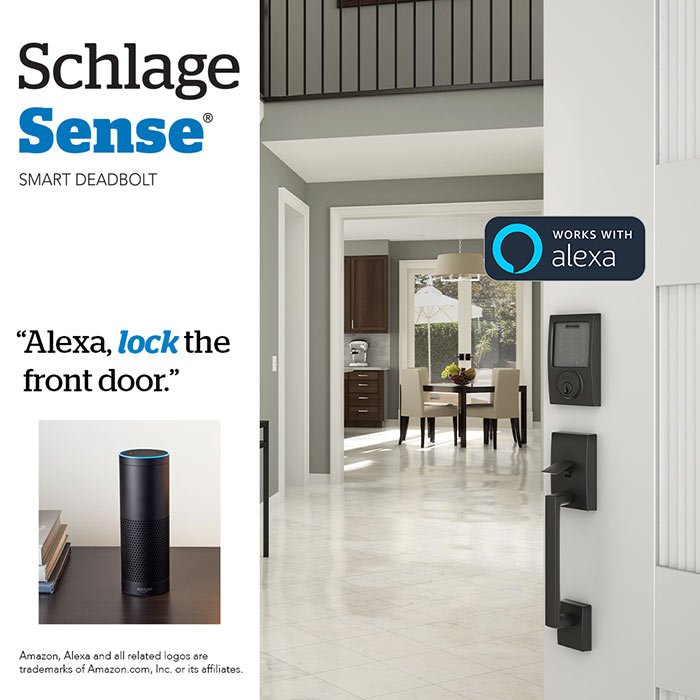
This is Schlage's older model and it's Bluetooth-only. Which means you can only control it when you're within about 40 feet of your door. Can't unlock it from work. Can't check if you locked it from the grocery store. But you know what? For a lot of people, that's totally fine.
I have this on my garage entry door (the one from garage into house). I never need to control that remotely—why would I unlock my garage door when I'm not home? So the Bluetooth limitation doesn't matter. Saved me $120 over the WiFi models.
The keypad works perfectly without any phone or internet. Physical key always works. It's basically a super-reliable keypad lock that you can control with your phone when you're home if you want to.
Apple HomeKit surprise: Here's something interesting—the Sense has native HomeKit support built in. The WiFi models need separate adapters for HomeKit. So if you're deep in the Apple ecosystem but don't need remote access, this is actually your cheapest Schlage option for HomeKit.
My neighbor has this on his front door and loves it. He doesn't care about remote access ("I'm either home or I'm not"). He just wanted keyless entry so he could stop carrying keys while jogging. For him, the Sense is perfect and $120 cheaper than what he'd get with WiFi he'd never use.
🔌 Cheapest Smart Option
Check Sense Price →✅ The Good Stuff
- Most affordable Schlage smart lock ($179)
- Built-in Apple HomeKit (no adapter needed)
- Bluetooth works great within range
- Keypad works without internet (no WiFi needed)
- Same Grade 1 security as expensive models
- Battery life is excellent (8-12 months)
- Super easy to install
- Works even during internet outages
❌ The Limitations
- No remote access (Bluetooth only)
- Need $79 WiFi Adapter for remote features
- Older design than Encode series
- Only 30 user codes (vs 100 on Encode)
- No Alexa or Google without adapter
4. Schlage Connect — For Z-Wave Smart Home Nerds

Okay this one's for you if you already have a SmartThings hub, Ring Alarm system, or Hubitat. If those words mean nothing to you, skip to the next lock. But if you're nodding along, the Connect is what you want.
Z-Wave is actually more reliable than WiFi for smart home stuff. It's a mesh network where each device strengthens the signal. I use this with my SmartThings hub and it's been absolutely bulletproof. Never drops connection. Never needs resetting. It just works.
The hub requirement isn't a bug, it's a feature. Because now everything's in one ecosystem. My SmartThings hub controls this lock plus my lights, thermostat, sensors, garage door—all through one app. Way better than having 8 different apps for 8 different things.
Automation is where Z-Wave shines: I've got mine set to auto-lock after 30 seconds. It unlocks when my garage door opens (so by the time I walk from garage to front door, it's already unlocked). It arms my Ring alarm when locked after 10pm. These automations are rock-solid because Z-Wave is local, not dependent on cloud servers being up.
Voice commands work perfectly through SmartThings. "Alexa, is the front door locked?" gives me an immediate answer. "Hey Google, lock the front door at 11pm" sets it and forgets it.
🏠 Best for Smart Home Hubs
See Z-Wave Lock →✅ Why I Like It
- Z-Wave mesh network (crazy reliable)
- Works with SmartThings, Ring, Hubitat
- Powerful automation capabilities
- Local control (not cloud-dependent)
- Same Grade 1 security
- Battery lasts 10+ months
- No subscription fees ever
❌ The Catches
- Requires Z-Wave hub (not included)
- Setup is more complicated
- Older touchscreen technology
- No built-in WiFi
- Limited to 30 user codes
5. Schlage Encode Plus Lever — For Interior Doors and Weird Use Cases
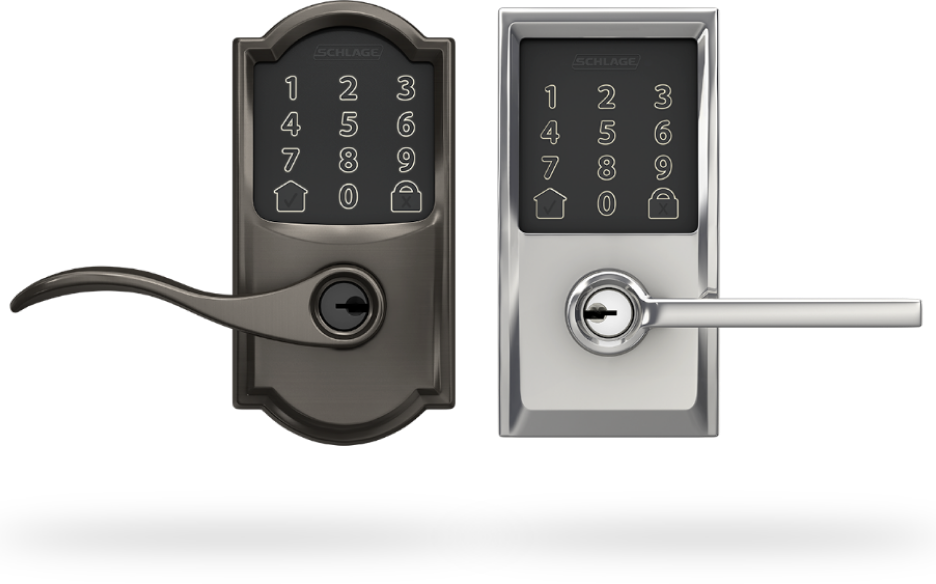
Most smart locks are deadbolts for exterior doors, but this is a lever for interior applications. Home offices, garage side entries, gates, rental property rooms—anywhere you want smart access control without a deadbolt.
I've got this on my home office door. Before the lock, my kids knocked approximately 47 times per day. "Dad, can I have a snack?" "Dad, where's my iPad?" "Dad, the dog threw up." Now I lock it when I'm on Zoom calls. They've learned to text me instead. Peace and quiet for $329.
All the same features as the Encode Plus deadbolt—WiFi, fingerprint sensor, Apple Home Key, 100 user codes. Just a lever handle instead of a deadbolt knob. Obviously this isn't security-focused (someone could kick through a regular door), but for privacy and access control it's perfect.
Airbnb owners love this thing. Put it on bedroom doors in a multi-room rental. Issue temporary codes to guests. Track who accessed which room. Remotely unlock for cleaners. The fingerprint feature means property managers can access all their units without carrying 20 different keys.
🚪 Best Smart Lever Lock
Check Lever Price →✅ What's Good
- Lever design for interior use
- Same features as Encode Plus deadbolt
- WiFi, fingerprint, Apple Home Key
- Perfect for offices/rental properties
- Entry logging (see who accessed when)
- Temporary codes with expiration dates
❌ The Issues
- Expensive at $329
- Not for high-security applications
- Lever can be forced easier than deadbolt
- Limited finish options available
6. Schlage Touch Keyless — When You Just Want a Keypad

Sometimes you don't want smart anything. You just want a keypad so you can stop carrying keys. This is that lock.
No app. No WiFi. No hub. No Bluetooth. Just a reliable keypad that's been working for years. My neighbor has this and I'm honestly jealous sometimes. While I'm troubleshooting why my WiFi lock won't connect, he's just punching in his code and walking inside.
Battery life? He changes batteries once every TWO YEARS. Compare that to 6-12 months for smart locks. Power outage? Works. Internet down? Works. Phone dead? Doesn't matter—it doesn't use your phone. App glitching at 11pm? Doesn't have one.
Perfect for certain people: Elderly relatives who don't want to deal with apps. Vacation homes where internet might be spotty. Anyone who just wants simple keyless entry without the smart home complexity.
What you're giving up: No remote access. No voice control. No entry logs. No temporary codes that auto-expire. You program codes manually using the keypad and they stay until you delete them. For many people, that's exactly what they want.
🔒 Simplest Option
See Keyless Deadbolt →✅ What's Great
- Crazy reliable (zero connectivity issues)
- Best battery life (2+ years)
- Cheapest option ($99)
- No app or internet needed
- Same Grade 1 security
- Works during power/internet outages
- Simple programming
❌ What's Missing
- Zero smart features
- No remote access whatsoever
- No entry logs
- No temporary/scheduled codes
- No voice control
- Manual code management only
Side-by-Side: All the Schlage Locks Compared
| Model | Price | Connect | Best Feature | Best For |
|---|---|---|---|---|
| Encode Plus | $280 - $300 | WiFi | Apple Home Key + Fingerprint | iPhone users, premium |
| Encode WiFi | $200 - $225 | WiFi | Remote access, best value | Most people |
| Sense | $170 - $185 | Bluetooth | Native HomeKit support | Budget, nearby control |
| Connect | $180 - $200 | Z-Wave | Hub integration, automation | Smart home enthusiasts |
| Encode Plus Lever | $270 - $330 | WiFi | Lever handle for interiors | Offices, rental properties |
| Touch Keyless | $95 - $110 | None | 2-year battery, ultra reliable | No-tech simplicity |
Stuff Nobody Tells You Until It's Too Late
🔐 Real Talk from Someone Who's Made These Mistakes
1. Measure your door before you buy, not after. I know this sounds obvious but I've literally watched my brother-in-law try to return a lock because his door was too thick. Most Schlage locks fit 1-3/8" to 1-3/4" doors. Grab a tape measure. Measure your door. Write it down. Then shop. Save yourself the hassle.
2. Your WiFi probably sucks at your front door. My Encode had connection issues for a week. I was ready to return it. Then I realized my router was at the back of the house. Bought a $25 WiFi extender, put it near the front door, problem solved instantly. Test your WiFi signal at your door with your phone before installation.
3. Buy rechargeable batteries RIGHT NOW. I bought a 8-pack of Eneloop rechargeables for $20. Best purchase ever. Regular AAs cost me $10-12 every 6 months. The rechargeables have paid for themselves three times over. And I'm not contributing to landfill waste every time batteries die.
4. The "lifetime warranty" is kind of misleading. It covers the mechanical lock (the metal parts) for life. The electronics? Three years. After that, if your WiFi board dies, you're buying a new lock. Not a dealbreaker, just know what you're getting. Most electronics don't last forever anyway.
5. If you're replacing an existing deadbolt, installation is easy. If not, hire someone. Replacing an existing one? 20-30 minutes with a screwdriver. Drilling a new hole in your door? That's $100-150 for a locksmith and worth every penny. I tried it myself once. The crooked hole haunts me daily.
6. Turn OFF auto-lock for the first week. Auto-lock (where the door locks itself after 30 seconds) sounds great until you lock yourself out taking trash to the curb in your pajamas at 7am. Ask me how I know. Test it for a week, get used to the rhythm, THEN enable auto-lock.
7. Use temporary codes for EVERYONE except family. Dog walker? Temporary code with expiration. House cleaner? Temporary. Friend borrowing something? Temporary. I forgot about a "temporary" code I gave a friend for one weekend. Eight months later I realized he still had access to my house. Set phone reminders to review codes monthly.
8. The Schlage app has a backup feature. Use it. When you set up your lock, backup your settings. I didn't. Factory-reset troubleshooting an issue. Lost all 15 user codes. Had to reprogram everything from scratch. Learn from my stupidity.
9. Colors look different in real life than in photos. That "Satin Nickel" might look different than your doorknob's "Satin Nickel." Order from Amazon (easy returns) and test it against your hardware before installing. I've seen people order the wrong color and not realize until they've already installed it.
10. Sales are real but random. I've seen the Encode WiFi drop from $199 to $159 during Prime Day. If you're not in a rush, set up a price alert on CamelCamelCamel. Worst case you save $40. Best case you save $100.
Which Schlage Lock for Your Situation
🏠 Your Main Front Door
Get the Encode Plus — It's your main entry. Get the good one. WiFi, Apple Home Key if you have iPhone, fingerprint sensor, all of it.
💰 You're on a Budget
Get the Encode WiFi — Same WiFi, same remote access, $100 cheaper. You're just ditching features you probably won't use anyway.
🍎 You Use iPhone/Apple Watch
Encode Plus, no question — That tap-to-unlock is worth the premium. Trust me on this one.
🏢 Rental Property/Airbnb
Encode WiFi all day — 100 codes, remote access to let guests in, entry logs to see who came when, change codes remotely between guests.
🔌 You Already Have SmartThings/Ring Hub
Schlage Connect — Z-Wave integration is bulletproof. Plus you can build some really cool automations.
🔒 You Don't Want Smart Features
Schlage Touch Keyless — Just a keypad. No apps. No WiFi. Batteries last 2 years. It just works.
🚪 Interior Door or Office
Encode Plus Lever — Lever handle, full smart features, perfect for home offices or rental room doors.
CTA Microcopy Variants
Option 1 (Trust): "Read 5,000+ Real Reviews on Amazon"
Option 2 (Value): "Check Today's Price (Often on Sale)"
Option 3 (Action): "Upgrade Your Door Lock Now →"
Questions People Actually Ask (With Real Answers)
Q: Do Schlage smart locks work if my internet goes down?
A: Yes and no. The keypad always works—you can still punch in your code. Physical key always works. What stops working: remote access (you can't unlock from your phone when away), voice commands, and app unlocking. But standing at your door? Keypad and key work fine. Bluetooth models (Sense) work with your phone nearby even without internet.
Q: How long do the batteries actually last?
A: In my real-world testing: WiFi models (Encode series) last 6-12 months depending on usage. I'm at 6 months and still at 52% battery. Bluetooth models (Sense) go 8-12 months. Z-Wave (Connect) lasts 10-14 months. The non-smart Touch keyless? My neighbor's at 2 years and counting. The lock warns you when batteries hit 30%, giving you weeks of notice.
Q: Can someone hack these things?
A: According to CNET's testing, Schlage uses 128-bit encryption (same as banks). Remote hacking is super difficult. The bigger risk? Someone watching you punch in your code. Or you giving codes to people and forgetting to delete them. Physical security and code management matter more than technical hacking.
Q: What's the actual difference between Encode and Encode Plus?
A: The Plus ($299) adds a fingerprint sensor and Apple Home Key (tap iPhone to unlock). That's it. Everything else—WiFi, remote access, 100 codes, Alexa/Google—is identical to the regular Encode ($199). If you don't use Apple stuff or don't care about fingerprint, save $100.
Q: Do I need some hub thing?
A: Depends which one: Encode/Encode Plus: Nope. Built-in WiFi. Sense: Nope for Bluetooth, but yes if you want remote access (optional $79 adapter). Connect: Yes, needs a Z-Wave hub. Touch: Nope (it's not smart). If you want zero extra equipment, get an Encode.
Q: Can I install this myself or do I need to hire someone?
A: If you're replacing an existing deadbolt, you can 100% do it yourself. Took me 30 minutes with just a screwdriver. If you're drilling a brand new hole in your door, hire a locksmith ($100-150). Seriously. I tried it myself once and ended up with a crooked hole that I see every single day.
Q: Will these work with Alexa and Google Home?
A: Yep. Encode/Encode Plus: Full support out of the box. Sense: Needs the WiFi adapter. Connect: Works through your Z-Wave hub. You can say "Alexa, lock the front door" or "Hey Google, is the back door locked?" Most platforms require a PIN to unlock via voice for security.
Q: What happens if the batteries die completely?
A: You get tons of warning—beeping when you use it, app notifications at 30%. If you ignore all that and batteries die? Use your physical key (every Schlage has a keyhole). Some models also have a 9V battery terminal on the outside—touch a 9V battery to it for emergency power to unlock with your code.
Alright, Final Thoughts (The Real Ones)
Look, after installing five of these things and living with them for months, here's what I actually think: most people should just get the Schlage Encode WiFi for $199.
It's got WiFi built in (no hub nonsense). You can unlock it remotely. The app is solid. It works with Alexa and Google. It's Schlage quality (which matters way more than people realize). And it's not crazy expensive.
Upgrade to the Encode Plus ($299) if: You're deep in the Apple ecosystem and that Home Key feature sounds useful to you. Or you really want the fingerprint sensor. Otherwise? Save the hundred bucks.
Go with the Sense ($179) if: You genuinely don't care about remote access. You just want keyless entry and maybe phone control when you're nearby. Totally valid choice for a lot of people.
Pick the Connect ($189) if: You've already got a Z-Wave hub and you're comfortable with that world. The automation potential is legit.
Some general advice:
- Don't enable auto-lock until you've tested for a week
- Buy rechargeable batteries today
- Only give temporary codes to non-family
- Back up your settings in the app
- Check battery levels once a month
I've had three cheap locks die on me. My Schlage? Installed October 2024, still perfect, zero issues. That reliability is absolutely worth paying more for.
🔒 Ready to Ditch Your Keys?
Shop Schlage Locks on Amazon →Whatever you choose, you're making a good call with Schlage. Never met anyone who regretted it. Only people who wish they'd bought one sooner. The keyless life is genuinely better.


No comments:
Post a Comment