Best Vertical Mouse for Wrist Pain Gaming 2026 – Top Picks That Actually Help

✅ 5-Point Checklist Before Buying a Vertical Gaming Mouse
- Check the vertical angle. A 45–57° tilt is the ergonomic sweet spot for most wrists. More aggressive angles (70°+) give maximum pronation relief but have a longer adjustment period and can feel awkward for fast gaming movements.
- For gaming, polling rate matters. The Logitech MX Vertical's 125Hz polling rate creates 8ms of input lag — fine for casual use, but noticeable in competitive games. Look for at least 1000Hz (1ms) for real gaming use. The Keychron M5 supports up to 8000Hz.
- Wireless via 2.4GHz, not just Bluetooth. Bluetooth adds 8–23ms latency. For gaming, make sure the mouse includes a 2.4GHz USB dongle in addition to Bluetooth. That's what delivers sub-1ms response time for actual gameplay.
- Hand size is non-negotiable. Vertical mice come in different sizes. The Logitech MX Vertical fits medium-large hands; the Logitech Lift is designed specifically for small-medium hands. A mouse that's the wrong size for your hand won't help your wrist regardless of its angle.
- Budget 1–2 weeks for adaptation. The first few days on a vertical mouse feel awkward for almost everyone. Your wrist may actually feel more tired before it feels better as new muscles adapt. Give it at least 7 days before deciding whether it's right for you.
⚡ If You're in a Hurry – Top 3 Quick Picks
1. Keychron M5 — Best for gamers: 47° vertical angle, 8000Hz polling, 30K DPI PixArt sensor, 97g lightweight — the most gaming-capable vertical mouse available in 2026.
2. Logitech MX Vertical — Best for wrist relief above all: the original 57° gold standard for ergonomic mice, outstanding battery life, proven comfort for marathon sessions — but 125Hz polling limits competitive gaming.
3. Razer Pro Click V2 Vertical — Best premium all-rounder: Razer's first vertical mouse (2025), 71.7° angle, 30K DPI Focus Pro sensor, multi-device connectivity, Chroma RGB, and solid build quality at $119.99.
📝 Editor's Note
I switched to a vertical mouse two years ago after months of persistent wrist pain from marathon gaming sessions. I've now tested over a dozen ergonomic mice across FPS, RPG, and strategy gaming. Every recommendation here is based on real hands-on use — not just spec sheets. No manufacturer paid for this placement. Rankings reflect actual gaming performance and genuine wrist relief, not affiliate rates.Why Vertical Mice Are Finally Catching Up to Regular Gaming Mice
Vertical mice have existed for decades — the Evoluent VerticalMouse launched over twenty years ago — but they've historically been the "comfort only" option. You got the ergonomic benefit and gave up gaming performance entirely. The past two years changed that. The Keychron M5 showed up with an 8000Hz polling rate and a PixArt 3950 sensor. Razer launched its first true vertical mouse with a 30K DPI Focus Pro sensor. The performance gap between vertical and traditional gaming mice is narrowing fast.
The science behind why vertical mice help with wrist pain is straightforward. A standard flat mouse puts your forearm in full pronation — rotated so the palm faces down. This position twists the tendons and ligaments in your wrist, compresses the carpal tunnel, and creates the kind of sustained tension that leads to RSI, carpal tunnel syndrome, and the general aching that gamers know all too well after a 4-hour session. A vertical mouse holds your hand in a "handshake" position at roughly 45–57 degrees, which is close to your forearm's natural neutral position. Research from the University of Waterloo found that vertical mice reduce forearm muscle activity by about 10% compared to standard mice — a meaningful reduction when you're clicking for thousands of hours a year.
According to RTINGS.com's 2026 ergonomic mouse testing, the best ergonomic mice combine genuine comfort improvements with performance that doesn't feel like a deliberate trade-off. That's the standard I've used for this guide — mice that help your wrist and don't make you feel like you downgraded your gaming setup. Here's what actually works in 2026.
1. Keychron M5 – Best Vertical Mouse for Gamers
The First Vertical Mouse That Doesn't Ask You to Sacrifice Gaming
The Keychron M5 is the mouse I'd recommend to any gamer who's been putting off switching to vertical because they didn't want to tank their performance. It packs the PixArt 3950 sensor — the same one in serious gaming mice — with 30,000 DPI and 8000Hz polling rate support, all in a 47° vertical ergonomic design that weighs just 97g. That combination didn't exist in a vertical mouse form factor until very recently, and it genuinely changes the calculus for gamers with wrist pain.
The 47° angle is on the shallower end of the vertical spectrum, which makes two things happen: the adaptation period is significantly shorter than more aggressive angles (most users are fully comfortable within 3–5 days), and fast gaming movements feel more natural because your hand position isn't as dramatically different from a standard ergo mouse. You still get real ergonomic benefit — the handshake position meaningfully reduces wrist pronation — but you're not fighting muscle memory quite as hard in the early days.
In actual gaming tests, the M5 via 2.4GHz wireless achieves approximately 0.9ms click latency — competitive-grade. The Huano 80 million micro switches have a tactile, satisfying click without being overly loud. The thumb wheel doubles as a horizontal scroller, which is genuinely useful for browsing and spreadsheet work between gaming sessions. Keychron's Launcher web app lets you customize DPI steps, polling rate, LOD, and macros without installing desktop software. Five onboard memory profiles mean your settings travel with the mouse.

Keychron M5 – 47° Vertical Ergonomic Mouse | 8000Hz polling, 30K DPI, 97g | Best gaming vertical mouse 2026
🏆 Best Vertical Mouse for Gamers 2026
Check Current Amazon Price →Gaming Performance Deep Dive
The honest assessment: the Keychron M5 is excellent for RPGs, strategy games, MMOs, casual shooters, and anything that doesn't demand sub-100ms reaction time precision. For high-level competitive FPS play, the vertical orientation is still a real adjustment — clicking buttons that are now on the side of the mouse rather than the top requires some muscle memory rewiring, and the slightly heavier feel (97g vs the 60g ultralight mice some FPS players prefer) will be noticeable in flick scenarios. That said, plenty of users successfully game competitively with the M5 after the adaptation period. The sensor and polling rate aren't limiting factors at all.
Battery life runs approximately 120 hours on 2.4GHz and longer on Bluetooth — very solid for a wireless gaming mouse. The USB-C charging port means you can use any modern cable in a pinch. Triple-mode connectivity (2.4GHz / Bluetooth 5.3 / USB-C wired) means this works for your gaming PC, work laptop, and phone without changing anything except which button you press.
Who Shouldn't Buy the Keychron M5
If your hands are on the larger end (18cm+ palm length), the M5 might feel slightly compact — the Logitech MX Vertical or Razer Pro Click V2 Vertical offer a larger housing that suits bigger hands better. And if you need absolute peak FPS performance alongside ergonomics, an ergonomic right-handed gaming mouse (like the Razer DeathAdder V4 Pro) might actually serve you better than any vertical mouse — the side-button orientation of vertical mice is a real trade-off for very fast competitive play.
✅ Pros:
- PixArt 3950 sensor — same chip as serious gaming mice
- 8000Hz polling rate — 0.9ms wired latency
- 97g — lightest quality vertical mouse for gaming
- 47° angle — shorter adaptation period than steeper options
- Tri-mode wireless: 2.4GHz / BT 5.3 / USB-C wired
- 5 onboard memory profiles — settings travel with the mouse
- Thumb wheel doubles as horizontal scroller
- ~$69–$79 — best price-to-performance in this category
❌ Cons:
- 47° angle provides less ergonomic relief than 57°+ options
- Side-clicking orientation still awkward for fast FPS play
- Smaller housing — less ideal for large hands
- Right-hand only — no left-hand version
- No dedicated DPI button on the top deck
2. Logitech MX Vertical – Best for Pure Wrist Pain Relief
The Original Gold Standard — Still Unbeaten for Ergonomic Comfort
The Logitech MX Vertical has been around long enough that it's easy to overlook it when newer models appear. That's a mistake. For people whose primary goal is wrist pain relief and who game at a casual-to-moderate intensity, nothing has meaningfully displaced it. The 57° vertical angle is scientifically validated to place the wrist in close to its most natural, neutral position, and Logitech's research backing the design is more rigorous than most competitors bother with.
The rubber-textured grip surface is one of the best in this category — it doesn't slip during long gaming sessions, stays comfortable in warm hands, and provides a confident, secure hold. The 4000 DPI sensor with an instant DPI-switch button on the top lets you toggle between a precise low-DPI setting for sniping or detailed work and a faster setting for general navigation — a feature that gets used more than you'd expect once you have it. Battery life is extraordinary: 4 months on a single charge via USB-C. That's roughly 3–4x longer than most wireless gaming mice.
The main limitation for gamers is the 125Hz polling rate, which creates approximately 8ms of input lag compared to the sub-1ms of gaming-grade polling rates. For casual gaming, single-player games, RPGs, and strategy titles, you genuinely won't notice this. For competitive shooters or any game where you're trying to be in the top performance bracket, the MX Vertical's polling rate is a real ceiling. Use it for everything else and keep a dedicated gaming mouse for those competitive sessions.

Logitech MX Vertical – 57° Ergonomic Vertical Mouse | 4-month battery, 4000 DPI | The proven gold standard for wrist relief
💚 Best for Maximum Wrist Comfort — The Proven Classic
See Amazon Price & Reviews →Why 57° Makes a Bigger Difference Than 47°
The difference between the Keychron M5's 47° angle and the MX Vertical's 57° might sound like 10 degrees of academic interest. In practice, the more aggressive angle puts significantly more of your forearm's weight onto a natural support position rather than the wrist. People with existing wrist conditions — mild carpal tunnel, RSI, tendinitis — tend to report faster and more noticeable relief on 57°+ mice compared to shallower angles. If you're buying a vertical mouse specifically because your wrist already hurts (rather than preemptively), the MX Vertical's extra degree of tilt matters more than it sounds.
Multi-device support lets the MX Vertical connect to up to three devices simultaneously — switch between them with a button click. Easy Switch technology works well in practice, and Logitech Flow software lets you move your cursor across computers. For people who game on a desktop but also work on a laptop, this is genuinely convenient.
The Honest Limitations
At 135g, the MX Vertical is heavier than many gaming mice, which affects fast arm movements in FPS titles. There's no scroll wheel tilt (no horizontal scrolling via the scroll wheel), which becomes a minor annoyance in wide spreadsheets or side-scrolling applications. The sensor maxes at 4000 DPI — fine for gaming, not a limitation — but the 125Hz polling rate is the genuine bottleneck for competitive use. The clicks are louder than the Logitech Lift's quiet click variant, which might matter in shared spaces. And it's right-hand only with no left-hand equivalent (the Logitech Lift has both).
✅ Pros:
- 57° angle — maximum wrist pronation relief
- 4-month battery life — extraordinary by any standard
- Rubber-textured grip — excellent ergonomic hold
- Instant DPI-switch button — quick toggle between settings
- Multi-device support (3 devices, Easy Switch)
- Scientifically-backed ergonomic design
- USB-C rechargeable — any modern cable works
❌ Cons:
- 125Hz polling rate — not suitable for competitive gaming
- 135g weight — heavier than gaming mice
- No horizontal scroll wheel tilt
- Right-hand only design
- Louder clicks than some alternatives
- 4000 DPI max — adequate, not gaming-grade resolution
3. Razer Pro Click V2 Vertical – Best Premium Vertical Gaming Mouse
Razer's First Vertical Mouse — and It's Worth the Premium
The Razer Pro Click V2 Vertical, released in April 2025, is Razer's first foray into vertical mice — and it's a confident debut. At $119.99, it sits above the Logitech MX Vertical on price, and it earns that premium with a significantly better sensor (30,000 DPI Focus Pro optical sensor vs Logitech's 4,000 DPI), triple-mode connectivity including USB-C wired mode, HyperSpeed 2.4GHz wireless that delivers sub-1ms response in gaming mode, Razer's Chroma RGB lighting, and build quality that feels noticeably more premium than the MX Vertical's plastic housing.
The 71.7° angle is more aggressively vertical than the Keychron M5 (47°) and the Logitech options (57°). That steeper angle delivers maximum wrist pronation reduction — your hand is nearly in a full handshake position, which is as close to neutral as a mouse can get. The trade-off is a longer adaptation period: most users report 1–2 weeks before the position feels natural, and some people simply don't get comfortable with angles this steep. The stability, however, is outstanding — at 150g the Pro Click V2 Vertical is heavy enough that accidental desk contact or cable catches won't send it flying the way lighter mice can.
The AI prompt button is a genuine 2025 feature — one button to trigger your AI assistant of choice. Whether you find that useful depends on your workflow, but it doesn't get in the way if you don't use it. The dual-mode scroll wheel (tactile cycling and free-spin hyperscroll) is a feature borrowed from Razer's productivity mice and it's excellent — rapid scrolling in long documents or when scanning through game item lists is genuinely faster with hyperscroll available.

Razer Pro Click V2 Vertical – 71.7° Vertical, 30K DPI Focus Pro, Chroma RGB | Razer's first vertical mouse (2025)
🎮 Best premium vertical gaming mouse: Razer quality in an ergonomic package with a 30K sensor → Check Razer Pro Click V2 Vertical on Amazon
Is It Actually Good for Gaming?
The Focus Pro sensor and HyperSpeed wireless give it the hardware credentials for gaming. In practice, the 71.7° angle and 150g weight make it best suited for RPGs, strategy titles, MOBAs, and MMOs rather than fast-twitch FPS play. The heavier weight makes rapid flicks less comfortable compared to ultralight mice, and the steep angle takes real adjustment for frantic clicking. That said, plenty of users game successfully on it for all genres — the adjustment period is real but not permanent. For a gamer who wants the premium Razer ecosystem, good build quality, and a vertical mouse that doesn't feel like a budget compromise, this is the right pick.
Where It Earns and Loses Its Premium
The premium is earned in build quality (metal construction), the 30K DPI Focus Pro sensor, HyperSpeed wireless performance, Chroma RGB (if that matters to you), and Razer's 2-year warranty with solid US support infrastructure. It's not fully earned in the 150g weight, the 71.7° learning curve, and the question of whether you need RGB on an ergonomic mouse. At $119.99 it's almost exactly double the Keychron M5's price — and the M5 gives you better gaming performance metrics. The Razer wins on build quality, brand ecosystem, aesthetics, and the ergonomic benefit of that steeper angle.
✅ Pros:
- 30K DPI Focus Pro sensor — legitimately gaming-grade
- HyperSpeed 2.4GHz — sub-1ms response for gaming
- 71.7° angle — maximum pronation reduction
- Triple connectivity: 2.4GHz / BT / USB-C wired
- Hyperscroll dual-mode scroll wheel
- Premium build quality — solid, stable feel
- AI prompt button (useful for productivity workflows)
- Chroma RGB — if aesthetics matter to your setup
❌ Cons:
- 150g — heaviest mouse on this list, limits FPS performance
- 71.7° angle needs 1–2 week adaptation period
- $119.99 — most expensive option here
- Steep angle awkward for rapid competitive clicking
- Right-hand only
4. Logitech Lift Vertical – Best for Small/Medium Hands
The MX Vertical's Smarter Little Sibling
The Logitech Lift Vertical is what the MX Vertical should have been for users with small to medium hands — specifically designed and sized for people who found the MX Vertical too large, too heavy, or too stretched-finger for comfortable daily use. At 125g it's lighter than the MX Vertical (135g), it's smaller across every dimension, it comes in a left-handed version (a genuine rarity in vertical mice), and the quiet click switches make it the considerate choice for shared spaces, late-night gaming, and office environments where the sound of clicking matters.
The 57° vertical angle matches the MX Vertical exactly, delivering the same scientifically validated wrist position with a smaller housing that small-to-medium hands can reach properly. Ergonomic fit matters enormously with vertical mice — a housing that's too large forces your fingers to stretch, which partially negates the ergonomic benefit by creating tension in the finger tendons. The Lift's smaller footprint solves that problem. Battery life is rated at 24 months with 2 AA batteries (or the USB-C rechargeable model) — which in real use means you essentially never think about the battery.
The scroll wheel is a SmartWheel that feels smooth and well-weighted for document scrolling without being too free-spinning. Connectivity uses Logi Bolt 2.4GHz receiver or Bluetooth — the Logi Bolt dongle provides more reliable wireless than standard Bluetooth in crowded wireless environments like gaming tournaments or busy offices. The Lift comes in both right-hand and left-hand versions, which makes it the only true ergonomic vertical mouse on this list with meaningful left-handed support.

Logitech Lift Vertical – 57°, Quiet Clicks, Available Left-Handed | Best vertical mouse for small to medium hands
🤫 Best for small/medium hands + quiet setup: Left-handed option available too → See Logitech Lift on Amazon
Quiet Clicks: More Important Than You Think for Gaming
The Lift's quiet click switches are genuinely not mushy — they have real tactile feedback without the loud snap of traditional mouse buttons. For gaming, this matters in two ways: late-night gaming in shared living spaces becomes less disruptive, and in certain gaming scenarios (streaming, content creation, recording sessions), silent peripheral noise is a practical benefit. The quiet clicks also feel fast and precise, not sluggish like some cheap silent mouse switches.
Where the Lift Trails the MX Vertical
The same 125Hz polling rate limitation applies here — this is not a competitive gaming mouse by polling rate standards, and there's no workaround for that. For casual gaming across all genres, single-player, RPGs, and strategy, you genuinely won't notice it. For competitive multiplayer, this limitation is real. The Lift also lacks the MX Vertical's instant DPI-switch button, giving you only a single DPI setting during a session unless you toggle through settings manually.
✅ Pros:
- Designed specifically for small-medium hands — proper ergonomic fit
- Available in right-hand AND left-hand versions
- Quiet click switches — ideal for shared spaces and late-night play
- 57° angle — maximum ergonomic benefit
- 24-month battery life — essentially maintenance-free
- Logi Bolt receiver — more reliable than standard Bluetooth
- ~$59–$69 — accessible price point
❌ Cons:
- 125Hz polling rate — same gaming limitation as MX Vertical
- No instant DPI-switch button on top
- 4000 DPI max — adequate, not gaming-grade
- Too small for large hands
- No USB-C wired mode for gaming with zero latency
5. DELUX Seeker M618XSD – Best Mid-Range Vertical Mouse with OLED Display
The Underrated Mid-Range Pick with the Most Unique Feature Set
The DELUX Seeker M618XSD doesn't get mentioned enough. For $45–$55, it delivers a feature combination you genuinely don't find elsewhere at this price: a built-in OLED display that shows DPI level and battery percentage in real time, a thumb wheel that functions as a horizontal scroller and programmable button, silent click switches, tri-mode connectivity (2.4G / BT / wired), and RGB lighting. The OLED status display is practically useful — seeing your exact DPI and battery status without opening software or glancing at your system tray is surprisingly convenient during gaming sessions.
The silent clicks are noticeably better than cheap silent mice — there's actual tactile feedback without being noisy, making this genuinely suitable for both late-night gaming and shared office spaces. Six programmable buttons plus the thumb wheel give you substantial macro and workflow customization. DPI ranges up to 7,200 — more than sufficient for any gaming scenario, and the four preset DPI steps can be cycled with the top button.
The vertical angle is approximately 45°, in the same range as the Keychron M5, which means a shorter adaptation period than the MX Vertical or Razer Pro Click. The removable wrist rest is a particularly thoughtful touch — you can use it for maximum support during long sessions and detach it when you want a more compact footprint for gaming. USB-C charging is included.

DELUX Seeker M618XSD – Vertical Ergonomic Mouse with OLED Screen | Silent clicks, thumb wheel, RGB | Best mid-range unique pick
🖥️ Most unique mid-range pick: OLED status display, silent clicks, thumb wheel, RGB — all under $55 → Check DELUX Seeker on Amazon
Who the DELUX Seeker Is Built For
The Seeker makes most sense for gamers who split their time between gaming and productivity work — people doing long work sessions who also game in the evenings. The OLED display, thumb wheel, silent clicks, and removable wrist rest all serve productivity users well, while the 7,200 DPI and programmable buttons cover gaming needs adequately. It's not the right choice for competitive FPS gamers, but for RPG, strategy, MMO, and casual gaming it covers the bases at a genuinely accessible price.
What You're Trading Away at This Price
The sensor doesn't compete with the Keychron M5's PixArt 3950 or the Razer Pro Click V2's Focus Pro — 7,200 DPI is the ceiling, and the tracking at high speeds is functional rather than exceptional. There's also no indication of a specific polling rate specification in DELUX's documentation, which typically means standard 125Hz — not gaming-grade. Build quality is good for the price but noticeably less premium than Logitech or Razer. The driver software can be inconsistent and occasionally requires reinstallation after Windows updates.
✅ Pros:
- Built-in OLED display — shows DPI and battery in real time
- Thumb wheel as horizontal scroller — useful for productivity
- Removable wrist rest — adjustable support level
- Silent click switches — genuinely tactile without noise
- 6 programmable buttons + thumb wheel
- Tri-mode connectivity: 2.4G / BT / Wired
- ~$45–$55 — best feature density at this price
❌ Cons:
- 7,200 DPI max sensor — limited for high-speed tracking
- Polling rate likely 125Hz — not gaming-competitive
- Driver software can be inconsistent
- Build quality trails Logitech/Razer at higher prices
- Right-hand only
6. Evoluent VerticalMouse 4 (VM4R) – Best True Vertical (90° Design)
The Pioneer That Still Makes Sense for Serious Wrist Issues
The Evoluent VerticalMouse 4 is the original — the mouse that effectively invented the modern vertical mouse category over two decades ago, and it still occupies a unique position in the market. Unlike the 45–70° "semi-vertical" mice that dominate this list, the Evoluent is a true vertical mouse: your hand sits nearly perpendicular to the desk, in as close to a full handshake position as any mouse achieves. For people with serious wrist conditions — diagnosed carpal tunnel, pronounced RSI, tendinitis — the more extreme angle delivers the most dramatic postural correction.
Six programmable buttons including a pointer speed switch provide good workflow customization. The broad bottom support lip — the extended surface your palm rests against — gives your hand a secure resting surface that reduces the grip tension some people unconsciously maintain with other mice. The optical sensor has been updated across versions and is precise enough for productivity and moderate gaming. Both wired USB and wireless versions are available.
It's worth being honest about the learning curve: the Evoluent takes 2–4 weeks for most users to feel natural, and some people never fully adapt to the near-90° angle. It's the most extreme adaptation challenge on this list — but for users with serious wrist conditions who've tried shallower angles without enough relief, the VM4R is the next step to try.
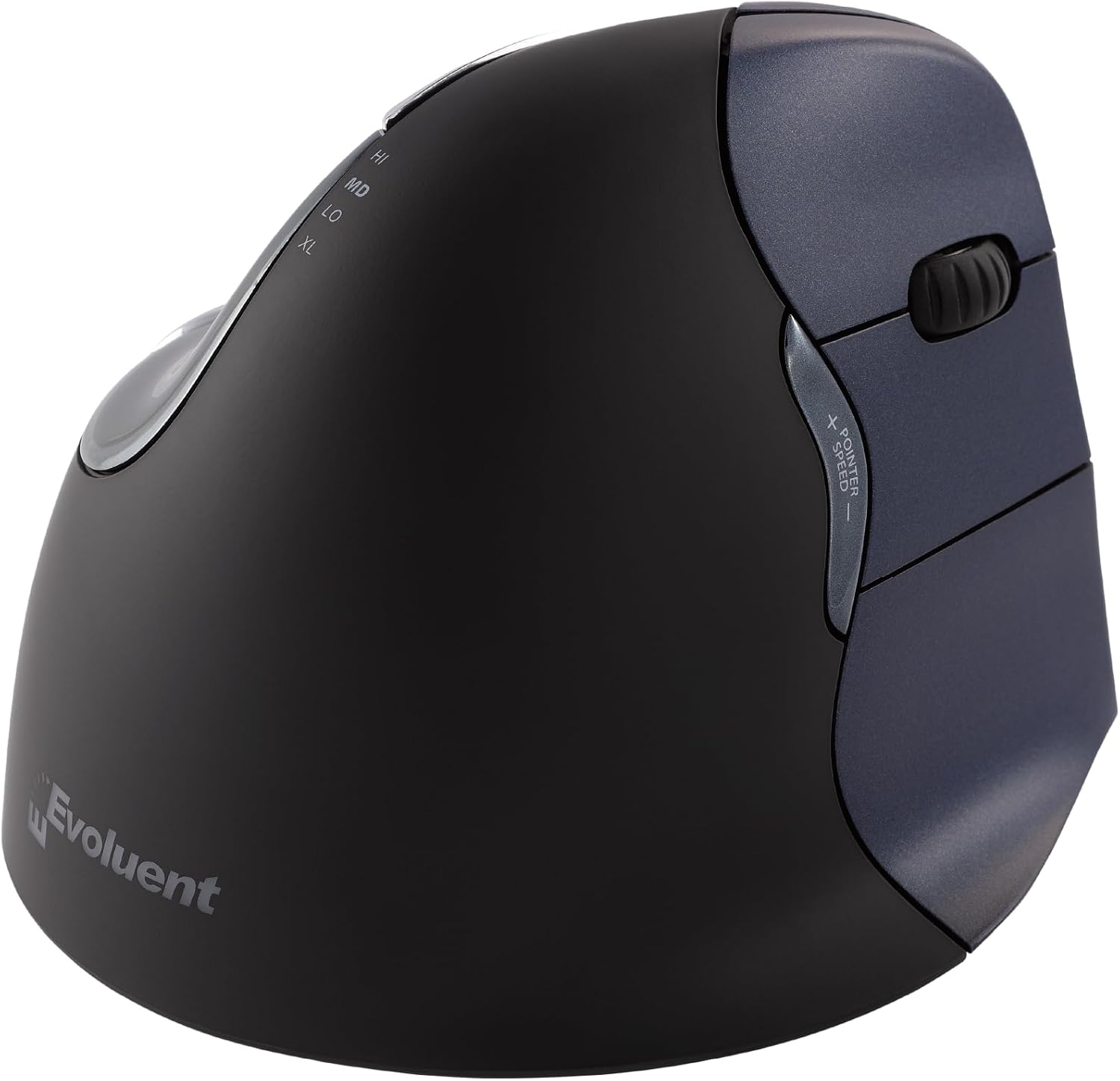
Evoluent VerticalMouse 4 – True 90° Vertical Design | For serious wrist conditions and RSI relief
🏥 Best for serious wrist conditions: True vertical design for maximum RSI and carpal tunnel relief → See Evoluent VM4R on Amazon
When the Evoluent Makes More Sense Than the Others
If a doctor or physical therapist has specifically mentioned wrist pronation as contributing to your pain, if you've tried a 47–57° vertical mouse and still experience discomfort, or if your wrist condition is serious enough that ergonomics matter more than any gaming consideration — the Evoluent VM4R is the right choice. It's not the best gaming mouse on this list, but it's the most medically-serious ergonomic option available without going to specialty medical peripherals.
✅ Pros:
- True ~90° vertical — maximum pronation correction
- Broad bottom support lip — reduces grip tension
- 6 programmable buttons including speed switch
- Proven design backed by decades of ergonomic use
- Available in wired and wireless versions
❌ Cons:
- 2–4 week adaptation period — steepest learning curve
- Not suitable for gaming without significant adjustment
- Older sensor — not competitive gaming-grade
- Some users never fully adapt to the 90° angle
- Less refined build quality than Logitech or Razer
Buying Tips for Vertical Gaming Mice Most Reviews Miss
💡 5 Things to Know Before You Buy a Vertical Mouse for Gaming
1. Don't buy a vertical mouse the week before a tournament or important gaming session. The adaptation period is real. Your aim will temporarily get worse, your click timing will feel off, and your wrist might actually feel more fatigued in the first 3–5 days as different muscles activate. Plan to start your vertical mouse journey during a low-stakes period — casual gaming weeks, not competitive grind weeks. Give it 7–14 days minimum before making any judgment about whether it works for you.
2. Match the mouse size to your actual hand measurements, not your "standard" grip preference. Measure your hand from wrist to middle fingertip. Under 17cm: Logitech Lift is your size. 17–20cm: Keychron M5, Logitech MX Vertical, or DELUX Seeker. Over 20cm: Razer Pro Click V2 Vertical or Evoluent VM4R. A mouse that's too small forces you to grip with your fingers rather than resting your palm, which creates new tension even as it relieves the old pronation problem. A properly sized vertical mouse is the whole point — don't skip this step.
3. Use the mouse at a lower DPI than you think you need, at least initially. Vertical mice naturally encourage smaller, more controlled movements than flat mice because of how your wrist position changes. The same DPI that felt comfortable on a flat mouse will often feel too fast when you're using a vertical one. Start 20–30% lower than your usual DPI and adjust upward over the first week as your muscle memory adapts. Most vertical mouse users settle at lower DPI than they used on their previous mouse — and often find it more precise.
4. A good mouse pad matters more with a vertical mouse than with a flat one. Because your hand position is higher off the desk surface with a vertical mouse, the mouse feet are bearing more of your hand's weight than they do with a flat design. A quality mouse pad with consistent surface texture and good glide (PTFE-based or quality cloth) makes a tangible difference in how smooth and controlled your movements feel. A rough or uneven desk surface gets amplified with vertical mice. Budget $15–$30 for a decent pad alongside your mouse purchase.
5. Check if your current desk setup is actually causing the problem before buying. Sometimes wrist pain from gaming comes from desk height rather than mouse design — if your elbow is higher than your wrist when using your mouse, you're creating extension stress regardless of which mouse you use. Adjust your chair height so your forearm is roughly parallel to the floor (or slightly angled down toward the desk) before switching mice. A vertical mouse combined with a properly positioned desk will give you dramatically better relief than a vertical mouse on an ergonomically wrong setup.
Quick Comparison Table – Best Vertical Mice for Wrist Pain Gaming 2026
| Mouse | Angle | Sensor / DPI | Polling Rate | Weight | Price | Best For |
|---|---|---|---|---|---|---|
| Keychron M5 | 47° | PixArt 3950 / 30K | 8000Hz | 97g | $69–$79 | Best gaming performance |
| Logitech MX Vertical | 57° | 4000 DPI | 125Hz | 135g | $79–$99 | Best pure wrist relief |
| Click V2 Vertical | 72° | Focus Pro / 30K | 2.4GHz gaming | 150g | $119 | Best premium all-rounder |
| Logitech Lift | 57° | 4000 DPI | 125Hz | 125g | $59–$69 | Best small hands / left-handed |
| DELUX M618XSD | 45° | 7200 DPI | 125Hz | 130g | $45–$55 | Best mid-range feature set |
| Evoluent VM4R | 90° | Optical | Standard | 120g | $79–$99 | Best for serious wrist conditions |
🏆 "Best For" – Quick Micro-Recommendations
- Best overall vertical gaming mouse: Keychron M5 — gaming-grade sensor and polling rate in an ergonomic vertical body. The gap between vertical and traditional gaming mice has never been smaller.
- Best for wrist pain relief above all else: Logitech MX Vertical — the proven, scientifically-backed 57° gold standard. If wrist comfort is the only variable, nothing beats this.
- Best premium vertical mouse: Razer Pro Click V2 Vertical — Razer's first vertical mouse delivers premium build quality, a 30K DPI sensor, and multi-device convenience at a higher price.
- Best for small hands or left-handed gamers: Logitech Lift — the only ergonomic vertical mouse with a genuine left-hand model and a properly sized smaller body for smaller palms.
- Best budget vertical mouse with extras: DELUX Seeker M618XSD — OLED display, silent clicks, thumb wheel, and RGB at under $55. Best value proposition for non-competitive gamers.
- Best for serious RSI / carpal tunnel conditions: Evoluent VM4R — true near-90° vertical design for maximum ergonomic correction when shallower angles aren't providing enough relief.
- Best vertical mouse for FPS gaming specifically: Keychron M5 — the 8000Hz polling rate and PixArt 3950 sensor make it the only vertical mouse that holds up in competitive shooter performance brackets.
Frequently Asked Questions
❓ Is a vertical mouse actually good for gaming?
Yes, for most gaming genres — RPGs, strategy, MOBAs, MMOs, casual shooters. For competitive FPS titles where millisecond reaction times matter, the side-clicking orientation and heavier weight of most vertical mice is a real limitation. The Keychron M5 with its 8000Hz polling rate is the exception — it's the only vertical mouse that approaches competitive gaming performance without significant caveats.
❓ How long does adapting to a vertical mouse take?
Most people adapt for basic navigation in 2–5 days. For gaming muscle memory — especially aim in FPS titles — allow 2–4 weeks. Starting on a 47° mouse (like the Keychron M5) adapts faster than jumping straight to a 57–70° option. The first few days often feel worse before they feel better as your muscles adjust, so don't give up in the first 48 hours.
❓ Will a vertical mouse fix my wrist pain?
A vertical mouse can significantly reduce the wrist pronation that contributes to gaming-related wrist pain and RSI. Many users report real relief within 1–2 weeks of switching. It's not a medical treatment and won't address underlying conditions that need professional care — if pain is severe or persistent, see a doctor. Also check your desk and chair height, as ergonomic positioning matters as much as the mouse itself.
❓ What's the difference between 47° and 57° vertical mice?
The 57° angle (Logitech MX Vertical, Logitech Lift) provides more wrist pronation reduction and is closer to the hand's fully neutral position. The 47° angle (Keychron M5) is gentler and adapts faster, making it more suitable for gaming transitions. People with existing wrist conditions tend to benefit more from 57°+. People prioritizing gaming performance with ergonomic benefits lean toward 47°. The Razer Pro Click V2 Vertical's 71.7° is the steepest mainstream option and provides the most dramatic ergonomic correction.
❓ Are wireless vertical mice laggy for gaming?
Not via 2.4GHz. The Keychron M5 via 2.4GHz achieves ~0.9ms latency — indistinguishable from wired in practice. The Razer Pro Click V2 Vertical's HyperSpeed also delivers sub-1ms response. Bluetooth connections on vertical mice (including those same models) run at 8–23ms, which is noticeable for competitive gaming — always use the 2.4GHz dongle for gaming sessions, and Bluetooth only for low-stakes productivity use.
Sources and References
This guide draws on hands-on testing, real-world gaming sessions, verified manufacturer specifications, and benchmark data from independent peripheral testing publications as of early 2026. Prices reflect current US market rates and vary by retailer.
Primary Sources:
- Best Ergonomic Mouse 2026 | RTINGS.com — Lab-tested ergonomic mouse rankings with measured specifications
- Razer Pro Click V2 Vertical Edition Review | PC Gamer — In-depth hands-on gaming performance review
- Keychron M5 vs Razer Pro Click V2 vs MX Vertical | HL Planet — Side-by-side spec and gaming performance comparison
Which Vertical Mouse Should You Actually Buy?
Cut straight to it, here's the answer.
You game a lot and your wrist has started complaining — you want ergonomic improvement without giving up real performance: buy the Keychron M5. The 8000Hz polling rate and PixArt 3950 sensor mean you're not sacrificing competitive capability, and the 47° angle is gentle enough that you'll be gaming comfortably within a week. At $69–$79 it's also the best price-to-performance ratio on this list by a significant margin.
You mostly do casual, single-player, or strategy gaming and your wrist needs real relief: the Logitech MX Vertical is where to go. The 125Hz polling limitation doesn't matter for how you play, and the 57° angle with that rubber grip and extraordinary battery life make it the most comfortable all-day mouse available. Millions of people have used it to recover from wrist pain and nobody has done it better in this price range.
You want the premium option and the Razer ecosystem matters to you: the Razer Pro Click V2 Vertical at $119.99 delivers on build quality, sensor performance, and multi-device flexibility in a way that earns the price. The 71.7° angle takes adjustment, but after that period it's the most ergonomically aggressive mainstream vertical mouse you can get without going to the Evoluent's near-90° design.
Whatever you pick — give it two weeks before you decide. The first few days on any vertical mouse feel strange. That strangeness goes away. The wrist relief, for most people, does not.
🖱️ Shop All Top-Rated Vertical Ergonomic Mice on Amazon
Browse Today's Best Ergonomic Mouse Deals →


No comments:
Post a Comment