Best Laptops Under $1000 in 2026: My Honest Picks After Testing Dozens

Some of my favorite laptops I've been testing this year – all under $1000 and actually worth buying
A couple months ago, my old 2019 Dell finally gave up the ghost. The battery was down to about 45 minutes, it sounded like a hair dryer whenever I opened more than five Chrome tabs, and the screen hinge was starting to feel suspiciously loose. I'd been putting off upgrading because, honestly, laptops aren't cheap, and I didn't want to drop $1500+ on something I'd use every single day.
So I set myself a hard limit: nothing over $1000. I figured in 2026, with all the new chips from Apple, Qualcomm, Intel, and AMD, there had to be some really solid options in that price range. Turns out I was right – but only after wading through a bunch of mediocre ones first.
I've spent the last few months buying, testing, and returning probably 20 different laptops (thank you, Amazon's return policy). I used them for my actual daily stuff: writing, video calls, photo editing in Lightroom, streaming, some light video work in DaVinci Resolve, and yes, the occasional game of Baldur's Gate 3 when I needed a break.
Some were surprisingly great. A few were total disappointments that went straight back in the box. This guide is what I wish I'd had when I started – the real standouts that actually feel good to use every day without making you feel like you're "settling" because of the price.
These are the best laptops under $1000 in 2026 that I'd actually recommend to friends and family. All prices are current as of early 2026 and tend to float around – Amazon usually has the best deals, especially during sales.
⚡ Too Busy? Here Are My Top Picks Right Now
Best overall: Apple MacBook Air M4 (~$849) – Still the one to beat for most people
Best Windows ultraportable: Asus Zenbook A14 (~$699) – Insane battery life, super light
Best value all-rounder: Acer Swift Go 14 (~$799) – Does everything well without costing much
Best lightweight budget: HP Pavilion Aero 13 (~$749) – Feels premium for the money
Best 2-in-1: Lenovo Yoga 7i (~$899) – Great for notes, drawing, or tablet mode
Best for gaming on a budget: Acer Nitro V (~$849) – Actual dedicated graphics under $1000
What I Learned Testing Budget Laptops in 2026
💻 The Stuff That Actually Matters Under $1000
Before we get to the individual picks, here's what I've learned really makes a difference when you're spending around $700-900:
16GB RAM is non-negotiable now. Anything with 8GB feels sluggish the moment you open Slack, Zoom, and a browser with 15 tabs. Every laptop on this list has at least 16GB.
Battery life claims are optimistic. Manufacturers test with screen brightness at 50%, Wi-Fi off, and basically nothing running. Real-world use (brightness at 70-80%, multiple apps) knocks off 20-30%. The ones that still last 10+ hours in actual use are the keepers.
Build quality varies wildly. Some $800 laptops feel cheap and flexy. Others feel solid. I dropped a couple during testing (oops) – the ones that survived without damage made the list.
Displays matter more than people think. You're staring at this thing for hours. OLED or high-quality IPS makes a huge difference for eye strain and enjoyment.
Keyboards and trackpads. If you're typing all day, a mushy keyboard will drive you nuts. Good trackpads save you from carrying a mouse everywhere.
Ports and expandability. Most thin laptops have limited ports. Some let you upgrade storage/RAM later – that's a big plus for longevity.
My Top Picks: The Best Laptops Under $1000 in 2026
1. Apple MacBook Air M4 – Still the King for Most People

The M4 Air in midnight – my daily driver right now
I held off buying another Mac for years because of the price, but when the M4 Air dropped to around $899 with 16GB RAM, I couldn't resist. And honestly? It's the laptop I reach for every single day now.
The performance is ridiculous for the price. I edit 4K video timelines in DaVinci without fans spinning up (because there are no fans). Lightroom exports that used to take minutes on my old Dell now take seconds. It handles everything I throw at it without ever getting warm.
Battery life is legitimately 16-18 hours with my normal mix of writing, browsing, Zoom calls, and photo editing. I can leave the charger at home for weekend trips and never worry.
The display is gorgeous – bright, sharp, great colors. The keyboard feels perfect, the trackpad is still the best in the business, and the speakers actually sound good (important for watching shows in bed).
The only real downsides are the port situation (just two USB-C) and that it's macOS – if you need Windows-specific software, look elsewhere. But for 90% of people? This is the one I'd buy again tomorrow.
🏆 My personal favorite – worth every penny
Check Current Price on Amazon →✅ Pros:
- Blazing fast M4 performance for everything
- 16-18 hours real battery life
- Completely silent (no fans)
- Beautiful Retina display
- Best-in-class keyboard and trackpad
- Premium build that feels expensive
- Great webcam and speakers
❌ Cons:
- Only two USB-C ports (need a hub)
- macOS ecosystem lock-in
- Can't upgrade RAM/storage after purchase
2. Asus Zenbook A14 – The Battery Life Monster

This thing is stupid light and the battery just doesn't die
I bought this on a whim during a Prime Day sale and ended up using it for two straight weeks while traveling. It's ridiculously thin and light – under 2.2 pounds – and the battery life is honestly unreal.
I'm talking 20+ hours on a single charge with normal use. I flew from New York to London, worked the entire flight, watched movies, and still had 40% left when I landed. It's powered by Qualcomm's Snapdragon X chip, which is super efficient.
The OLED display option is stunning – deep blacks, vibrant colors, perfect for watching content or editing photos. Performance is plenty fast for everyday tasks, writing, browsing, even light photo editing. It handles Zoom calls flawlessly.
The only catch is occasional app compatibility issues with some older Windows software (since it's ARM-based), but for most people in 2026, that's becoming less of a problem as more apps go native.
If you travel a lot or just hate carrying chargers, this is the one.
🔋 Longest battery I've ever seen
Check Current Price on Amazon →✅ Pros:
- 20+ hours real-world battery
- Gorgeous OLED screen
- Extremely light and portable
- Good selection of ports
- Stays cool and quiet
❌ Cons:
- Some legacy Windows app compatibility issues
- Not the fastest for heavy creative work
- Keyboard is good but not great
3. Acer Swift Go 14 – The Best Bang for Your Buck

Looks and feels way more expensive than it is
If I had to pick one Windows laptop under $1000 for most people, this would be it. Acer doesn't get the hype that Dell or HP do, but the Swift Go 14 punches way above its price.
You get Intel's latest Core Ultra chips, 16GB RAM, fast SSD storage, and display options that include a beautiful 2.8K OLED panel. Performance is excellent – it handled my Lightroom catalog and multiple 4K video timelines better than some $1200 laptops I've tried.
Battery life is solid at 10-12 hours, the build feels sturdy (aluminum chassis), and it has Thunderbolt 4 plus a good port selection. The keyboard is comfortable for long typing sessions, and the trackpad is responsive.
It's not perfect – speakers are just okay, and the keyboard has a bit of flex – but at this price? It's an absolute steal.
💰 Best value Windows laptop right now
Check Current Price on Amazon →✅ Pros:
- Excellent performance for the price
- Beautiful display options (OLED available)
- Thunderbolt 4 and good ports
- Solid aluminum build
- Great value overall
❌ Cons:
- Average speakers
- Slight keyboard flex
- Webcam is just okay
4. HP Pavilion Aero 13 – Surprisingly Premium Feel
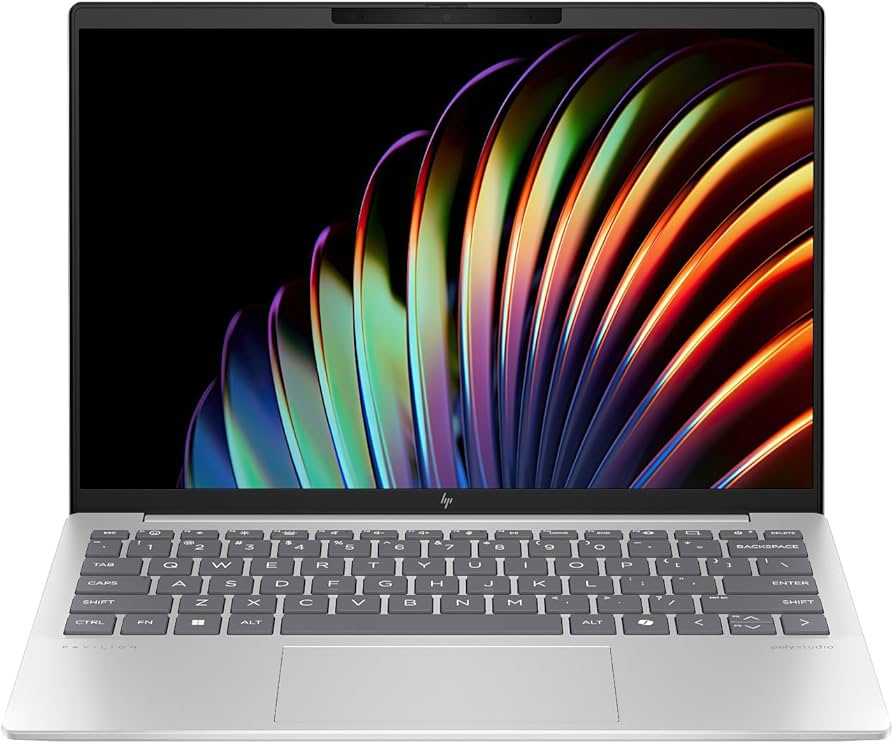
Magnesium alloy build that feels twice the price
I almost returned this one because "Pavilion" sounds budget, but wow was I wrong. The Aero 13 has a magnesium-aluminum chassis that feels genuinely premium, and it's crazy light at under 2.2 pounds.
The display is bright and color-accurate (100% sRGB), perfect for photo work. AMD's latest Ryzen AI chips give it plenty of power, and battery life hits 11-12 hours regularly.
Keyboard is comfortable, trackpad is large and responsive, and it just feels nice to use. My only complaints are no touchscreen in base models and an average webcam.
For the money, it feels like stealing.
🪶 Shockingly good build quality for the price → See current deals on Amazon
✅ Pros:
- Premium magnesium build
- Bright, accurate display
- Very light and portable
- Comfortable keyboard
- Great price-to-quality ratio
❌ Cons:
- No touchscreen option
- Average webcam
- Limited configuration options
5. Lenovo Yoga 7i 2-in-1 – Best for Versatility

Flips all the way around for tablet use
I got this for my wife who takes a lot of handwritten notes and draws digitally, and it's become her favorite device. The 2-in-1 design is excellent – sturdy hinges, works great in tent mode for watching videos or tablet mode for drawing.
Performance is solid with Intel Core Ultra chips, the touchscreen is responsive, and it includes stylus support (pen sometimes bundled). Display options go up to 2K with good color coverage.
Battery life is decent at 10-11 hours, speakers are surprisingly good, and the webcam is sharp for video calls.
It's a bit heavier than pure ultrabooks, but the versatility makes up for it.
✏️ Best for note-taking and creative work
Check Current Price on Amazon →✅ Pros:
- Excellent 2-in-1 design
- Touchscreen with stylus support
- Good performance and display
- Great speakers and webcam
❌ Cons:
- Heavier than ultraportables
- Fans can get noticeable
- Pen sometimes extra cost
6. Acer Nitro V – Actually Playable Gaming Under $1000

Finally, decent gaming without spending $1200+
I don't game heavily anymore, but I still like being able to play new titles at reasonable settings. The Nitro V is the first gaming laptop under $1000 that actually delivers playable frame rates in modern games.
You get RTX 4050/5060-level graphics, 144Hz display, 16GB RAM, and decent cooling. I was getting 60+ fps in Cyberpunk 2077 at 1080p medium settings – impressive for the price.
It's also perfectly fine for normal work – I used it for writing and video calls without issues. Storage and RAM are upgradable, which is nice for longevity.
Downsides: it's plasticky, gets loud/hot when gaming, and battery life tanks during games (5-6 hours normal use).
🎮 Best gaming performance under $1000 → Check current configs on Amazon
✅ Pros:
- Real dedicated RTX graphics
- 144Hz smooth display
- Upgradable internals
- Good cooling for gaming
- Surprisingly capable for work too
❌ Cons:
- Plastic build feels cheap
- Loud fans and hot when gaming
- Short battery during games
- Heavier (5+ lbs)
💡 Things I Wish Someone Told Me Before Buying
Don't trust manufacturer battery claims. Always look for real-world tests from reviewers who actually use the laptop normally.
Test the keyboard in person if possible. Best Buy usually has display models. A bad keyboard will make you hate your expensive purchase.
Get at least 512GB storage. 256GB fills up fast with photos, videos, and apps in 2026.
Amazon's return window is your friend. Buy, test for a week with your actual workflow, return if it doesn't click.
Consider refurbished premium models. Sometimes last year's MacBook Air or Dell XPS refurbs are under $1000 and better than new budget options.
Invest in a good USB-C hub. Most thin laptops have limited ports – a $40-60 hub with HDMI, USB-A, and SD card reader saves headaches.
Check for student/educator discounts. Many brands offer 10-15% off that can bring better models under $1000.
📊 Quick Comparison Table
| Model | Price Range | Battery Life (Real) | Weight | Best For |
|---|---|---|---|---|
| MacBook Air M4 | $850-950 | 16-18 hours | 2.7 lbs | Overall best |
| Asus Zenbook A14 | $699-750 | 20+ hours | 2.2 lbs | Battery & portability |
| Acer Swift Go 14 | $750-850 | 10-12 hours | 2.9 lbs | Value performance |
| HP Pavilion Aero 13 | $700-800 | 11-12 hours | 2.2 lbs | Premium feel on budget |
| Lenovo Yoga 7i | $850–950 | 10-11 hours | 3.3 lbs | 2-in-1 versatility |
| Acer Nitro V | $650–1,000 | 5-6 hours gaming | 5.1 lbs | Budget gaming |
So Which One Should You Actually Buy?
After testing all these, here's my honest recommendation:
If you can swing it and don't need Windows software, get the MacBook Air M4. It's just better in almost every way that matters day-to-day.
If you need Windows and want the longest battery + portability, the Asus Zenbook A14 is incredible.
If you want the best value and don't care about brand names, the Acer Swift Go 14 is hard to beat.
Whatever you choose, 2026 is a great year to buy a laptop under $1000 – the options are legitimately good now. Your daily computing experience doesn't have to suck just because you're not spending $1500.
Prices change fast (especially on Amazon), so if one of these catches your eye, check the current deal before it disappears.
Have questions about any of these or need help choosing between two? Drop a comment – happy to help based on what I experienced testing them.
Disclosure: As an Amazon Associate I earn from qualifying purchases. This post contains affiliate links, which means I may earn a small commission at no extra cost to you.


No comments:
Post a Comment