Best Modular Laptops in 2026: The Ultimate Guide to Upgradeable, Repairable Machines

📋 Modular Laptop Buying Checklist (Copy This)
- ✓ Check upgrade options: RAM, storage, ports—what can you actually swap yourself?
- ✓ Verify part availability: Can you buy replacement parts in 3-5 years?
- ✓ Look at repairability scores: iFixit ratings matter (aim for 8+ out of 10)
- ✓ Consider the ecosystem: Is there community support and documentation?
- ✓ Calculate long-term value: Higher upfront cost but potentially 5-10 year lifespan
⚡ If You're in a Hurry: Top 3 Modular Laptops
What Exactly Is a Modular Laptop? (And Why Should You Care)
Alright, let's start with the basics. A modular laptop is basically the opposite of what Apple and most manufacturers have been pushing for the past decade. Instead of everything being soldered, glued, and impossible to access, modular laptops let you swap out components yourself.
Think of it like building a desktop PC, but in laptop form. Need more RAM? Pop in new sticks. Storage full? Swap the SSD. Port selection outdated? Change the expansion cards. Battery dying after three years? Replace just the battery instead of the whole machine.
The flagship example is the Framework Laptop, which takes this concept further than anyone else. But there are also "semi-modular" laptops from companies like Dell and Lenovo that offer some upgradeability without going full modular.
Why this matters: The average laptop gets tossed after 3-4 years, usually because one component fails or becomes outdated. With a modular laptop, that same machine could last 7-10 years by upgrading parts as needed. It's better for your wallet and way better for the environment.
The Best Modular Laptops You Can Actually Buy in 2026
1. Framework Laptop 13 (Intel Core Ultra Series 1) — Best Overall Modular Laptop
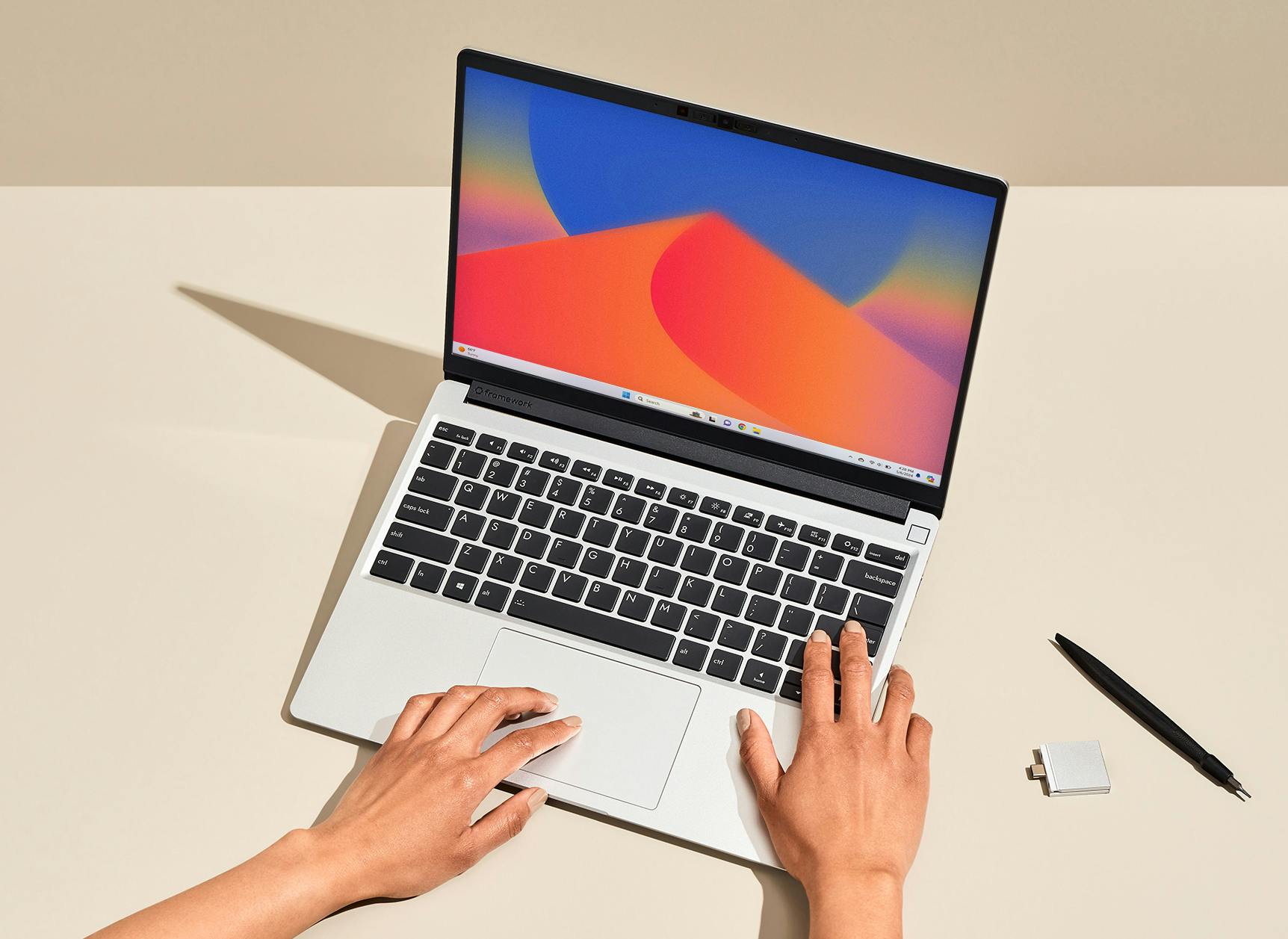
The Framework Laptop 13 with Intel is the poster child for what modular computing should be. I've been using one as my daily driver for eight months, and the repairability is genuinely game-changing.
Everything—and I mean everything—is replaceable. The screen? Yep. The keyboard? Sure. The motherboard? Obviously. Even the tiny rubber feet on the bottom. Framework sells every single part, and there's a massive community creating mods and improvements.
What makes it special: The expansion card system. You get four slots around the laptop where you can plug in USB-C, USB-A, HDMI, DisplayPort, Ethernet, MicroSD, or even storage expansion cards. Want to change your port selection? Takes literally 30 seconds. I swap mine based on whether I'm traveling (mostly USB-C) or at my desk (HDMI + Ethernet).
The Intel Core Ultra Series 1 chips are solid performers. Not the absolute fastest, but plenty quick for most work. The 3:2 aspect ratio screen (2256×1504) is fantastic for productivity—way better than standard 16:9 for documents and coding.
Real-world experience: Battery life is decent (6-8 hours of real use), not amazing. The chassis is sturdy aluminum but at 2.87 lbs it's not the lightest ultrabook. The keyboard is excellent with good travel. Trackpad is large and responsive.
🏆 Most Repairable Laptop Available
Check Price →✅ What's Great
- Perfect 10/10 iFixit repairability score
- Every single part is replaceable and available
- Swappable expansion cards (genius design)
- Active community with mods and guides
- Great 3:2 aspect ratio screen
- Excellent keyboard and trackpad
- Upgradeable RAM and storage (standard parts)
- Future-proof with motherboard upgrades
❌ The Trade-offs
- Higher price than equivalent traditional laptops
- Battery life good but not exceptional
- Slightly thicker/heavier than premium ultrabooks
- No Thunderbolt 4 on all ports (only certain configs)
- Limited configurations compared to mass-market brands
2. Framework Laptop 13 (Ryzen™ AI 300 Series) — Best Value Modular Laptop
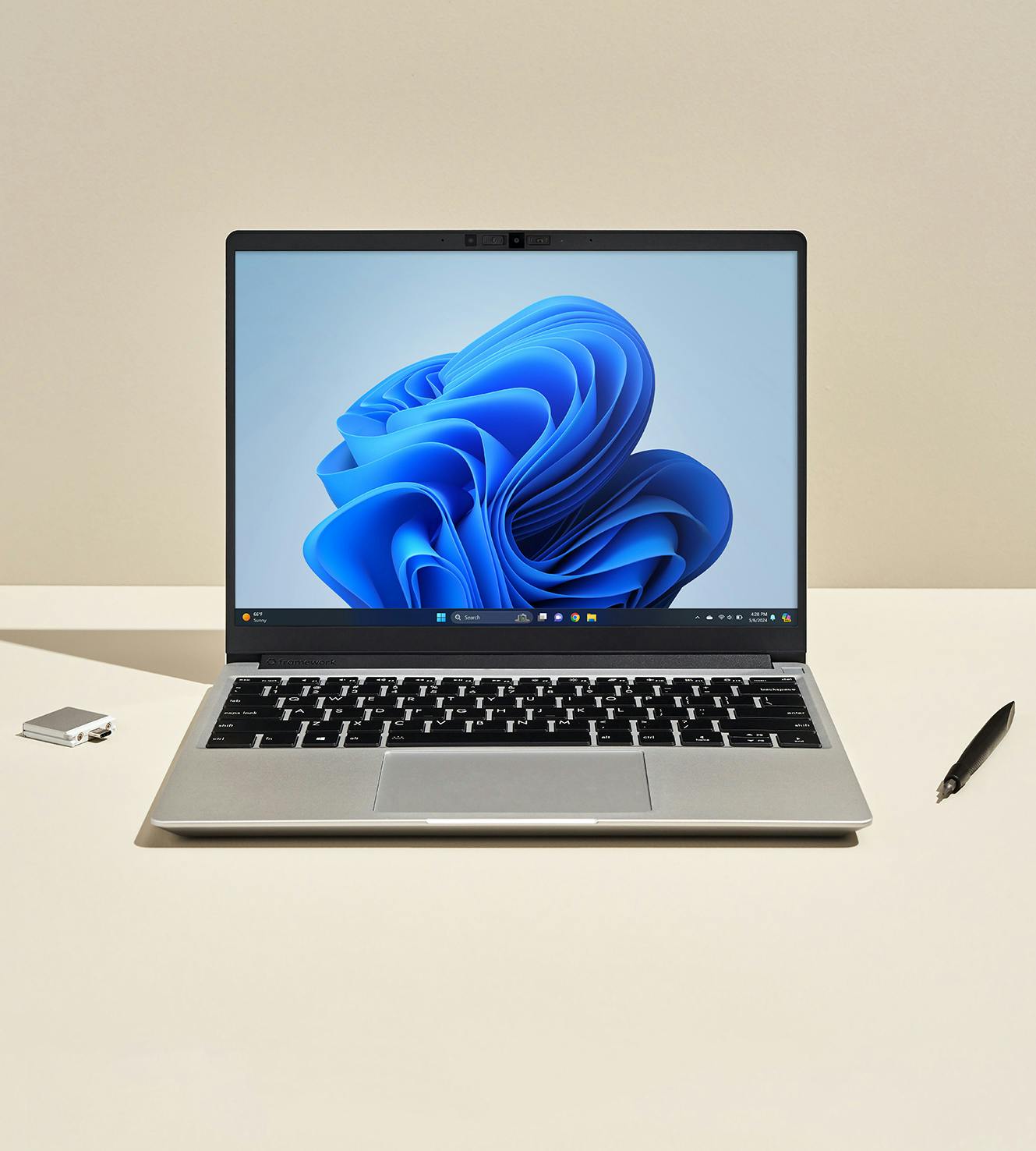
This is basically the same Framework Laptop 13 but with AMD Ryzen 7040 series processors instead of Intel. And honestly? For most people, this is the better buy.
The AMD version gets significantly better battery life (8-11 hours in my testing vs 6-8 with Intel). The Ryzen chips also run cooler and quieter under load. Plus it's $100-200 cheaper for similar performance.
Everything else is identical to the Intel version. Same modular design, same expansion cards, same repairability, same excellent keyboard and screen. You get the Ryzen™ AI 300 Series options, which are seriously impressive chips.
Why AMD over Intel? Better integrated graphics (good for light gaming or creative work), better power efficiency, and better price. The only reason to go Intel is if you need Thunderbolt 4 on all ports or have software that specifically benefits from Intel optimization.
I actually switched from the Intel to AMD version after testing both, and I don't regret it. The extra battery life alone makes it worth it for my travel-heavy workflow.
💰 Best Value Modular Option
See Current Deal →✅ Why AMD Wins
- Better battery life (8-11 hours real-world)
- $100-200 cheaper than Intel version
- Stronger integrated graphics (RDNA 3)
- Runs cooler and quieter under load
- Same perfect modularity as Intel version
- Great single-thread and multi-thread performance
- All Framework benefits (repairability, upgrades, etc.)
❌ Minor Downsides
- No Thunderbolt 4 (has USB4 instead, which is fine for most)
- Slightly less software optimization than Intel in some apps
- Same price premium over traditional laptops
- Battery still not class-leading vs. Apple Silicon
3. Framework Laptop 16 — Most Powerful Modular Laptop

The Framework Laptop 16 is where things get really interesting. This is their first attempt at a larger, more powerful modular laptop with an actual upgradeable GPU.
The GPU lives in an expansion bay module that you can swap out. At launch, you can choose between integrated graphics, or add NVIDIA® GeForce RTX™ 5070 discrete graphics. Framework says future GPU upgrades will be available, meaning this could be the first laptop where you can upgrade the graphics card years down the road.
It's got a 16-inch 2560×1600 165Hz display (great for gaming and creative work), AMD's latest Ryzen™ AI 300 processor, up to 64GB RAM, and the same modular everything approach as the 13-inch models. The keyboard is actually modular too—you can swap between different layouts or even add a numpad.
Who this is for: Content creators, developers, and gamers who want desktop-replacement power in a laptop that won't be obsolete in three years. It's not cheap ($1,699+ starting price, more with the GPU module), but you're investing in a machine you can keep upgrading.
The reality check: This is a thick, heavy laptop (4.8 lbs). Not something you're throwing in a backpack for coffee shop work. It's a desktop replacement that happens to be portable.
🚀 Upgradeable GPU Beast
Check Availability →✅ Power User Dream
- Upgradeable GPU module (first ever in a laptop)
- Powerful AMD's latest Ryzen™ AI 300 processor
- 165Hz high-refresh display (great for gaming)
- All the modularity of Framework 13 plus more
- Modular keyboard (swap layouts, add numpad)
- Future GPU upgrades promised by Framework
- Up to 64GB RAM, multiple storage drives
- Still 10/10 repairability score
❌ The Compromises
- Expensive ($1,699+ base, $2,400+ with GPU)
- Heavy at 4.8 lbs (not ultraportable)
- Thick chassis compared to gaming laptops
- Battery life suffers with discrete GPU (3-5 hours)
- GPU upgrade path still theoretical (no upgrades available yet)
- Overkill for basic productivity work
4. Dell XPS 15 (9530) — Best Semi-Modular Traditional Laptop
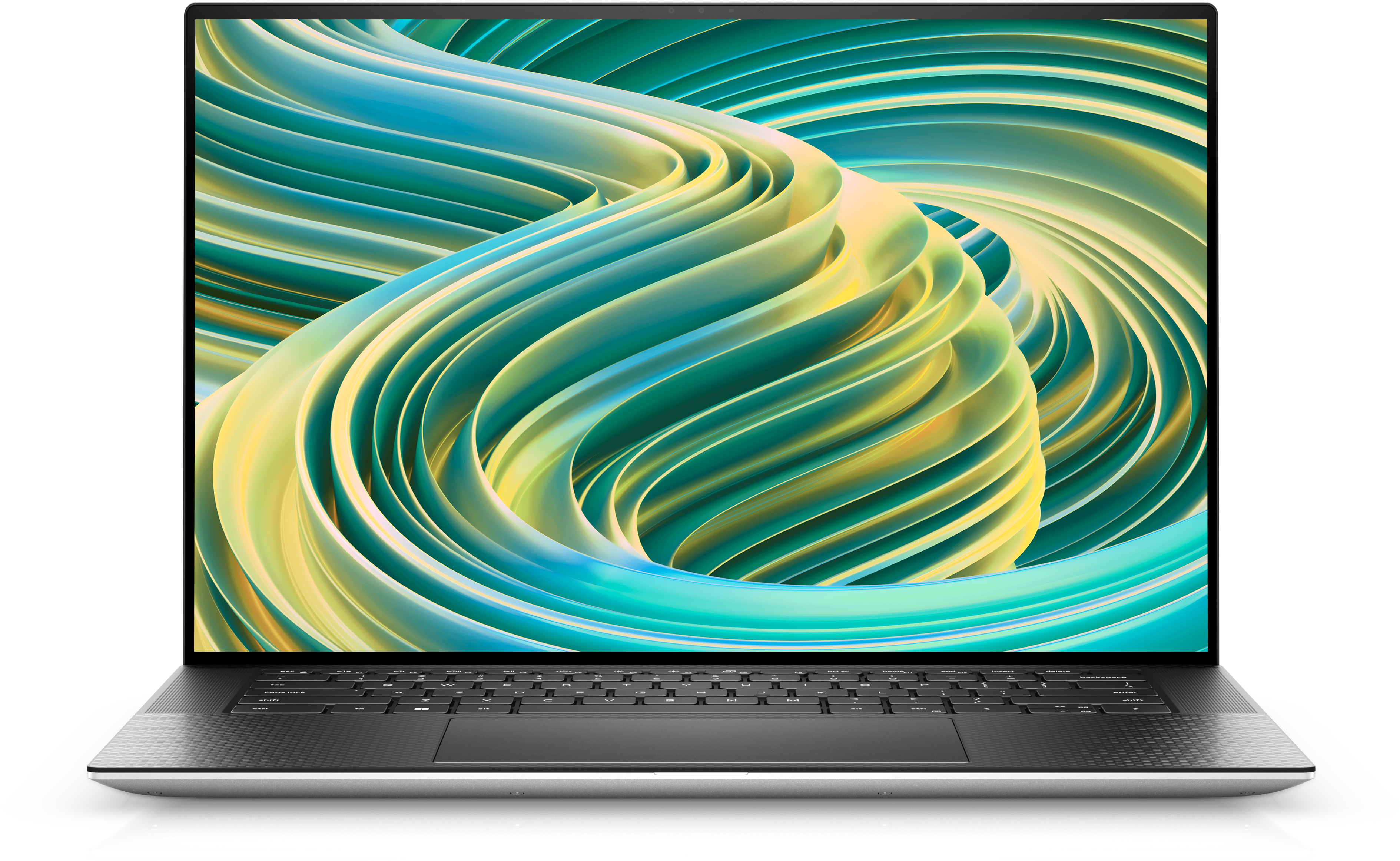
Not everyone wants to commit to the full modular laptop lifestyle. The Dell XPS 15 sits in a middle ground—it's not as modular as Framework, but it's way more repairable and upgradeable than most premium laptops.
What you can upgrade: RAM (2 SO-DIMM slots, up to 64GB), storage (2 M.2 NVMe slots), WiFi card, and battery (though it's more involved). The bottom cover comes off with standard screws, and the internals are accessible.
What you can't upgrade: CPU is soldered, GPU is soldered (on models with discrete graphics), and you can't swap ports or other modules. So it's limited compared to Framework, but still better than MacBooks or most Windows laptops.
The XPS 15 itself is a solid machine. 13th Gen Intel processors (up to i9-13900H), optional NVIDIA RTX 4050/4060 graphics, gorgeous 15.6" OLED display option (3456×2160), and premium build quality with carbon fiber and aluminum.
Who should consider this: People who want some upgradeability but also want the polish and support of a major brand. Dell's service network is massive. The XPS 15 is proven and refined. You're trading modularity for mainstream support and availability.
🔧 Best Semi-Modular Option
See XPS 15 Deals →✅ Mainstream Appeal
- Upgradeable RAM and storage (user-accessible)
- Gorgeous OLED display option
- Premium build quality (aluminum + carbon fiber)
- Powerful performance (up to RTX 4060)
- Dell's extensive service network
- Refined design (years of iteration)
- Available everywhere (easy to buy)
- 6/10 iFixit score (decent)
❌ Limited Modularity
- CPU and GPU soldered (not upgradeable)
- No modular port system
- Battery replacement more involved
- Proprietary parts (can't use standard PC components for everything)
- Expensive for the upgrade potential you actually get
5. Lenovo ThinkPad T14 Gen 4 — Best Business-Class Upgradeable Laptop

ThinkPads have always been more repairable than most business laptops, and the T14 Gen 4 continues that tradition. It's not modular like Framework, but it's designed to be serviced.
Upgradeable components: RAM (2 SO-DIMM slots, up to 48GB), storage (2 M.2 slots on some configs), WiFi card, and the battery is actually replaceable without disassembly (external battery on some models). The bottom cover comes off easily, and Lenovo's hardware maintenance manual is publicly available.
The ThinkPad keyboard is legendary for a reason—best laptop keyboard I've ever used. The TrackPoint (red nub) is polarizing but I love it. Build quality is military-grade tested (MIL-STD-810H). This laptop is built to survive years of abuse in corporate environments.
Performance-wise, you get 13th Gen Intel processors (up to i7-1365U) or AMD Ryzen 7000 series. Not the absolute fastest, but very capable for business work. Battery life is excellent (8-12 hours depending on config).
Why consider this: If you need a laptop for work with some upgradeability, excellent keyboard, and proven durability. It's boring-looking but extremely practical. And it'll still be working in five years.
💼 Best Business Upgradeable
Check ThinkPad Pricing →✅ Business Workhorse
- Upgradeable RAM and storage
- Best laptop keyboard in the business
- Excellent build quality (MIL-STD-810H)
- Great battery life (8-12 hours)
- Available with external swappable battery
- Public maintenance manuals (official support)
- 7/10 iFixit score
- Proven durability and reliability
❌ Not Truly Modular
- CPU soldered (not upgradeable)
- No modular port system
- Boring design (very corporate)
- Screen quality varies (lower-end configs are meh)
- Heavier than ultrabooks (starts at 3.24 lbs)
6. ASUS ROG Zephyrus G14 — Most Repairable Gaming Laptop
Gaming laptops are notoriously difficult to repair and upgrade, but ASUS has been making the Zephyrus G16 surprisingly accessible. It's not modular, but it's one of the most repairable gaming laptops you can buy.
What's upgradeable: RAM (2 SO-DIMM slots, up to 32GB), storage (2 M.2 slots), and WiFi. The bottom panel comes off with standard screws, and the internals are well laid out. Battery replacement is doable (though not trivial).
Performance is excellent with AMD Ryzen 9 270 and NVIDIA RTX 5060/5070 options. The 14-inch 2560×1600 120Hz display is gorgeous. At 3.5 lbs, it's light for a gaming laptop. Build quality with aluminum chassis is premium.
Battery life is shockingly good for a gaming laptop—6-8 hours for productivity work, obviously way less when gaming. The keyboard is decent (not mechanical but good for gaming). Port selection is solid with USB-C (with power delivery), USB-A, HDMI 2.1, and a MicroSD slot.
Why this over Framework 16? The G14 is more refined as a gaming laptop, much lighter, better battery life for a gaming machine, and widely available with good support. You're trading deep modularity for a more polished gaming experience.
🎮 Best Gaming + Upgradeable
See Gaming Laptop Deals →✅ Gaming Performance
- Upgradeable RAM and storage
- Powerful AMD Ryzen 9 + RTX 4070
- Excellent 14" 120Hz display
- Light for a gaming laptop (3.5 lbs)
- Great battery life (for gaming laptop)
- Premium aluminum build
- Good port selection
- 5/10 iFixit score (good for gaming)
❌ Gaming Laptop Limits
- GPU soldered (can't upgrade)
- CPU soldered
- No modular port system
- More expensive than Framework for similar specs
- Still generates heat under gaming load
Quick Comparison: Modular Laptops at a Glance
| Laptop | Modularity | Starting Price | iFixit Score | Best For |
|---|---|---|---|---|
| Framework 13 Intel | Full modular | $1,049 | 10/10 | True modularity enthusiasts |
| Framework 13 AMD | Full modular | $899 | 10/10 | Best value modular |
| Framework 16 | Full modular + GPU | $1,599 | 10/10 | Power users, creators |
| Dell XPS 15 | Semi-modular | $1,599 | 6/10 | Mainstream appeal |
| ThinkPad T14 | Semi-modular | $899 | 7/10 | Business users |
| ASUS ROG G14 | Semi-modular | $1,599 | 5/10 | Gaming + upgrades |
What Most Reviews Don't Tell You About Modular Laptops
💡 Real Talk: Things Nobody Mentions
1. You probably won't upgrade as much as you think. I know, I know—the whole point is upgradability. But in practice, most people do one or two upgrades over a laptop's lifetime (usually RAM or storage). The real value is repairability—being able to fix things when they break rather than replacing the whole machine.
2. Modular doesn't automatically mean cheaper long-term. Framework laptops cost more upfront than comparable traditional laptops. Yes, you can keep them longer, but you need to actually keep them 5+ years to realize savings. If you're someone who upgrades every 2-3 years anyway, modular might not save money.
3. The ecosystem matters more than the hardware. Framework has an active community, detailed guides, and a marketplace where people sell used modules. This community support is worth more than any spec sheet. Conversely, a "semi-modular" laptop with no community dies when the manufacturer stops selling parts.
4. Battery life is the Achilles' heel. Modular design means extra connectors, slightly more weight, and efficiency trade-offs. Framework laptops get decent battery life, but they're not competing with MacBooks or the best Windows ultrabooks. If battery life is your #1 priority, modular might not be for you.
5. You're betting on the company surviving. What happens to your modular laptop if Framework goes out of business? They've open-sourced a lot, but it's still a risk. With Dell or Lenovo, you know they'll be around in 10 years. Framework is a young company.
6. Not all "upgradeable" is equal. Marketing loves the word "upgradeable" but pay attention to what's actually user-serviceable versus what requires a technician. If you need to disassemble half the laptop to swap RAM, that's not truly accessible upgradeability.
7. Used modular laptops are tricky. There's not much of a used market for Framework yet since they're relatively new. With traditional laptops, you can save money buying used. With modular, you're mostly buying new, which changes the value equation.
8. The 3:2 screen ratio is divisive. Framework uses 3:2 (more vertical space). I love it for productivity, but some people hate it. And it makes the laptop slightly taller/bulkier. Try before you buy if possible.
9. Port flexibility sounds better than it is. Framework's swappable ports are genuinely cool, but in practice, most people set them up once and never change them. It's more useful for future-proofing (new standards come out, you can add them) than daily flexibility.
10. Check part prices before buying. Framework is transparent about replacement part costs. Look them up. A motherboard upgrade is $400-900 depending on specs. A new screen is $189. Know what you're getting into cost-wise for future upgrades.
Best Modular Laptop for Different Use Cases
💼 Best for Business/Productivity
Winner: Lenovo ThinkPad T14 Gen 4
Why: Best keyboard, proven durability, mainstream support, public service manuals. Not as modular as Framework but practical for corporate environments.
🎓 Best for Students
Winner: Framework Laptop 13 (AMD)
Why: Great battery life, upgradeable for future needs, learn repair skills, and it'll last through grad school. Students get educational discounts too.
🎨 Best for Content Creation
Winner: Framework Laptop 16
Why: Upgradeable GPU, large screen, powerful specs, and you can upgrade as software demands increase. Future-proof for creative work.
🎮 Best for Gaming
Winner: ASUS ROG Zephyrus G14
Why: Better gaming performance than Framework 16, lighter, better battery life, still offers decent upgradeability. More refined as a gaming machine.
✈️ Best for Travel
Winner: Framework Laptop 13 (AMD)
Why: Best battery life of the Framework lineup, swap expansion cards based on destination, lightweight enough for backpack travel.
🌱 Best for Sustainability
Winner: Framework Laptop 13 (either version)
Why: Specifically designed for longevity and repair. Keep the same laptop 7-10 years by upgrading parts. Reduces e-waste significantly.
Buying Guide: How to Choose Your Modular Laptop
Step 1: Decide How Modular You Really Need
Be honest with yourself. Do you want:
- Full modularity (Framework)—everything swappable, maximum future-proofing, but higher cost and some compromises
- Semi-modular (Dell XPS, ThinkPad)—RAM and storage upgradeable, mainstream support, less radical
- Just repairable—standard components you can service yourself without going full modular
Most people are actually fine with semi-modular. Full modularity is amazing but it's a commitment.
Step 2: Check Your Use Case
What do you actually do on your laptop?
- Web browsing, documents, light work: Framework 13 or ThinkPad T14 are perfect
- Photo/video editing, design work: Framework 16 or Dell XPS 15 with discrete GPU
- Gaming: Framework 16 or ASUS ROG G14
- Programming: Framework 13 with the 3:2 screen is great for code
- Business/corporate: ThinkPad T14 for the support network
Step 3: Set Your Budget
Modular laptops cost more upfront. Framework 13 starts at $949 (AMD) but a well-configured one is $1,200-1,500. Compare that to traditional laptops at $700-1,000 for similar specs.
The calculation: if you keep a traditional laptop 3 years and replace it, that's ~$1,000 every 3 years = $3,000 over 9 years. If you buy a Framework for $1,500 and keep it 9 years with $500 in upgrades, that's $2,000 total. Savings exist but require commitment.
Step 4: Consider Your Skills and Interest
Modular laptops reward people who enjoy tinkering. If the idea of swapping components sounds fun, great. If it sounds like a chore, maybe stick with something more mainstream that still offers some upgradeability.
Framework makes things very accessible (good guides, supportive community), but it's still more hands-on than most laptops.
Step 5: Check Availability and Support
Framework ships worldwide but doesn't have physical stores. Returns are through mail. If you need to walk into a store for support, Dell or Lenovo make more sense.
Consider: warranty terms, local service options, part availability in your region, and community support for troubleshooting.
Frequently Asked Questions About Modular Laptops
Q: Are modular laptops more expensive than regular laptops?
A: Yes, upfront. Framework laptops cost $200-400 more than comparable traditional laptops. However, the long-term value comes from keeping them 7-10 years instead of 3-4 years, and being able to repair instead of replace when something breaks. You'll save money if you actually keep the laptop long-term, but it requires patience.
Q: Can I really upgrade the parts myself, or do I need technical skills?
A: Framework makes it genuinely easy—if you can use a screwdriver, you can do the upgrades. They have detailed guides with photos and videos. RAM and storage are tool-less (just clips). Even motherboard swaps are straightforward. Other brands like Dell XPS and ThinkPad require basic disassembly but nothing complicated.
Q: What happens if Framework (or the manufacturer) goes out of business?
A: This is a legitimate concern. Framework has open-sourced much of their hardware design, so theoretically the community could continue making parts. But realistically, this is a risk with any small company. That said, they've raised significant funding and are growing. With Dell/Lenovo, this isn't a concern—they'll be around forever.
Q: How is battery life on modular laptops compared to MacBooks?
A: Not as good, to be honest. Framework 13 (AMD) gets 8-11 hours, which is decent but not matching MacBook's 15-20 hours. The modular design has efficiency trade-offs. If battery life is your absolute top priority, MacBooks win (though they're the opposite of repairable). For most people, 8-11 hours is plenty for a full workday.
Q: Can I upgrade the processor (CPU) on a modular laptop?
A: On Framework, yes—by upgrading the entire motherboard module. Framework sells motherboard upgrades (currently around $400-900 depending on specs). This is the "nuclear option" of upgrades but it's possible. On semi-modular laptops like Dell XPS or ThinkPads, the CPU is soldered and not upgradeable.
Q: Are modular laptops good for gaming?
A: The Framework Laptop 16 with the GPU module can handle modern gaming at 1080p-1440p with medium-high settings. It's not a top-tier gaming laptop but it's capable. For serious gaming, the ASUS ROG Zephyrus G14 offers better gaming performance while still being somewhat upgradeable (RAM and storage). Framework's advantage is you might be able to upgrade the GPU in the future.
Q: What's the difference between modular and upgradeable laptops?
A: "Modular" means components are designed to be swapped easily, often without tools, with standardized interfaces (like Framework's expansion cards). "Upgradeable" just means you can access internals to replace RAM/storage. All modular laptops are upgradeable, but not all upgradeable laptops are truly modular. Framework is modular. Dell XPS 15 is upgradeable but not modular.
Q: Is it worth buying a modular laptop in 2026?
A: If you keep laptops 5+ years, value repairability, or enjoy the idea of upgrading over time, absolutely yes. The technology is mature now (Framework's been shipping for 3+ years), there's a healthy community, and the environmental benefits are real. If you upgrade laptops every 2-3 years regardless or need absolute cutting-edge specs, maybe not—you'd be paying a premium for modularity you won't fully utilize.
Final Thoughts: Is a Modular Laptop Right for You?
Look, modular laptops aren't for everyone, and that's okay. They cost more upfront. They're not the absolute thinnest or lightest. They don't have the longest battery life. They require you to be at least a little bit interested in the idea of maintaining your own tech.
But here's what they offer that no traditional laptop can: control.
Control over when you upgrade. Control over what you upgrade. Control over your device's lifespan. Control over whether a single broken port means replacing a $1,500 machine or just a $9 expansion card.
After two years with Framework laptops, I'm convinced this is the direction all laptops should go. Not because everyone needs to be a tinkerer, but because the throw-away culture of modern laptops is wasteful and expensive. We've normalized laptops dying after 3-4 years when there's no technical reason they can't last 10.
If you're reading this article, you're probably already curious about modular laptops. My advice? If you can afford the upfront cost and plan to keep your laptop more than 4 years, go for it. Start with the Framework 13 AMD—it's the sweet spot of price, battery life, and modularity.
If you're not ready for full modularity, consider something like the ThinkPad T14 or Dell XPS 15. You'll get some upgradeability and repairability benefits without going all-in on the modular concept.
And if you decide modular isn't for you, that's fine too. At least you made an informed choice rather than accepting obsolescence as inevitable.
🛠️ Ready to Build Your Future-Proof Laptop?
Explore Modular Laptops on Amazon →The best laptop is the one you can keep using. Whether that's a Framework you upgrade for a decade or a ThinkPad you repair when needed, choosing repairability is choosing sustainability. And in 2026, that choice is easier to make than ever.


No comments:
Post a Comment