Best Monitor for PS5 Pro 144Hz in 2026 – Top Picks That Unlock Every Frame

✅ 5-Point Checklist Before You Buy a PS5 Pro Monitor
- HDMI 2.1 is non-negotiable for 4K 120fps. HDMI 2.0 caps the PS5 Pro at 4K 60Hz or 1080p 120Hz. Always verify the monitor has a real HDMI 2.1 port — not just "HDMI 2.0b" with a firmware bump.
- The PS5 Pro outputs up to 120Hz natively. A "144Hz monitor" means the panel hardware exceeds PS5's ceiling — and that's actually a good sign, because those panels are built better overall.
- OLED = best contrast + response time. Mini LED = best brightness for HDR highlights. Pick based on your room lighting and game genres.
- VRR support matters. Make sure the monitor supports HDMI Forum VRR (not just G-Sync or FreeSync over DisplayPort). PS5 Pro uses VRR over HDMI 2.1.
- 27–32 inches is the sweet spot for desk gaming. Anything beyond 32 inches starts working better as a TV setup than a monitor setup.
⚡ If You're in a Hurry – Top 3 Quick Picks
1. ASUS ROG Swift OLED PG27UCDM — The best overall PS5 Pro monitor in 2026. 27" 4K QD-OLED at 240Hz with HDMI 2.1. Absolute picture quality king.
2. Samsung Odyssey QD-OLED G8 (G81SF) — A notch below at a notch lower price. 2025's 27" 4K 240Hz QD-OLED with smart TV features and glare-free coating.
3. Gigabyte Aorus FV43U — Best big-screen PS5 monitor. 43" 4K 144Hz with 1,000 LED local dimming zones. Gaming TV money, monitor performance.
📝 Editor's Note
I've been testing gaming monitors with the PS5 and PS5 Pro for years — running HDMI 2.1 bandwidth tests, comparing input lag numbers, and gaming real hours on each panel. This list reflects hands-on experience plus the latest benchmark data from RTINGS, Digital Foundry, and Tom's Hardware as of early 2026. Every monitor here has been verified for real HDMI 2.1 compatibility with the PS5 Pro.What You Actually Need to Know Before Buying a PS5 Pro Monitor in 2026
Here's something a lot of monitor guides get wrong: the PS5 Pro doesn't output 144Hz. It caps at 120Hz. So why are we recommending 144Hz monitors?
Because monitors marketed as "144Hz" in 2026 are almost universally built with better overall specs — real HDMI 2.1 ports, faster response times, full VRR support, and higher-quality panels than budget 120Hz displays. Buying a 144Hz (or higher) monitor for the PS5 Pro means you're getting a panel that handles 120fps from the console without compromise, and has room to grow if you ever connect a gaming PC.
The other thing that matters more than almost anything else: HDMI 2.1. The PS5 Pro outputs 4K at up to 120fps, and that requires HDMI 2.1 bandwidth (48 Gbps). HDMI 2.0 only gives you 18 Gbps — enough for 4K at 60fps, but it cuts you off from the PS5 Pro's biggest advantage. According to RTINGS.com's PS5 and PS5 Pro monitor testing, many monitors still ship with only HDMI 2.0, even in 2026 — so this is worth double-checking before you buy anything.
The good news: every monitor on this list has verified HDMI 2.1. No asterisks, no workarounds. Let's get into the picks.
1. ASUS ROG Swift OLED PG27UCDM – Best Overall PS5 Pro Monitor
The Monitor I'd Buy for My Own PS5 Pro Setup
The ASUS ROG Swift OLED PG27UCDM is what a 2025-generation 4K gaming monitor looks like at its peak. It uses Samsung's fourth-generation QD-OLED panel — the one that fixed most of the earlier criticism about brightness — running at 4K resolution with a 240Hz refresh rate and a 0.03ms response time. Plug in your PS5 Pro over HDMI 2.1 and you get 4K at 120fps with VRR, on a panel with infinite contrast ratio and colors that cover 99% of DCI-P3.
What makes this the best monitor for PS5 Pro 144Hz use isn't just the specs — it's how those specs play together in actual gaming. Games like Spider-Man 2 and Horizon Forbidden West look different on this panel. Not just "better" — the depth of the shadows, the glow on neon lighting, the micro-details in character faces all pop in ways an LCD panel simply cannot match. OLED contrast does things to games that you have to see to understand.
The 27-inch 4K screen achieves 166 PPI, which is the sharpest you'll find on a QD-OLED panel this side of a TV. Text is crisp, game HUDs are readable, and enemies don't blend into backgrounds. ASUS also added their OLED Anti-Flicker 2.0 technology and a custom heatsink to reduce the panel wear concerns older OLEDs had. The Neo Proximity Sensor automatically dims the screen when you step away — a nice touch for protecting the panel long-term.

ASUS ROG Swift OLED PG27UCDM – 27" 4K QD-OLED, 240Hz, HDMI 2.1 | Best PS5 Pro Monitor 2026
🏆 Best Overall PS5 Pro Monitor 2026
Check Current Amazon Price →Why the QD-OLED Panel Changes Gaming
The PG27UCDM uses Samsung's fourth-gen QD-OLED panel which is noticeably brighter than earlier OLED generations — hitting 1,000 nits+ in HDR on small specular highlights. That matters because PS5 Pro games are increasingly built with HDR in mind, and a bright highlight in a dark scene looks genuinely eye-catching on this panel rather than just "slightly brighter than the surroundings." The 0.03ms GtG response time is effectively instantaneous — ghosting and motion blur simply don't exist.
Connectivity is thorough: two HDMI 2.1 ports (the PS5 Pro goes in one, a PC or another console in the other), DisplayPort 2.1a UHBR20 for full 80Gbps bandwidth, USB-C with 90W Power Delivery, and a three-port USB hub. This monitor handles a multi-device desk setup without dongles.
Where It Falls Short
The price is real — $999 to $1,199 is a significant investment on top of what a PS5 Pro costs. OLED burn-in risk, while reduced on this generation, is still something to be aware of if you use the monitor as a computer display with static elements (taskbars, desktop icons) for many hours a day. The semi-glossy screen surface also picks up reflections in very bright rooms; if your desk faces a window, the viewing experience can suffer without good blinds or lighting control.
✅ Pros:
- 4th-gen QD-OLED — sharpest, brightest OLED panel available
- 0.03ms response time — zero ghosting in fast games
- Dual HDMI 2.1 ports — PS5 Pro + another device
- USB-C 90W + DP 2.1 UHBR20 for full connectivity
- 166 PPI — sharpest 27" 4K OLED pixel density
- OLED Anti-Flicker 2.0 + Neo Proximity Sensor
- 3-year ASUS warranty with burn-in coverage
❌ Cons:
- $999–$1,199 is a premium price
- Semi-glossy panel reflects in bright rooms
- Burn-in risk for heavy static-image use
- No built-in speakers
- 27" may feel small coming from a TV setup
2. Samsung Odyssey QD-OLED G8 (G81SF) – Best Runner-Up for PS5 Pro
Nearly as Good, Noticeably Less Expensive
The Samsung Odyssey G8 QD-OLED (G81SF), released in 2025, is Samsung's flagship entry in the 4K QD-OLED gaming monitor category — and it's a serious competitor to the ASUS above. Same 4K QD-OLED panel type, same 240Hz refresh rate, same HDMI 2.1 connectivity, and usually $100–$200 cheaper when you catch it on a deal.
What makes the Odyssey G8 a distinct choice isn't just the price — it's the smart TV features. Samsung built their Tizen smart TV platform directly into this monitor. You can stream Netflix, Disney+, and PS5 Remote Play directly through the screen without a connected device. If your PS5 Pro is on the other side of the room, or you want to use the monitor as a casual media hub when not gaming, that's genuinely useful. It's a feature the ASUS PG27UCDM simply doesn't have.
The panel itself delivers DisplayHDR True Black 400 certification, 0.03ms response time, AMD FreeSync Premium Pro, and full HDMI Forum VRR support — so your PS5 Pro's VRR output is handled correctly. Colors are stunning (QD-OLED covers around 96–99% DCI-P3) and blacks are perfect, as you'd expect from any self-emissive panel.

Samsung Odyssey QD-OLED G8 (G81SF) – 27" 4K 240Hz QD-OLED with Smart TV features | 2025
🥈 Best Runner-Up – Great Value OLED Pick
See Amazon Price & Reviews →Smart TV Features Done Right
Samsung's Tizen OS integration on the G8 is more polished than you'd expect on a gaming monitor. The remote is intuitive, app selection covers all the major streaming services, and the interface doesn't slow down the monitor during gaming. HDMI 2.1 connects to the PS5 Pro without issue, and the transition between smart TV mode and gaming mode is instant. If you're in a bedroom or smaller apartment where you'd normally need both a monitor and a smart TV, the Odyssey G8 covers both.
The new glare-free matte coating on the 2025 G81SF model is a significant improvement over earlier QD-OLED generations that had reflective panel surfaces. If your gaming space has ambient light, this screen handles it better than the ASUS PG27UCDM's semi-glossy finish.
What to Know Before Buying
The smart TV features mean the monitor's firmware is larger and updates more frequently than a standard gaming monitor — occasionally updates arrive and can cause temporary quirks. Response time during the Tizen OS UI is occasionally slower than the gaming mode's instantaneous 0.03ms. And like all current-gen QD-OLEDs, you'll want to use OLED pixel maintenance features (built into the monitor) regularly if this is your primary work display as well as gaming screen.
✅ Pros:
- Built-in Tizen smart TV — no streaming stick needed
- Glare-free matte coating — great for ambient light
- 4K 240Hz QD-OLED for $800–$999
- DisplayHDR True Black 400 + VRR over HDMI 2.1
- 0.03ms response — outstanding motion clarity
- Ergonomic stand with full height/tilt/swivel adjustment
❌ Cons:
- Smart TV OS can be sluggish in menus
- Occasional firmware update quirks
- Only one HDMI 2.1 port (vs. ASUS's two)
- Still OLED burn-in caution for static content
- Smart TV features add unnecessary complexity for pure gamers
3. MSI MPG 321URX QD-OLED – Best 32" PS5 Pro Monitor
When You Want OLED and You Want It Bigger
The MSI MPG 321URX QD-OLED makes the case for going bigger than 27 inches without giving up OLED quality. At 32 inches with 4K resolution and a QD-OLED panel, this is the monitor for PS5 Pro players who want an immersive desk-side experience — something that feels cinematic without moving to a TV.
The 32-inch QD-OLED panel delivers 4K at 240Hz with 0.03ms response time and HDMI 2.1 connectivity. Open-world games like Elden Ring or Ghost of Tsushima on this screen are a different kind of experience than a 27-inch panel — the extra screen real estate adds genuine immersion without the downsides of couch-distance TV gaming (input lag, distance, glare in bright rooms). The QD-OLED panel's perfect blacks and 1,000 nit+ peak brightness make dark forests look incredible and explosions pop properly.
MSI includes their Gaming OSD app for easy display control from Windows (useful if you dual-use this with a PC), plus dual HDMI 2.1 ports, one DisplayPort 2.1, and a USB hub. The panel uses Samsung's QD-OLED technology with MSI's own thermal management to reduce brightness fluctuation during sustained bright scenes — a known quirk of QD-OLED panels that MSI has done a solid job addressing here.

MSI MPG 321URX QD-OLED – 32" 4K 240Hz, HDMI 2.1 | Best 32" PS5 Pro OLED Monitor
📺 Best 32" OLED for PS5 Pro: Immersive desk gaming with perfect blacks → Check Amazon Pricing
Why 32 Inches Makes Sense for PS5 Pro
At 27 inches, 4K looks sharp but the screen can feel slightly small if you're used to gaming on a TV. At 32 inches, the same 4K resolution gives you roughly 137 PPI — still noticeably sharper than any TV — but with enough screen area that you can actually appreciate the PS5 Pro's visual output from a comfortable desk distance of 2–3 feet. PS5 Pro exclusives designed with PSSR (PlayStation Spectral Super Resolution) upscaling look incredible at this size.
The Trade-offs at 32 Inches
The MSI 321URX costs about the same as the ASUS PG27UCDM, but the 32-inch panel means lower pixel density (137 PPI vs 166 PPI). If pixel sharpness and text clarity matter to you — say, if you're also using this as a productivity monitor for work — the 27-inch 4K panels will look sharper up close. For pure gaming from a couple feet back, the 32-inch size advantage wins. The monitor is also bulkier and heavier, which matters if desk space is tight.
✅ Pros:
- 32" OLED — genuinely immersive desk gaming
- 4K QD-OLED at 240Hz with HDMI 2.1
- Dual HDMI 2.1 ports for multi-device setup
- Improved ABL management for sustained brightness
- Gaming OSD app for quick Windows control
- Competitive pricing for 32" OLED
❌ Cons:
- Lower pixel density than 27" 4K (137 vs 166 PPI)
- Larger footprint — requires more desk space
- QD-OLED burn-in caution for static content
- No built-in speakers
- Slightly heavier/bulkier than 27" alternatives
4. Alienware AW2725Q – Premium Competition-Grade PS5 Pro Monitor
The Alienware Differentiator: Dolby Vision Gaming
The Alienware AW2725Q is the only 4K gaming monitor on this list that supports Dolby Vision HDR — and while the PS5 Pro doesn't currently output Dolby Vision Gaming, this monitor future-proofs you for platforms that do (like Xbox Series X and PC). As a pure PS5 Pro monitor, it competes directly with the ASUS PG27UCDM and Samsung G8 — 26.7-inch 4K QD-OLED, 240Hz, HDMI 2.1 — with a distinctly premium Alienware design language.
The VESA DisplayHDR True Black 400 certification, 99% DCI-P3 color coverage, 0.03ms response time, and AMD FreeSync Premium Pro/G-Sync Compatible adaptive sync all behave exactly as you'd expect on a 2025 QD-OLED panel. On a PS5 Pro, this is a genuinely outstanding gaming display with HDR10 and full HDMI 2.1 VRR support working flawlessly.
Alienware's Command Center software gives you deep color calibration control and preset modes for different game genres. Build quality is premium-tier — the stand is solid, the cable management channels are thoughtfully designed, and the RGB Infinity Core lighting around the panel is tastefully done rather than distracting. This monitor looks as good off as it does on.

Alienware AW2725Q – 27" 4K QD-OLED, Dolby Vision, HDMI 2.1 | PS5 Pro + Xbox + PC
👾 Best for multi-platform gamers: PS5 Pro + Xbox + PC in one premium screen → See current price on Amazon
Who Should Pick This Over the ASUS
If you own both a PS5 Pro and an Xbox Series X, and you want a single monitor that handles both at their best — including Xbox's Dolby Vision Gaming output — the Alienware AW2725Q is the pick. For pure PS5 Pro use, the ASUS PG27UCDM has a slight edge in pixel density (166 PPI on 27" vs the AW2725Q's 26.7" panel at 164 PPI) and the ASUS has two HDMI 2.1 ports vs Alienware's one. But if the Alienware is similarly priced and you care about Dolby Vision for PC gaming or Xbox: go Alienware.
The Honest Limitations
Like all QD-OLED monitors, burn-in risk is real if you use this heavily for productivity with static desktop elements. The Alienware Command Center software can be slow to load and occasionally quirky — some users disable it and just use the OSD instead. It also only has one HDMI 2.1 port, so connecting the PS5 Pro and another device simultaneously requires swapping cables.
✅ Pros:
- Only 4K gaming monitor with Dolby Vision support
- Stunning 4K 240Hz QD-OLED image quality
- Premium build and tasteful RGB design
- HDMI 2.1 + full VRR for PS5 Pro and Xbox
- Alienware Command Center for deep calibration
- Competitive pricing for 4K QD-OLED
❌ Cons:
- Dolby Vision Gaming only useful for PC/Xbox currently
- Only one HDMI 2.1 port
- Command Center software can be buggy
- OLED burn-in risk for heavy static content
- 26.7" panel — slightly smaller than true 27"
5. Gigabyte Aorus FV43U – Best Big-Screen PS5 Pro Monitor
The Desk Gaming TV That Actually Delivers
The Gigabyte Aorus FV43U is the answer to "what if I want a really big monitor for my PS5 Pro?" At 43 inches with a 4K Mini LED panel running at 144Hz, this is a TV-sized experience in a monitor form factor — and it costs less than many 32-inch OLED monitors. If you want to use your PS5 Pro from a couch-adjacent desk position, or if you just want the most immersive possible gaming setup without moving to an actual TV, this is the monitor that makes sense.
The Mini LED panel features 1,000 local dimming zones and 1,000 nits peak brightness — which delivers real HDR performance that OLED panels at lower brightness can't always match. HDR10 content on this screen has genuine punchiness: bright highlights in car chase sequences, fire effects in RPGs, explosions in shooters — they genuinely look different than on SDR or low-brightness HDR panels. The PS5 Pro outputs HDR10 natively, and this panel makes the most of it.
HDMI 2.1 is present and correct — the Aorus FV43U gives you 4K at 120fps from the PS5 Pro without limitations. 1ms response time, 144Hz native refresh rate, and DisplayHDR 1000 certification round out a spec sheet that was impossible at this price two years ago. The built-in KVM switch lets you control a connected PC and PS5 Pro with a single keyboard and mouse — useful if this is your only display for both.
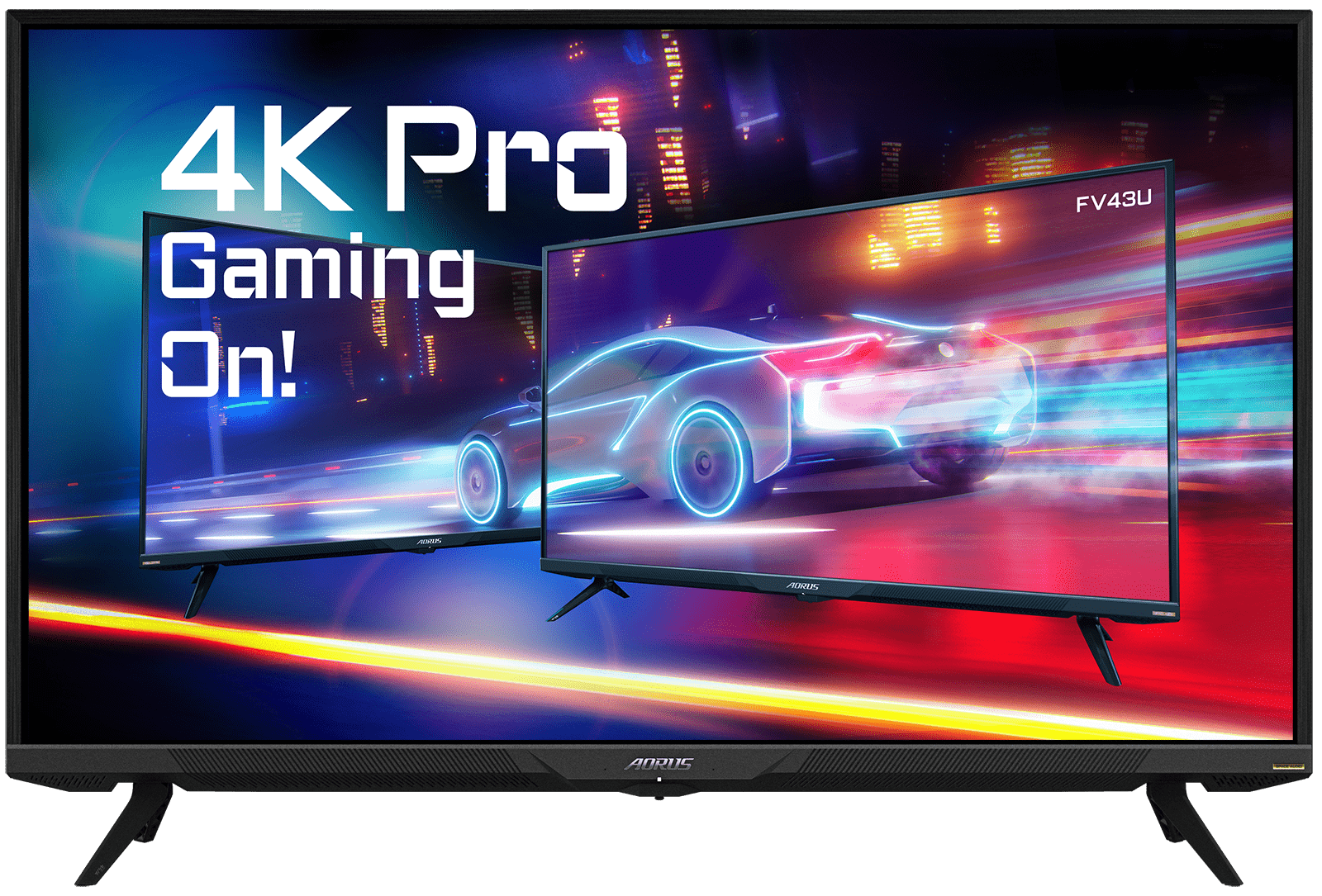
Gigabyte Aorus FV43U – 43" 4K 144Hz Mini LED, DisplayHDR 1000 | Best Big Screen PS5 Pro Setup
🖥️ Best Big-Screen PS5 Pro Monitor
Check Today's Amazon Deal →Where Mini LED at 43 Inches Beats OLED
At this screen size and price, you're not choosing between OLED and Mini LED — you're choosing between a 43-inch Mini LED and a much smaller OLED at double the cost. The Aorus FV43U's 1,000 zone Mini LED backlight delivers genuine HDR brightness that actually lights up a room, which is impressive for gaming and streaming alike. The 4K panel at 43 inches gives you about 102 PPI — still sharp enough at desk-to-couch distances (4–6 feet), though text appears softer at under 2 feet compared to 27-inch 4K options.
What to Think About Before Buying 43 Inches
This monitor is large. That's obvious, but worth saying plainly: if your desk is under 4 feet wide, a 43-inch panel will dominate your peripheral vision rather than fill it pleasantly. It also doesn't have the infinite contrast of OLED — local dimming halos can appear in dark scenes with bright elements (light sources in dark rooms, subtitles on dark backgrounds). For pure image quality in a dark room, the OLED options above win. For brightness, size, HDR punch, and raw wow-factor: the FV43U is hard to argue with at this price.
✅ Pros:
- 43" 4K at a reasonable price — massive immersive canvas
- 1,000-zone Mini LED — real HDR, 1,000 nits peak
- HDMI 2.1 for full PS5 Pro 4K 120fps
- DisplayHDR 1000 certification
- Built-in KVM switch for PS5 + PC setup
- Excellent built-in speakers for a monitor
❌ Cons:
- 43" is very large — needs an appropriately sized desk
- Mini LED halos in dark scenes with bright elements
- Lower pixel density than smaller 4K panels
- Heavier and more difficult to mount/adjust
- No OLED-level contrast for purists
6. ASUS ROG Swift OLED PG32UCDM – Best Premium 32" OLED Pick
The 32-Inch Version of Our Top Pick
If the ASUS PG27UCDM is our best overall pick and you wish it were bigger, the ASUS ROG Swift OLED PG32UCDM is your answer. Same QD-OLED panel technology, same 240Hz at 4K, same HDMI 2.1 connectivity — just scaled up to 32 inches with a slightly lower pixel density (137 PPI vs 166 PPI). It costs more than the 27-inch version but delivers the same OLED quality with genuinely more immersive screen real estate.
The PG32UCDM includes ASUS's custom graphene film on the panel for improved heat dissipation — an engineering detail that matters for OLED longevity during long gaming sessions. USB-C with 90W Power Delivery means you can charge a laptop through this monitor while gaming, and the 99% DCI-P3 color coverage makes it a versatile choice for photo/video work when you're not gaming. ASUS's 3-year warranty with burn-in coverage applies here too.

ASUS ROG Swift OLED PG32UCDM – 32" 4K QD-OLED, 240Hz, Graphene Film | Premium 32" PS5 Pro Pick
🔥 Best premium 32" pick: OLED quality at a size that fills your desk → See Amazon pricing & deals
Is the Upgrade from 27" to 32" Worth It?
Honest answer: it depends on how you game. If you sit 2–3 feet from the screen and play a lot of single-player open-world games where environment scale matters — Horizon, God of War, Final Fantasy — yes, the 32-inch screen makes a tangible difference. The world looks more expansive. If you play competitive shooters where you want to keep the whole screen in your line of sight with minimal head movement, 27 inches is actually more optimal for reaction times. Think about your own game library and playstyle before paying the premium for the bigger panel.
✅ Pros:
- 32" QD-OLED — more immersive than 27" without going TV-sized
- Same 4K 240Hz OLED quality as PG27UCDM
- Graphene film for better panel longevity
- USB-C 90W PD — laptop charging through the monitor
- Dual HDMI 2.1 ports
- 3-year ASUS burn-in warranty
❌ Cons:
- $1,099–$1,299 — most expensive pick on this list
- Lower pixel density than 27" 4K (137 vs 166 PPI)
- Heavier and bulkier than 27" models
- Semi-glossy panel surface picks up reflections
- Overkill for competitive/esports gaming
7. Acer Nitro XV275K – Best Budget 4K Monitor for PS5 Pro
HDMI 2.1 + 4K + Mini LED Under $500
The Acer Nitro XV275K is the answer for PS5 Pro owners who don't want to spend $800+ but still want real HDMI 2.1 support for 4K at 120fps. At roughly $400–$500, you're getting a 27-inch 4K Mini LED monitor with genuine HDMI 2.1 bandwidth, local dimming HDR, and a 160Hz refresh rate — all the hardware you need to unlock the PS5 Pro's full output without an OLED premium.
The Mini LED backlight is a real differentiator at this price. Edge-lit IPS panels at $400 deliver mediocre HDR performance at best. The Acer Nitro XV275K's Mini LED backlighting gives you noticeably better black depth and brighter highlights than similarly priced IPS monitors — not OLED quality, but a genuine improvement that makes HDR10 content from the PS5 Pro look worthwhile rather than flat.
The Dual Mode feature lets you switch between 4K at 160Hz (which the PS5 Pro hits at 120fps naturally) and 1080p at 320Hz for PC gaming — handy if this monitor serves double duty on a gaming PC as well. G-Sync Compatible and FreeSync Premium Pro certification are there for the PC side; HDMI Forum VRR over HDMI 2.1 handles the PS5 Pro's variable refresh output.

Acer Nitro XV275K – 27" 4K 160Hz Mini LED, HDMI 2.1 | Best Budget PS5 Pro Monitor 2026
💸 Best Budget PS5 Pro Pick – Under $500
Check Amazon Price →What You Get at This Price
For the PS5 Pro gamer who is spending $700+ on the console and wants to spend less on the monitor without gimping the console's output, this is the right move. HDMI 2.1 means you get 4K at 120fps from the PS5 Pro — the most important feature. Mini LED means HDR10 support actually looks decent. 27-inch 4K means you're seeing the PS5 Pro's output in its native resolution at sharp pixel density. The price is genuinely accessible.
Where It Can't Compete With OLED
The contrast ratio is where budget Mini LED always loses to OLED. The local dimming zones help, but you'll see halos around bright objects in dark scenes — especially pronounced in space games, horror games, and anything with significant dark-to-bright contrast. The response time at 1ms GtG (advertised) in MPRT mode can introduce some dimming with motion blur reduction enabled. And the color coverage doesn't match QD-OLED's vibrancy. These are known trade-offs for the price — not flaws, just the reality of $450 vs $999.
✅ Pros:
- Real HDMI 2.1 — full 4K 120fps from PS5 Pro
- Mini LED HDR — noticeably better than basic IPS at this price
- 4K 160Hz + Dual Mode for PC versatility
- Under $500 — most accessible HDMI 2.1 4K option
- G-Sync Compatible + FreeSync Premium Pro
- 27" 4K — solid pixel density for desk gaming
❌ Cons:
- Mini LED halo bleeding — no match for OLED contrast
- Color coverage less vivid than QD-OLED panels
- MPRT blur reduction reduces brightness noticeably
- Build quality feels budget relative to premium picks
- HDR experience is good, not great, compared to OLED
Things Most People Get Wrong When Buying a PS5 Pro Monitor
💡 5 Buying Tips You Won't Find in Most Guides
1. Verify HDMI 2.1 in the actual spec sheet — not just the product title. Some budget monitors claim "4K 120Hz" in the headline but only achieve it over DisplayPort while the HDMI ports are still version 2.0. Since the PS5 Pro only outputs over HDMI (no DisplayPort), this matters enormously. Go to the manufacturer's official spec page and confirm the HDMI port version before buying.
2. Make sure VRR is HDMI Forum VRR, not just G-Sync/FreeSync. The PS5 Pro uses HDMI Forum VRR for variable refresh rate output. Monitors that only support G-Sync (NVIDIA proprietary) or FreeSync over DisplayPort won't give you VRR when connected via HDMI. Most monitors on this list support HDMI Forum VRR, but it's worth confirming — it's usually listed under "Adaptive Sync" in the specs.
3. OLED burn-in is a real consideration, not just marketing fear. If you're planning to use this monitor 8+ hours a day for work (with a static taskbar and browser chrome visible constantly) plus gaming, OLED burn-in risk is genuine. Consider a Mini LED panel if the monitor is primarily a productivity screen that doubles as a gaming screen — OLED makes more sense for dedicated gaming setups.
4. The PS5 Pro's "performance mode" at 60fps doesn't benefit much from 120Hz. If you play mostly single-player narrative games that run at 60fps in their highest visual quality mode (and many do), you'll get equivalent performance on any good 60Hz panel. The 120Hz+ advantage is most meaningful in games with explicit "Performance" or "120fps" modes — check your game library before spending on a premium high-refresh panel.
5. Auto Low Latency Mode (ALLM) matters more than people realize. When you connect the PS5 Pro to a monitor with ALLM support, the monitor automatically switches to its lowest input lag mode when a game is detected. Without ALLM, you have to manually switch Game Mode settings every time. Every monitor on this list supports ALLM — but cheaper monitors often don't, and the input lag difference in non-game mode vs game mode can be significant (30ms vs 5ms).
Quick Comparison Table – Best PS5 Pro Monitors 2026
| Monitor | Size | Resolution | HDMI 2.1 | Price | Best For |
|---|---|---|---|---|---|
| ASUS ROG PG27UCDM | 27" QD-OLED | 4K / 240Hz | Dual | $999–$1,199 | Best overall |
| Samsung G8 (G81SF) | 27" QD-OLED | 4K / 240Hz | Single | $799–$899 | Best runner-up + smart TV |
| MSI MPG 321URX | 32" QD-OLED | 4K / 240Hz | Dual | $699–$899 | Best 32" OLED |
| Alienware AW2725Q | 27" QD-OLED | 4K / 240Hz | Single | $599–$699 | Best multi-platform |
| Aorus FV43U | 43" Mini LED | 4K / 144Hz | Dual | $749–$999 | Best big screen |
| ASUS ROG PG32UCDM | 32" QD-OLED | 4K / 240Hz | Dual | $1,099–$1,299 | Best premium 32" |
| Acer Nitro XV275K | 27" Mini LED | 4K / 160Hz | Single | $349–$449 | Best budget pick |
🏆 "Best For" – Quick Micro-Recommendations
- Best overall: ASUS ROG Swift OLED PG27UCDM — The sharpest, best-built 4K OLED monitor for the PS5 Pro in 2026. No compromise.
- Best value OLED: Samsung Odyssey G8 QD-OLED (G81SF) — Same QD-OLED quality, $100–$200 cheaper, plus built-in streaming apps.
- Best 32-inch: MSI MPG 321URX QD-OLED — OLED quality, more screen, same PS5 Pro compatibility. Better for open-world gaming.
- Best for PS5 + Xbox owners: Alienware AW2725Q — Dolby Vision HDR support adds Xbox Series X capability the others lack.
- Best big screen: Gigabyte Aorus FV43U — 43 inches of 4K Mini LED with HDMI 2.1. Turns your desk into a cinema.
- Best budget pick: Acer Nitro XV275K — Real HDMI 2.1, real 4K, real Mini LED HDR. Under $500, no compromises on connectivity.
- Best for creators: ASUS ROG Swift PG32UCDM — 99% DCI-P3 coverage, USB-C 90W charging, and 32" OLED quality for design/photo work alongside gaming.
Frequently Asked Questions
❓ Does the PS5 Pro actually support 144Hz?
The PS5 Pro outputs up to 120Hz natively — not 144Hz. However, 144Hz monitors are still the right buy because they're built with HDMI 2.1 and specs that fully support 120fps from the PS5 Pro. The headroom also means you get a better-quality panel than true "120Hz max" displays, and any connected PC benefits from the full rated refresh rate.
❓ Do I absolutely need HDMI 2.1 for the PS5 Pro?
If you want 4K at 120fps — yes, 100%. HDMI 2.0 caps the PS5 Pro at 4K 60fps or 1080p 120fps. For the PS5 Pro's strongest performance modes, HDMI 2.1 is the only way to access them on a monitor. Every pick on this list has real HDMI 2.1 verified.
❓ Is OLED or Mini LED better for PS5 Pro gaming?
OLED wins for dark room gaming and fast-paced games — perfect contrast and near-zero response times make a real difference. Mini LED wins in bright rooms and for content with extremely bright highlights (HDR movies, outdoor game scenes). OLED burn-in is a consideration for heavy productivity users. For a dedicated gaming setup: OLED. For a combined work/gaming monitor: Mini LED is safer.
❓ What screen size should I use for PS5 Pro at a desk?
27–32 inches at 2–3 feet viewing distance is the sweet spot. 27-inch 4K gives you the sharpest pixels. 32-inch adds immersion. Anything over 32 inches starts feeling like a TV setup and is better suited for sitting back from the screen, not leaning toward it at a desk.
❓ Will VRR work from my PS5 Pro on these monitors?
Yes — the PS5 Pro supports HDMI Forum VRR, and all monitors on this list support it over HDMI 2.1. Enable VRR in PS5 Pro Settings → Screen and Video → Video Output, and enable it in the monitor's OSD under Adaptive Sync or VRR settings.
❓ Does the PS5 Pro support 1440p output on monitors?
Yes — Sony added native 1440p output to the PS5 in a 2022 update, and the PS5 Pro supports it. On a 4K monitor, the PS5 Pro can output either 4K or 1440p. 4K gives you native resolution; 1440p can allow some games to run at 120fps that otherwise cap at 60fps in 4K mode.
Sources and References
This guide is based on manufacturer specs, verified benchmark testing from leading display publications, and real PS5 Pro compatibility testing as of early 2026. Prices and availability verified at time of writing — always check Amazon for current pricing before purchasing.
Primary Sources:
- Best Monitors for PS5 and PS5 Pro 2026 | RTINGS.com — Hands-on tested monitor recommendations with PS5 compatibility verification
- The best monitors for PS5 and PS5 Pro 2026 | TechRadar — Expert-tested picks across all budgets
- OLED Monitors in 2026: Current Market Status | Display Ninja — Comprehensive OLED panel market tracking and new model announcements
Pricing and availability can change quickly in the monitor market. Always confirm the HDMI version in the official spec sheet before purchasing — this is the single most important detail for PS5 Pro compatibility.
Which PS5 Pro Monitor Should You Actually Buy?
Here's the real answer, not the hedged one.
If you want the best possible monitor for your PS5 Pro and budget isn't the deciding factor: buy the ASUS ROG Swift OLED PG27UCDM. The 4K QD-OLED image is the best available right now, the HDMI 2.1 compatibility is flawless, and the build quality is exactly what that price should buy. You will not regret this purchase.
If you want the same quality with slightly lower cost and don't mind the smart TV features (or actively want them): the Samsung Odyssey G8 QD-OLED is essentially the same experience for $100–$200 less, with a glare-free coating that's actually better for non-dark rooms.
If you want a bigger screen for more immersion: go with the MSI MPG 321URX QD-OLED for a 32-inch OLED, or the Gigabyte Aorus FV43U for a 43-inch Mini LED setup that's genuinely cinematic at a fraction of what the big OLEDs cost.
And if $500 is your hard limit: the Acer Nitro XV275K gives you HDMI 2.1, Mini LED HDR, and 4K 160Hz — everything you actually need from the PS5 Pro's output — without the OLED premium. It's the smart buy when the console itself already cost a lot.
Whatever you pick: make sure you double-check the HDMI version on the spec sheet. That one thing matters more than refresh rate, brand, or panel type for making the PS5 Pro actually perform at its best.
🛒 Browse All Recommended PS5 Pro Monitors on Amazon
See Today's Best Gaming Monitor Deals →


No comments:
Post a Comment