Apple Event 2026: Everything Happening Right Now (Plus What's Actually Worth Buying)

🍎 Apple Event Survival Guide (Keep This Handy)
- ✓ Expect 2-3 big events yearly — Spring (March/April for iPads), WWDC (June for software), Fall (September for iPhones)
- ✓ Watch free on Apple.com or YouTube — starts 10am Pacific / 1pm Eastern usually, no login needed
- ✓ Stuff ships fast — preorders within days, products available 1-2 weeks later typically
- ✓ Best setup for watching: decent screen (not your phone), good internet, headphones help with the production value
- ✓ Real info comes after the hype — keynote is marketing, detailed reviews and specs tell you what actually matters
⚡ Just Want the Highlights? Best Stuff from Recent Apple Events
How Apple Events Actually Work in 2026 (And When to Expect Them)
Apple's gotten into a pretty predictable rhythm with events. Three big ones per year, each with its own flavor. Here's what typically goes down and where we're at in the 2025-2026 cycle.
Spring Event (March/April) — iPad Season Usually
Spring events are the quieter cousins of the fall blockbusters. This is where refreshed iPads show up, sometimes new Macs, occasionally random accessories nobody saw coming. We're probably weeks away from one in March or April 2026 — the rumor mill is pretty loud about new iPad Air models with M3 chips, maybe an updated Apple Pencil Pro, and possibly (don't get your hopes up too much) a Mac Pro refresh that people have been begging for.
Spring also tends to be where Apple announces services stuff — new shows for Apple TV+, game announcements for Arcade, Apple News+ features that might actually matter. Less hardware spectacle, more "here's what's in our ecosystem now."
WWDC (June) — Software Central
WWDC in June is technically a developer conference but normal people watch it too because it's where Apple shows off iOS 19, iPadOS 19, macOS whatever-California-landmark-they're-using-next, watchOS 12 — all the software updates that'll ship in September. The keynote is packed with features you can't actually use until fall but are fun to geek out about anyway.
Sometimes there's surprise hardware (Mac Pro debuted here, Vision Pro got announced here), but it's mostly a software show. If you're not writing apps, you're basically watching to see what your iPhone will be able to do in six months.
Fall Event (September) — This Is The Big One
This. This is it. September means new iPhones, almost always new Apple Watches, frequently AirPods updates. The Fall 2025 event gave us iPhone 17 lineup, Apple Watch Series 10, and those surprisingly good AirPods 4. The products announced here basically fund Apple's entire holiday quarter and then some.
Fall events have maximum production value. Glossy videos. Executives demo features that look impossible. Camera samples that make you question reality. You know how this works if you've ever watched one. The hype machine goes full throttle.
📅 What's coming: Based on Apple's usual timing, Spring 2026 event should hit late March or early April. They typically announce events about a week beforehand. Check Apple's events page or follow @Apple on Twitter for official word. The rumor sites will know before Apple announces though, let's be real.
What Actually Came Out of Recent Apple Events (The Stuff You Can Buy Right Now)
Let me walk through the standout products from Fall 2025 and what we're expecting for Spring 2026. These are the things worth actually considering if you're shopping.
1. iPhone 17 Pro & Pro Max — The Camera Thing Finally Makes Sense
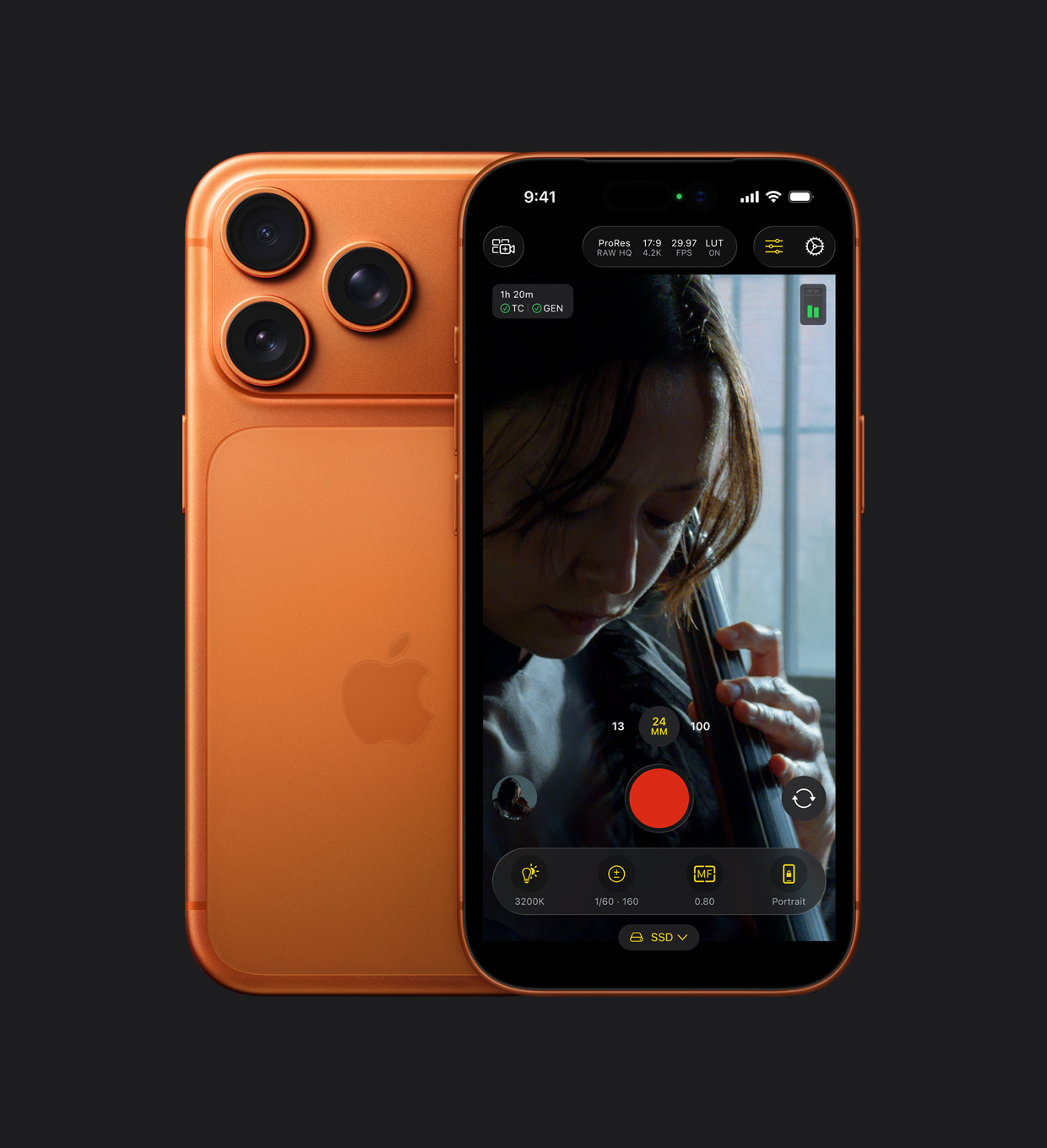
The whole iPhone 17 Pro reveal was basically "look at this camera system." Apple finally — finally — put that 8x telephoto lens on both Pro sizes instead of making it a Pro Max exclusive thing. So if you wanted the smaller Pro but also wanted the best camera, you're not compromised anymore. About time honestly.
New stuff that genuinely matters in daily use: Apple Intelligence is the game changer. Other than that the camera Control button is this pressure-sensitive physical button thing that felt gimmicky in the demos but after using it for a week it's actually pretty useful for quick camera access. The all 48MP rare cameras means your shots don't look like garbage anymore. And all those computational photography tricks keep getting better at making every photo look good without you trying.
The titanium design from last year's iPhone 16 Pro stuck around but they refined it a bit — feels slightly nicer in hand, weighs a touch less. Battery life is solid, full day easy and sometimes pushing two with lighter use. USB-C with Thunderbolt means if you shoot a ton of video the transfers are actually fast now.
Should you upgrade? From iPhone 15 Pro or older, yeah probably worth it. Got the 16 Pro? The apple intelligence and camera improvements are nice but unless photography is your main thing and you don't use AI in your day to day life, you can probably wait another year.
📱 Latest Pro iPhone
Check iPhone 17 Pro Max Price →✅ The Good Stuff
- 8x telephoto on both Pro sizes finally
- A19 Pro still stupid fast
- Apple Intelligence is useful in day to day life
- Titanium feels premium and lighter
- 48MP all camera actually takes good shots
- Easily gets through a full day on battery
- USB-C Thunderbolt for fast transfers
- ProMotion 120Hz still buttery smooth
❌ Real Talk
- Starts at $999 which is a lot of money
- Camera Control button takes getting used to
- Not a massive leap from iPhone 16 Pro
- Still no charging brick in the box (classic Apple)
- Pro Max is legitimately heavy for smaller hands
2. MacBook Pro M4 Pro (14-inch) — That Battery Life Claim Is Actually True

Apple dropped the M4 MacBook Pros in a quieter October event and they're low-key the stars of late 2025. The M4 chips (M4, M4 Pro, M4 Max — yeah they're keeping that naming scheme) are the first time since M1 that a chip upgrade feels actually noticeable in day-to-day use and not just benchmark numbers.
The 14-inch with M4 Pro is the sweet spot for most people who aren't doing super light work. Base M4 is fine for web browsing and email but if you're doing anything real (video editing, photo work, development, running VMs), spring for the M4 Pro. And that battery life thing where they claim "up to 24 hours" — I know, I know, marketing numbers are always inflated. Except this time it's actually close to real. Got through a long work day, slept with it closed, used it half the next day before needing to charge. That's wild.
New stuff worth knowing about: nano-texture display option costs extra but if you work anywhere near windows it completely eliminates glare. Thunderbolt 5 on the Pro and Max models (insane bandwidth for external drives and displays). Base config finally starts with 16GB RAM instead of 8GB (only took them forever). Space Black color shows fingerprints less badly than before.
Downsides are mostly price-related. These are not cheap machines. Base 14-inch M4 Pro starts at $1,999. But for something you'll keep for five-plus years that handles professional work without ever making a sound or getting hot, it's genuinely worth it.
💻 M4 MacBook Pro
See MacBook Pro Deals →✅ Laptop Goals
- 24 hours battery is real (tested it myself)
- M4 Pro actually feels noticeably faster
- Nano-texture display option is glare-free magic
- Starts with 24GB RAM now thank god
- Thunderbolt 5 on Pro/Max (crazy fast)
- Completely silent even pushing it hard
- Space Black hides fingerprints better
- That XDR display is still gorgeous
❌ The Price Tag Reality
- $1,799 starting hurts the wallet
- Nano-texture adds $150 more
- RAM/storage upgrades get expensive fast
- Notch is still there (doesn't bug me but some hate it)
- HDMI is 2.1 not the latest 2.1a
3. Apple Watch Series 11 — Two-Day Battery Finally Happened

Apple Watch Series 11 was the sleeper hit of Fall 2025 that didn't get enough attention. Apple somehow made it thinner than Series 11 while making the display bigger and the battery last longer. That math shouldn't work but here we are.
The display is legit bigger — not "you have to hold them next to each other to tell" bigger but "oh yeah that's more screen" bigger. Makes reading texts easier, seeing workout stats better, basically everything you do on a tiny wrist computer. And it's brighter too which matters when you're outside in sunlight.
Battery life. Finally. Two days consistently. Not "two days if you turn everything off and don't use it" — two actual days of normal use with workouts, sleep tracking, always-on display. The whole deal. You charge it every other night instead of every night. This was the main Apple Watch complaint for like eight years and they finally fixed it.
Health stuff got meaningful updates — sleep apnea detection got FDA clearance and is actually useful if you snore or have sleep concerns. Improved heart rate sensor. Temperature sensing for cycle tracking. watchOS 12 runs smooth on it without any lag.
Titanium version is lighter and tougher if you're hard on watches. Aluminum works fine for most people and costs less. GPS + Cellular makes sense if you run without your phone but adds $100 upfront plus monthly data plan costs.
⌚ Latest Apple Watch
Check Apple Watch Price →✅ About Time
- Two-day battery (actually real-world tested)
- Bigger display in thinner body somehow
- Sleep apnea detection FDA cleared
- Noticeably brighter for outdoor use
- Faster charging (80% in about 45 min)
- Titanium option weighs less
- watchOS 11 is smooth and feature-rich
- Heart rate tracking more accurate
❌ Minor Gripes
- $299 starting still feels pricey
- Not a huge jump from Series 9 honestly
- Cellular adds $100 plus monthly fees
- Some older bands don't fit quite right
- Blood oxygen still disabled (legal drama)
4. iPad Air M3 — Might Be The Tablet of 2026 (Spring Rumor)

This one's rumor territory but the leaks are pretty solid for Spring 2026. iPad Air with M3 would slot perfectly between the base iPad and the crazy expensive Pro — giving you MacBook Air level performance in the more affordable Air body.
Expected updates based on what usually leaks accurately: M3 chip (big jump from the M2 in current Air), possibly ProMotion 120Hz display (this would be huge if true), Wi-Fi 7, better front camera with Center Stage. Design should stay similar to current Air — thin bezels, Touch ID in the power button, USB-C with faster speeds.
Why this matters: iPad Air is already the best value in the lineup. An M3 Air with ProMotion would basically be an iPad Pro without the expensive extras like Face ID or the super bright display. For students, creators on a budget, or anyone who wants a capable iPad without spending over a thousand dollars, this would be the one.
Expected pricing if Apple follows their usual strategy: $599 for base storage (probably bumped to 128GB from 64GB), with 11-inch and maybe a new 12.9-inch option. If this drops Spring 2026 like rumored, it's probably the tablet to wait for.
📱 Probably Spring 2026
Check iPad Air Availability →✅ If Rumors Pan Out
- M3 chip would be massive upgrade
- ProMotion 120Hz maybe finally
- Best value iPad if priced right
- Wi-Fi 7 future-proofs it
- Thin, light, actually portable
- Works with Apple Pencil Pro
- Better front camera with Center Stage
- More base storage expected
❌ Reality Check
- Still just rumors until official
- Won't have Face ID (Touch ID only)
- Display not as bright as Pro probably
- No rear camera flash
- ProMotion might not make the cut
5. AirPods 4 with ANC — The Sweet Spot Nobody Expected

Apple quietly made the best regular AirPods they've ever done. Two versions dropped — regular and one with Active Noise Cancellation. Get the ANC version. The extra $50 is worth it.
Here's what's wild: Apple brought actual ANC to the open-ear design. Before this you needed the sealed ear-tip design of AirPods Pro to get noise cancellation. Now the regular stem AirPods (which tons of people prefer because they're more comfortable) have legitimately good ANC. Not AirPods Pro level but way better than I expected for open-ear buds.
Sound quality jumped noticeably from AirPods 3. Better bass without getting muddy, clearer vocals, wider soundstage for such small drivers. The H2 chip from AirPods Pro 2 is in these, which means better connection and smarter features like Adaptive Audio that adjusts ANC based on where you are.
USB-C charging case finally (Lightning is dead, good riddance). Wireless charging on the ANC version. Find My with speaker in the case so you can ping it when it falls between couch cushions. Solid 4-5 hours per charge, 20+ total with the case. Comfortable for hours because the open design means zero ear pressure.
At $179 for ANC these are the AirPods most people should actually buy. Not as premium as Pro 2 but way more versatile than base AirPods used to be.
🎧 Best AirPods for Most People
Get AirPods 4 →✅ Actually Impressive
- ANC in open-ear design (first time ever)
- H2 chip with smart adaptive features
- Way better sound than AirPods 3
- Comfortable for hours (no ear tips needed)
- USB-C charging finally happened
- Wireless charging on ANC model
- Find My with speaker in case
- Good value at $179 for ANC version
❌ Trade-offs
- ANC weaker than AirPods Pro 2 obviously
- Open design leaks some sound out
- No ear tips won't work for everyone
- Battery shorter than Pro 2 (4-5 hrs vs 6)
- $50 jump from base to ANC version
6. Mac Mini M4 — Best Desktop Value Apple's Ever Done

Mac Mini got a quiet refresh with the MacBook Pros and honestly it's one of the best values in Apple's entire lineup right now. $599 for an M4 Mac is kind of absurd when you think about what that gets you.
The new design is somehow even smaller than before — they made it tinier while improving the cooling which seems like it shouldn't be possible but here we are. Sits on a desk without eating space. Front I/O finally (thank you) with two USB-C ports you can actually reach. Still has good ports on back including Thunderbolt 4, HDMI 2.1, Gigabit Ethernet, headphone jack.
M4 base model at $599 handles basically everything normal people do — web, email, casual photo editing, light video work. M4 Pro model at $1,399 is for serious stuff — video editing, 3D rendering, development work. Both run completely silent under load because the thermal design is that good.
Perfect if you already have a monitor, keyboard, mouse and just want a Mac. Or as a home server for Plex, Time Machine, whatever. At $599 it's the cheapest way into the ecosystem and it's not even compromised hardware — it's legitimately powerful.
🖥️ Cheapest Mac Ever
Check Mac Mini Price →✅ Value Champion
- Just $499 starting (cheapest Mac ever)
- M4 chip is plenty powerful
- Even smaller than previous gen
- Front USB-C ports finally accessible
- Completely silent always
- Good port selection overall
- Gigabit Ethernet built in
- Can upgrade to M4 Pro for more power
❌ What You Don't Get
- No display/keyboard/mouse (BYO peripherals)
- RAM not user-upgradeable (soldered)
- Storage not upgradeable either
- Upgrades at purchase get expensive
- Only two Thunderbolt on base M4
7. iPad Pro M5 13-inch — Best Screen to Watch Apple Events On

Want to watch the next Apple event in ridiculous luxury? The 13-inch iPad Pro M5 with that new Ultra Retina XDR Display is genuinely the best screen for it outside of maybe a high-end TV. The colors, the HDR, the blacks — it makes Tim Cook's keynote look better than it probably deserves.
This iPad Pro is absurdly thin (5.1mm — thinner than most smartphones) but doesn't feel fragile at all. The M4 chip is complete overkill for watching videos but means this thing will be fast for years. Four speakers sound incredible for something this thin. And if you're live-tweeting or taking notes during the event, the on-screen keyboard or Magic Keyboard attachment make it easy.
ProMotion 120Hz makes scrolling through rumor sites buttery smooth before the event. Face ID unlocks instantly. USB-C with Thunderbolt means you could drive an external display if you wanted. Pair it with AirPods and you've got the ultimate Apple event setup.
📺 Premium Event Watching
See iPad Pro →✅ Luxury Tier
- Ultra Retina XDR display is stunning (best iPad screen ever)
- Incredibly thin but feels solid
- M5 chip future-proofs it
- Four speakers sound amazing
- ProMotion 120Hz super smooth
- Perfect for watching events in bed
- Works with Pencil Pro and Magic Keyboard
- All-day battery even streaming
❌ The Reality
- $1,199 starting is steep
- Accessories sold separately ($$)
- Massive overkill just for videos
- iPadOS still limits pro workflows
- 13-inch is big for casual portability
Quick Comparison Table
| Product | Price | Key Thing | Best For |
|---|---|---|---|
| iPhone 17 Pro | $1,299 | 5x telephoto both sizes | Best iPhone camera |
| MacBook Pro M4 | $1,799 | 24-hr battery real | Pro work laptop |
| Apple Watch 11 | $299 | Two-day battery | Health tracking |
| iPad Air M3 | $599 est | M3 chip | Best value tablet |
| AirPods 4 ANC | $159 | Open-ear ANC | Everyday comfort |
| Mac Mini M4 | $549 | Cheapest Mac | Budget desktop |
| iPad Pro M5 | $1,199 | Retina XDR screen | Premium tablet |
How to Actually Watch Apple Events (Without Missing the Good Parts)
💡 Real Talk About Watching Keynotes
1. Apple.com stream is usually better quality. YouTube works too but Apple's site at apple.com/events typically has better bitrate and fewer buffering moments. Plus you avoid YouTube comments spoiling things if you're thirty seconds behind.
2. Events start 10am Pacific / 1pm Eastern almost always. Apple's been consistent about this for years. Set a reminder for 9:45am PT to get coffee and settled in. Keynotes run 60-90 minutes usually, sometimes longer if there's a lot to announce.
3. The real info comes after the show ends. What Apple doesn't say on stage matters more than what they do. After it's over, check the tech specs pages on Apple's site, read hands-on articles from journalists who got early access, watch detailed YouTube breakdowns. The keynote is marketing theater. The follow-up is truth.
4. Don't preorder the second it goes live. I know the temptation. But give it 24-48 hours. Let reviews from people who actually touched it filter in. Unless it's an iPhone and you absolutely need it launch day for some reason, waiting a bit means you make a more informed choice. Returns are possible but avoiding regret is better.
5. Watch with decent audio. Apple spends crazy money on event production. The sound design, the music cues, the spatial audio demos when they show AirPods — it's all part of the experience. Laptop speakers miss half of it. AirPods, good headphones, or solid speakers make it way more immersive and actually enjoyable.
6. Twitter during events is half the fun. Tech Twitter absolutely lights up during Apple events. Funny takes, technical breakdowns, instant reactions — it's all there in real time. Makes watching feel social even if you're alone on your couch at 1pm on a Tuesday.
7. Expect "one more thing" but don't count on it. Apple's gotten better about saving big stuff for the end. But not every event has a surprise finale. If it feels done at the 75-minute mark, it's probably done. When there is a "one more thing" though, it's usually actually worth the wait.
8. The environmental segment is longer than you think. Apple always does a whole thing about carbon neutral and recycled materials. It's genuinely good they're doing it. It also adds like 10-15 minutes to every keynote. Perfect time for a bathroom break if needed.
9. Compare to last year for actual context. Apple frames literally everything as "the best we've ever made" because of course they do. Checking what last year's version offered gives you real perspective on whether the improvements actually matter for how you use stuff.
10. Everything leaks beforehand anyway. By the time an Apple event happens, the rumor sites have spoiled basically everything. The fun isn't surprise anymore — it's seeing how Apple presents things, what small details were wrong in the leaks, and what didn't leak at all. Manage expectations and you'll enjoy it more.
Best Products Based on What You're Actually Doing
📱 If You're Upgrading Your iPhone
Get: iPhone 17 Pro (pick your size)
Why: Both Pro sizes finally have that 5x telephoto so the smaller one isn't gimped, Camera Control is genuinely useful once you adjust, A18 Pro will be fast for years
💻 If You Do Actual Work on Your Laptop
Get: MacBook Pro M4 Pro (14-inch)
Why: 24-hour battery means you genuinely forget about charging, M4 Pro handles professional stuff silently, nano-texture screen kills glare if you work by windows
⌚ If You Track Health Stuff
Get: Apple Watch Series 10
Why: Two-day battery finally makes it practical for sleep tracking, sleep apnea detection is FDA cleared and actually works, bigger screen makes everything easier to read
💰 If You're on a Budget
Get: Mac Mini M4 + wait for iPad Air M3
Why: $599 Mac Mini is cheapest Mac ever and genuinely powerful, iPad Air M3 should be best value tablet, covers desktop and mobile under $1,300 total
🎧 If You Want Easy Daily Audio
Get: AirPods 4 with ANC
Why: Open-ear with actual noise cancellation is unique and works well, comfortable all day, seamless across all your Apple stuff
📺 If You Love Watching Apple Events
Get: iPad Pro M4 13-inch + AirPods
Why: OLED makes keynotes look incredible, great speakers, portable enough to watch in bed or wherever, AirPods for immersive sound
Questions People Actually Ask About Apple Events
Q: When's the next Apple event in 2026?
A: Based on Apple's usual timing, expect Spring 2026 event late March or early April, WWDC first week of June, and Fall event in September. Apple announces them about a week beforehand on their site and Twitter. Check apple.com/events for official word though the rumor sites usually know first.
Q: How do I watch Apple events live?
A: Apple streams everything live on apple.com/events and their YouTube channel. Events start 10am Pacific (1pm Eastern) typically. Watch on any device with a browser — iPhone, iPad, Mac, PC, whatever. No login needed, completely free.
Q: What got announced at the last Apple event?
A: Fall 2025 September event gave us iPhone 17 lineup (5x telephoto on both Pro sizes), Apple Watch Series 10 (two-day battery), and AirPods 4 with ANC. October 2025 brought MacBook Pro M4 and Mac Mini M4. Spring 2026 should bring iPad Air M3 if rumors are right.
Q: When can I actually buy stuff after it's announced?
A: Usually preorders open within 2-3 days, products ship 1-2 weeks later. For iPhones it's pretty predictable — announced Tuesday, preorders Friday, launch the following Friday. Other products vary — sometimes available same day, sometimes weeks later.
Q: Are Apple events actually worth watching live?
A: If you're into Apple products, yeah they're fun. Production quality is incredible and following along with Twitter reactions makes it social. But if you just want facts, a 10-minute YouTube recap after gets you the same info way faster. It's entertainment as much as announcement.
Q: Should I wait for the next event to buy stuff?
A: If an event is 2-3 weeks away, wait. Either what's announced will be what you want, or it'll make current models cheaper. If the next event is months out and you need something now, just buy now. Apple's 14-day return window covers you if something surprise-drops right after.
Q: What's the difference between Spring, WWDC, and Fall events?
A: Spring (March/April) is iPads, Macs, and services. WWDC in June is mostly software (iOS, macOS updates) for developers with occasional hardware. Fall in September is the big one — always new iPhones, usually Apple Watches, sometimes AirPods. Fall drives Apple's holiday sales.
Q: Do old products get cheaper when new ones are announced?
A: Yeah typically. When Apple announces new models, they either discontinue or drop prices on previous gen stuff. When iPhone 17 launched, iPhone 15 dropped $100. Makes events good timing to buy slightly older products at better prices if you don't need the latest.
Wrapping This Up
Look, Apple events are part product launch and part performance art at this point. They're genuinely fun to watch even if you're not buying anything. But if you are shopping, the Fall 2025 cycle delivered some legitimately impressive stuff.
iPhone 17 Pro is the best iPhone camera ever made — that 5x telephoto on both Pro sizes was overdue. MacBook Pro M4 with actual 24-hour battery is laptop of the year material easily. Apple Watch Series 10 finally, after years of complaints, gets two-day battery. And if Spring 2026 rumors come through, iPad Air M3 might be the tablet sweet spot everyone's been waiting for.
Stuff announced at events ships fast. Unlike some tech companies that announce products you can't buy for months (looking at you, everyone else), Apple's pretty reliable about "available next Friday" timelines. Preorders go live quick, popular configs sell out, and if you're particular about colors or storage, ordering early actually matters.
Worth watching the Spring 2026 event when it happens? If you're reading this far, probably yeah. Should be interesting if that iPad Air M3 is real. And as someone who's been watching these since pulling the iPhone out of the manila envelope in 2008, they're still kind of magical even when you know everything that's coming from the leaks.
🍎 Shop Latest Apple Stuff
Explore Apple Lineup on Amazon →


No comments:
Post a Comment