Best Smart Door Locks for Airbnb Hosts – No More Key Handoffs (2026)
I once drove 45 minutes in Friday traffic to hand off keys to a guest who showed up three hours early. Then drove back. Then got a call at 11 PM because they locked themselves out. Then drove back again.
That was the day I decided traditional keys were dead to me.
After managing three Airbnb properties for the past four years, I've tested probably a dozen different smart locks. Some were amazing. Some bricked themselves during a guest check-in (nightmare fuel). Some had batteries that died faster than my phone on airplane mode.
Here's what I've learned: the right smart lock doesn't just save you time—it literally changes how you host. No more coordinating key handoffs, no more "I lost the key" messages at midnight, no more worrying about whether the last guest remembered to lock the door.
This guide covers the smart locks that actually work for Airbnb hosting in 2026. Not the ones with fancy features you'll never use, but the ones that'll make your life easier and your guests happier.
⚡ Quick Picks (If You're Between Check-Ins)
Best overall for most hosts: Schlage Encode Plus ($250-300) – WiFi built-in, super reliable, works with Airbnb
Best for multiple properties: Yale Assure Lock 2 ($180-220) – modular, flexible, scales well
Best budget option: Wyze Lock Bolt V2 ($70-90) – surprisingly good for the price, perfect for side hustles
Most durable: Kwikset Halo Touch ($130-170) – fingerprint + keypad, built like a tank
Easiest setup: August Wi-Fi Smart Lock ($130-180) – installs over existing deadbolt, done in 10 minutes
Why Smart Locks Are Non-Negotiable for Airbnb Hosts in 2026
🏠 The Real Benefits (From Someone Who's Actually Hosting)
Look, I'm not gonna give you some marketing nonsense about "enhancing the guest experience." Here's what smart locks actually do for you as a host:
You never meet guests in person (unless you want to). Self check-in is what guests expect now. Show up whenever, punch in your code, you're in. No coordinating schedules, no waiting around, no awkward small talk when you're exhausted.
No more lost key drama. Guests lose keys. It's just what happens. With smart locks, you can generate a new code in 30 seconds from your phone. Problem solved. No locksmith, no emergency key delivery, no stress.
You actually know when people come and go. Most smart locks log entry times. This is huge for knowing when cleaning needs to happen, whether guests actually checked out, or if someone's accessing your property when they shouldn't be.
Temporary codes that auto-expire. Generate a unique code for each booking that only works during their reservation. After checkout? Code's dead. No worrying about guests making copies or coming back unannounced.
Remote lockouts are possible (but use wisely). If someone violates house rules or you need to end a reservation early, you can lock them out remotely. I've only done this twice in four years, but having the option matters.
Cleaners and maintenance get their own codes. Give your cleaner a permanent code, contractor a temporary one, property manager a master code. Everyone has access exactly when they need it, and you can track it all.
Integration with Airbnb (on some locks). The best smart locks connect directly to Airbnb and automatically generate codes for guests. Set it once, forget it. Guests get their code in the Airbnb app without you lifting a finger.
What Actually Matters in an Airbnb Smart Lock
Before I start recommending specific locks, let me save you from the mistakes I made when I first started buying these things.
WiFi connectivity is essential. You need to manage codes remotely. Bluetooth-only locks require you to be physically nearby, which defeats the whole point. Get WiFi built-in or be prepared to buy a separate hub.
Battery life matters way more than you think. Check reviews for real-world battery life. Some locks claim 12 months but die in 3. You don't want surprise lockouts because batteries died during a guest stay.
Weatherproofing is critical. If your lock is on an exterior door (most are), it needs an IP rating. Rain, humidity, temperature swings—outdoor locks face brutal conditions.
Physical key backup saves your ass. Electronics fail. Batteries die. WiFi goes down. Always, always get a lock with a physical key override. I keep backup keys in a lockbox down the street.
Auto-lock is surprisingly important. Guests forget to lock doors. Auto-lock fixes this. Set it to engage 30 seconds after closing and never worry again.
Code capacity matters if you scale. Some locks store 30 codes, some store 250. If you're managing multiple properties or lots of cleaners/contractors, you need capacity.
1. Schlage Encode Plus WiFi Smart Deadbolt

Schlage Encode Plus - The reliable workhorse
This is what I use on two of my three properties, and it's been bulletproof for two years straight.
The Encode Plus has WiFi built in, so no hub needed. You manage everything through the Schlage Home app, which is actually good (rare for smart home apps). Create codes, delete codes, see who entered when, all from your phone.
It integrates directly with Airbnb, which is a game-changer. Once you set it up, Airbnb automatically generates unique access codes for each guest and sends them through the app. I haven't manually created a guest code in over a year.
Build quality is excellent—this is a proper security lock with ANSI Grade 1 rating, which is commercial-grade durability. The keypad is responsive, the mechanism feels solid, and it handles weather like a champ.
Battery life is legitimately good. I get 9-11 months on 4 AA batteries, and the app gives you low-battery warnings weeks in advance.
The catch? It's expensive at $250-300. But for a primary rental property where reliability matters, it's worth every penny.
🏆 Best overall smart lock for Airbnb hosts
Check Today's Price on Amazon →✅ Pros:
- WiFi built-in (no hub needed)
- Direct Airbnb integration
- Commercial-grade durability
- Excellent battery life (9-12 months)
- Physical key backup included
- Auto-lock works perfectly
- Weather resistant
❌ Cons:
- Expensive upfront cost
- Installation requires removing old deadbolt
- App requires account creation
- Keypad can be hard to see in bright sunlight
2. Yale Assure Lock 2 with WiFi
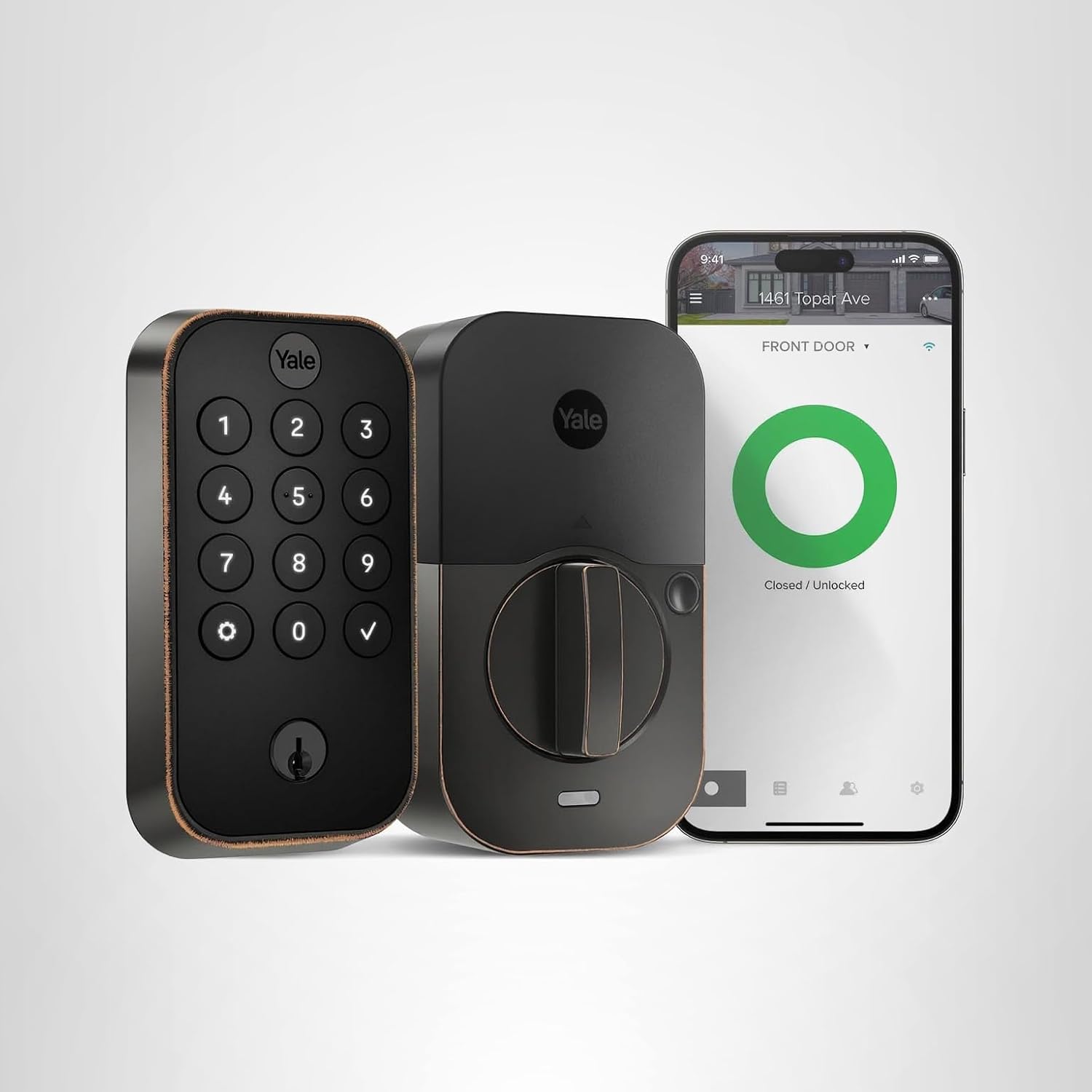
Yale Assure Lock 2 - Modular and scalable
The Yale Assure Lock 2 is what I recommend to hosts who are expanding to multiple properties or who want flexibility.
Here's what's clever about Yale: it's modular. You can start with Bluetooth-only and add a WiFi module later. Or get the WiFi version and swap to a different connectivity option if your needs change. Super useful as you scale.
The touchscreen keypad is backlit and easy to use, even for guests who aren't tech-savvy. It's got auto-lock that you can customize, physical key backup, and tamper alerts.
Yale's app is solid for managing codes. You can create temporary codes with specific start and end dates, which is perfect for back-to-back bookings or giving cleaners weekend-only access.
It works with pretty much everything—Airbnb, Google Home, Alexa, Apple HomeKit (with the right module). This flexibility is rare.
Build quality is good but not quite Schlage-level. It's more plastic, feels lighter. Still durable, just not as tank-like.
Battery life is solid, usually 8-10 months on 4 AA batteries.
🔧 Best for scaling hosts: Flexibility as you grow → See it on Amazon
✅ Pros:
- Modular design (upgrade connectivity later)
- Works with multiple platforms
- Touchscreen is easy for guests
- Good app with scheduling features
- Physical key backup
- Competitively priced
❌ Cons:
- Feels less premium than Schlage
- WiFi module sold separately on some versions
- Touchscreen can be glitchy in direct sunlight
- More complex setup than plug-and-play options
3. Wyze Lock Bolt V2

Wyze Lock Bolt - Best budget option
Okay, real talk—the Wyze Lock Bolt is shockingly good for how cheap it is. I use this on my basement apartment rental (my "side hustle" property) and it's been solid for over a year.
At $70-90, this is like a third the price of premium locks. That alone makes it worth considering if you're just starting out or testing the Airbnb waters.
It's WiFi-enabled (no hub needed), has auto-lock, supports temporary codes, and the Wyze app is actually pretty decent. You can create guest codes with expiration dates, see entry logs, get alerts.
The catch? No physical key backup. This is the one thing that makes me nervous. If the battery dies or electronics fail, you're locked out. Wyze claims the battery lasts 8+ months and gives warnings, but still—it's a risk.
Also, it's Bluetooth + WiFi, not pure WiFi, so remote management requires the Wyze Gateway ($20 extra) or you need WiFi at the property (which you should have anyway for guests).
Build quality is budget but functional. Plastic construction, feels lightweight, but it works. For a property near your home or a lower-priced rental, it's perfect.
💰 Best budget smart lock for new hosts
Get It on Amazon →✅ Pros:
- Crazy affordable ($70-90)
- WiFi enabled with good app
- Easy installation
- Auto-lock works well
- Temporary code scheduling
- Entry logging
❌ Cons:
- NO physical key backup (major risk)
- Budget build quality
- May need WiFi gateway for remote access
- Not weatherproof (indoor use only)
- Limited integration options
4. Kwikset Halo Touch WiFi Fingerprint Smart Lock

Kwikset Halo Touch - Fingerprint + keypad combo
The Halo Touch is interesting because it combines fingerprint recognition with a traditional keypad. For guests? They still use codes. For you and your cleaning crew? Fingerprint access is way faster.
WiFi is built-in, works with the Kwikset app which is solid for code management. You can create up to 250 user codes, which is overkill for most hosts but nice if you're scaling.
The fingerprint scanner can store 50 fingerprints. I use this for myself, my co-host, and my cleaner. We never need codes—just touch and go.
Build quality is really good. It's got SmartKey technology which means you can re-key it yourself in 30 seconds if needed (handy if you lose a physical key).
Battery life is decent, around 6-9 months depending on usage. The fingerprint scanner drains batteries faster than keypad-only locks.
It's weatherproof and has held up well on an exterior door that gets full sun and rain.
👆 Best for hosts who want fingerprint access: Fast entry for you, codes for guests → Check Amazon pricing
✅ Pros:
- Fingerprint + keypad options
- WiFi built-in
- Stores 250 codes + 50 fingerprints
- SmartKey re-keying technology
- Durable weatherproof construction
- Physical key backup
❌ Cons:
- Fingerprint scanner drains batteries faster
- More expensive than basic keypads
- Fingerprint recognition can be finicky
- Bulkier than simpler designs
5. August Wi-Fi Smart Lock (4th Gen)

August Wi-Fi Smart Lock - Easiest installation
The August lock is different from everything else on this list—it installs OVER your existing deadbolt instead of replacing it. This makes installation ridiculously easy and lets you keep your existing keys.
I installed this in under 10 minutes. No removing your old lock, no dealing with alignment issues, just stick it on the inside of your door and you're done. This is huge if you're renting a condo with HOA restrictions or if you're not super handy.
It's got WiFi built-in, auto-lock/unlock, activity logs, and temporary access codes. The August app is one of the better smart lock apps—clean interface, easy code management.
One cool feature: it can auto-unlock when you approach with your phone via geofencing. Guests can use the app for keyless entry instead of codes if they want.
The downside? It's inside-only, so guests still need a physical key or code for the outside unless you add an August Smart Keypad (sold separately, $80). This adds cost and complexity.
Also, because it motorizes your existing deadbolt, it's noisier than dedicated smart locks. Not a dealbreaker, just noticeable.
🔧 Easiest installation - done in 10 minutes
View on Amazon →✅ Pros:
- Incredibly easy installation (10 mins)
- Keep your existing keys and lock
- WiFi built-in
- Great app interface
- Auto-unlock with geofencing
- Good for rentals with restrictions
❌ Cons:
- Needs separate keypad for outside access ($80)
- Bulkier than other designs
- Motorized mechanism is noisy
- More expensive for full setup
- Battery life only 3-6 months
6. Lockly Vision Elite

Lockly Vision Elite - Built-in camera for security
The Lockly Vision Elite is overkill for most hosts, but if you want maximum security or deal with problem guests, the built-in camera is actually useful.
It's got a 1080p camera that records everyone who approaches your door. Motion-activated, night vision, two-way audio—basically a Ring doorbell built into your lock. This is great for verifying who's at your property or dealing with unauthorized visitors.
The lock itself is solid—keypad entry, fingerprint sensor, WiFi connectivity, physical key backup, app management. Does everything premium locks do.
The PIN Genie keypad is clever—numbers scramble each time so people can't guess codes by watching which buttons get pressed.
Battery life is the weak point because of the camera. You'll get 3-4 months max. It's rechargeable though (USB-C), not replaceable batteries.
Price is steep at $300-350, and honestly, most hosts don't need this level of security. But for high-end properties or if you've had security issues, it's worth considering.
📷 For security-focused hosts: Built-in camera + smart lock → See it on Amazon
✅ Pros:
- Built-in 1080p camera
- Two-way audio
- Fingerprint + keypad + key
- PIN Genie scrambling keypad
- Motion detection alerts
- Rechargeable battery
❌ Cons:
- Very expensive
- Short battery life (3-4 months)
- Overkill for most rentals
- Bulky design
- Subscription for cloud storage ($3/month)
💡 Things Airbnb Hosts Always Overlook
Test your lock BEFORE your first booking. Create a test code, lock yourself out, make sure the code works. Do this a few times. Find the bugs before guests do.
Keep backup keys in multiple locations. I keep one in a lockbox down the street, one at my house, and one with a trusted neighbor. When batteries die or electronics fail (they will), you need a plan B.
Set up low-battery alerts and actually respond to them. Don't wait until batteries are dead. When you get the warning, change them that week. Guest lockouts from dead batteries tank your ratings.
Auto-lock timing matters for Airbnb. Set it for 30-60 seconds after closing. Too fast and guests get annoyed, too slow and they forget to lock it manually. Find the sweet spot.
Include clear lock instructions in your welcome message. Send the code, explain how to enter it, mention the auto-lock feature. Don't assume guests will figure it out.
Generate unique codes for each booking. Reusing the same code is a security risk. Guests can share it, come back later, or "forget" to delete it. Unique codes expire after checkout.
Give cleaning crew permanent codes, not guest codes. Track when they access the property. If there's an issue, you'll know exactly when they were there.
WiFi at the property is not optional. Your smart lock needs internet. If WiFi goes down, remote management stops working. Have a backup plan or at least WiFi monitoring.
Weatherproofing matters even in mild climates. Humidity, temperature swings, and rain will destroy non-weatherproof locks faster than you think. Don't cheap out on this.
Check your HOA/rental agreement before installing. Some condos have rules about exterior door modifications. The August lock solves this since it doesn't replace anything.
🎯 Which Lock Should You Actually Get?
If this is your main income property: Schlage Encode Plus. Don't mess around with reliability on your primary earner.
If you're managing 2+ properties: Yale Assure Lock 2. The modularity and scalability matter when you're growing.
If you're just starting or this is a side hustle: Wyze Lock Bolt. It's cheap enough to test Airbnb hosting without massive upfront costs.
If you're not handy with tools: August Wi-Fi Smart Lock. 10-minute installation, no removing your existing lock.
If you want fingerprint access for yourself: Kwikset Halo Touch. Codes for guests, fingerprints for you and staff.
If you've had security issues: Lockly Vision Elite. The camera gives peace of mind and evidence if needed.
If you're in a condo with HOA restrictions: August Wi-Fi Smart Lock. Doesn't modify exterior hardware.
Final Thoughts From a Fellow Host
Look, buying a smart lock for your Airbnb isn't just about convenience—it's about professionalism. Guests expect self check-in now. They want to show up at their convenience, not yours. They want keyless entry. They want it to just work.
My actual recommendations:
Best overall: Schlage Encode Plus → Check Amazon Price
Best for scaling: Yale Assure Lock 2 → Check Amazon Price
Best budget: Wyze Lock Bolt V2 → Check Amazon Price
Easiest install: August Wi-Fi Smart Lock → Check Amazon Price
Best security: Lockly Vision Elite → Check Amazon Price
I haven't handed off physical keys in over three years. Haven't driven to a property for a lockout in two years. Haven't worried about whether a guest locked the door in... actually, I still worry about that, but at least now I can check from my phone and lock it remotely if needed.
The first smart lock I bought paid for itself in saved time and prevented headaches within about two months. Every lock since has been an even easier decision.
Whatever you choose, just make sure it has WiFi connectivity and a physical key backup. Those two features are non-negotiable. Everything else is nice-to-have.
Now go automate your check-ins and get back those hours you've been wasting on key handoffs. Your future self will thank you.
Disclosure: As an Amazon Associate I earn from qualifying purchases. This post contains affiliate links, which means I may earn a small commission at no extra cost to you.


No comments:
Post a Comment