Best External SSDs for Students – Fast, Portable & Worth the Money (2026)
I lost my entire senior project two weeks before it was due. 60+ hours of work. Gone.
My laptop's hard drive just... died. No warning, no weird noises, just dead. And because I was an idiot who thought "I'll back it up this weekend" for like three months straight, I had nothing. I ended up pulling multiple all-nighters recreating everything from memory and whatever notes I had on paper.
That's when I became weirdly obsessed with backup drives. Not the most exciting college phase, but way more useful than my brief attempt at becoming a gym bro.
Here's what I learned: external SSDs are basically essential survival gear for students. They're way faster than those old clunky external hard drives, they don't break when you inevitably drop them, and they're small enough that you'll actually carry them around instead of leaving them on your desk collecting dust.
I've tested a bunch of these over the past couple years—some for backing up projects, some for running software that my laptop can't handle, some just for moving massive video files between my laptop and the school computers. These are the ones that are actually worth your money.
⚡Quick Picks (If You're Between Classes)
Best overall for students: Crucial X9 ($80-110 for 1TB) – fast, reliable, doesn't cost a fortune
Best for super tight budgets: Teamgroup EX2 ($40-60 for 512GB) – surprisingly good for the price
Most rugged (for clumsy people): SanDisk Extreme Portable ($90-110 for 1TB) – survives drops, water, basically anything short of running it over
Fastest if you need speed: Samsung T9 ($130-150 for 1TB) – ridiculously fast transfers, great for video projects
Why SSDs Actually Matter for Students (Not Just Tech Hype)
💾 The Real Reasons You Need an External SSD
Backups are non-negotiable. I know, I know, boring adult advice. But losing your work sucks way more than spending $50 on a backup drive. Trust me on this one.
Here's the thing though—regular external hard drives (HDDs) are slow as hell and break easily. You know that old bulky drive your parents have from like 2010? The one that makes weird spinning noises? Yeah, those have actual mechanical parts inside that break when you drop them. Which you will, because you're carrying it in a backpack full of textbooks.
SSDs (Solid State Drives) are different:
- No moving parts = way less likely to break when dropped
- Actually fast = copying a 50GB project takes minutes, not half an hour
- Tiny and light = fits in your pocket, not your whole backpack
- Silent = no weird whirring sounds in quiet study areas
- Uses less power = won't drain your laptop battery
When you actually need an external SSD:
Backing up important work: Papers, projects, thesis work, code, design files. Anything that would make you cry if it disappeared. Set up automatic backups and forget about it.
Running out of laptop storage: Video projects eat storage alive. So do games, photo libraries, and that collection of PDFs you downloaded for "research" but never read. An external SSD gives you breathing room.
Moving files between computers: Working on school computers in the lab then continuing at home? External SSD. Collaborating with classmates? External SSD. Transferring footage from someone's camera? You guessed it.
Running demanding software: Some programs work better when run from an SSD. Video editing software especially loves fast storage.
Gaming (if that's your thing): Modern games are huge. Install them on an external SSD and you can play on different computers without redownloading everything.
What Actually Matters When Buying an External SSD
Before I start recommending specific drives, let me save you from wasting money on features you don't actually need.
Capacity: How much space do you actually need?
For most students, 500GB to 1TB is the sweet spot. If you're in video production, photography, or architecture, you might want 2TB. But be honest with yourself—if you're just backing up Word docs and PowerPoints, you don't need 4TB.
Speed: Does it matter?
Yes, but you don't need the absolute fastest. Most modern USB-C SSDs hit 1000MB/s which is plenty for everything except maybe professional 4K video work. Anything over 500MB/s will feel fast.
Durability: Will it survive being a student?
Look for IP ratings (water/dust resistance) and drop protection. Not because you're planning to drop it in a puddle, but because accidents happen. Especially at 2 AM in the library.
Price: What's actually worth it?
You can get a decent 1TB external SSD for $80-120. Don't overpay for fancy branding. But also don't buy the absolute cheapest thing on Amazon—those $30 "1TB SSDs" are usually fake or terrible quality.
Alright, here are the actual drives.
1. Crucial X9 (1TB/2TB/4TB)
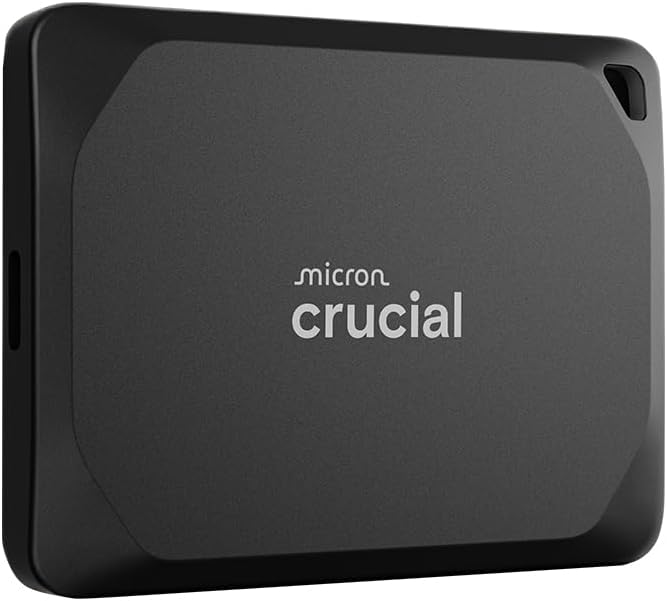
Crucial X9 - Best overall value for students
This is my top pick for most students, and here's why: it's fast enough, tough enough, and cheap enough that you'll actually buy it instead of procrastinating for another semester.
The X9 hits around 1000-1050 MB/s transfer speeds, which means backing up your entire semester's work takes minutes instead of watching a progress bar for an hour. It's not the absolute fastest on this list, but for student use? More than good enough.
Build quality is solid—it's got IP55 water and dust resistance, which means it'll survive getting caught in the rain or living at the bottom of your backpack. I've dropped mine off my desk multiple times and it's still fine.
It works with everything—Mac, Windows, Chromebook, even your phone if it has USB-C. Comes pre-formatted in exFAT so it's plug-and-play ready.
Size is perfect. It's about as big as a small phone, super light, and comes with a short USB-C cable that won't tangle in your bag.
The 1TB version usually runs $80-100 on Amazon, sometimes less during sales. That's genuinely good value for what you're getting.
🏆 Best all-around external SSD for college students
Check Today's Price on Amazon →✅ Pros:
- Great balance of speed and price
- IP55 rated (water/dust resistant)
- Works with literally everything
- Compact and lightweight
- 5-year warranty
- Actually available and in stock
❌ Cons:
- Not the absolute fastest option
- Design is pretty basic
- Cable is short (though that's also a pro)
- Gets slightly warm during heavy use
2. Teamgroup EX2 (512GB/1TB/2TB)

Teamgroup EX2 - Best budget option
Okay, real talk—if you're genuinely broke and just need something to back up your files, this is it.
The Teamgroup EX2 (sometimes labeled as MS30) is shockingly decent for how cheap it is. The 512GB version regularly goes for $40-50, and the 1TB is usually $60-70. That's less than dinner for two.
Speed is respectable—around 500-550 MB/s. Not gonna blow your mind, but way faster than old hard drives and totally fine for backing up documents, photos, and even video files if you're patient.
Build quality is... budget. It's plastic, it feels light (maybe too light?), and I wouldn't want to test its drop resistance. But for the price, it's functional.
It's USB 3.2 Gen 2, so it works with basically any computer. Comes with a USB-C to USB-C cable.
The big advantage here is price. If you're on financial aid and every dollar counts, this gets you into SSD territory without destroying your budget.
💰 Best budget pick: Perfect starter SSD for broke students → Grab it on Amazon
✅ Pros:
- Super affordable
- Decent speed for the price
- Very compact and light
- Works with all systems
- Good enough for basic backup needs
❌ Cons:
- Build quality feels cheap (because it is)
- No water/dust resistance
- Slower than premium options
- Shorter warranty (3 years vs 5)
- Gets warm under load
3. SanDisk Extreme Portable SSD (1TB/2TB/4TB)

SanDisk Extreme - Most durable option
If you're clumsy, outdoorsy, or just want something that won't die when you inevitably abuse it, get this one.
The SanDisk Extreme is basically indestructible. IP65 rating means it's dust-proof and can handle water sprays. 2-meter drop protection means it survives being knocked off your desk. Rubberized exterior means it doesn't slide around.
I've literally watched someone drop this in a puddle, dry it off, and keep using it. I've dropped mine on concrete. Still works fine.
Speed is solid—around 1050 MB/s read and 1000 MB/s write. Fast enough for 4K video editing if that's your thing. Definitely overkill for backing up Word docs, but nice to have.
It's got a carabiner loop on the back, which is weirdly useful for clipping it to your backpack.
Comes with AES 256-bit hardware encryption if you're paranoid about someone stealing your files (or if you're dealing with sensitive research data).
The 1TB version hovers around $90-110 depending on sales. A bit pricier than the Crucial, but worth it if durability matters.
🛡️ Most rugged SSD for students who drop everything
See Current Amazon Price →✅ Pros:
- Basically indestructible
- IP65 water/dust proof
- Fast transfer speeds
- Hardware encryption included
- Carabiner loop is actually useful
- 5-year warranty
❌ Cons:
- More expensive than alternatives
- Slightly bulkier than slimmer drives
- Rubberized coating can collect lint
- Orange color isn't for everyone
4. Samsung T9 Portable SSD (1TB/2TB/4TB)

Samsung T9 - Fastest for demanding projects
If you're in film school, architecture, game design, or anything that involves moving massive files constantly, this is probably worth the extra money.
The T9 is stupid fast. Like, up to 2000 MB/s fast. That's roughly twice as fast as most budget SSDs. In practical terms, a 100GB video project that would take 3-4 minutes to transfer on a normal drive takes less than a minute on this.
Build quality is premium Samsung—all metal construction, feels solid, looks professional. It's got thermal management built in so it doesn't throttle under heavy use.
It's also pretty tough—rated for drops up to 9.8 feet. Not as "adventure-proof" as the SanDisk Extreme, but durable enough for normal student abuse.
Comes with Samsung's Magician software which has some useful features like health monitoring and firmware updates. Also includes AES 256-bit encryption.
Works with everything—PC, Mac, Android, even gaming consoles.
The catch? It's expensive. The 1TB version is usually $130-150. That's a lot for a student budget. But if you're regularly working with 4K video, RAW photos, or other huge files, the time savings might be worth it.
⚡ Need maximum speed? Best for video/photo students → Check Amazon pricing
✅ Pros:
- Ridiculously fast (up to 2000 MB/s)
- Premium metal build quality
- Good thermal management
- Samsung Magician software
- Hardware encryption
- 5-year warranty
❌ Cons:
- Expensive for students
- Speed advantage only matters for huge files
- Gets noticeably warm
- Overkill for basic backup needs
5. SK hynix Tube T31 (1TB/2TB)

SK hynix Tube T31 - Most portable stick-style
This one's different—it looks like a really nice USB flash drive, but it's actually a full NVMe SSD inside.
The Tube T31 is tiny. Like, you can wear it on a keychain tiny. It plugs directly into your laptop's USB port—no cable needed. This is both awesome (nothing to forget or lose) and slightly annoying (it sticks out of your laptop).
Speed is really good for the size—around 1000 MB/s. That's proper SSD speed in something smaller than your thumb.
It's got both USB-C and USB-A connectors built in, so it works with literally any computer without adapters. Super convenient.
Build quality is solid aluminum. Feels premium, dissipates heat well.
The big advantage is convenience. It's so small you can just leave it on your keychain or in your pocket. No cable to forget, no case to lose.
The big disadvantage is that because it plugs directly into your laptop, it's more vulnerable to getting knocked or broken if you're moving around while it's connected.
🔑 Most portable SSD - fits on a keychain
Get It on Amazon →✅ Pros:
- Incredibly compact and portable
- No cable needed
- Both USB-C and USB-A built in
- Fast NVMe performance
- Premium aluminum build
- Perfect for minimalists
❌ Cons:
- Sticks out of laptop (easy to bump)
- Can get warm during use
- More expensive per GB than alternatives
- Easy to lose if not on keychain
6. WD My Passport SSD (1TB/2TB/4TB)

WD My Passport - Solid all-rounder
Western Digital's been making storage forever, and the My Passport SSD is just consistently solid. Not the fastest, not the cheapest, but reliable and well-rounded.
Speed is good—around 1050 MB/s. Fast enough for pretty much any student use case except maybe professional video work.
Build quality is nice. Metal and plastic construction that feels durable without being bulky. It's got shock resistance and vibration resistance built in.
Comes with WD's backup software which is actually pretty decent. You can set up automatic backups to run whenever you plug it in, which is way better than remembering to manually copy files.
It's got password protection and AES 256-bit hardware encryption if you need it.
Works with both PC and Mac out of the box.
The 1TB version usually runs $80-100. Pretty competitive pricing for what you're getting.
💾 Reliable brand name: Can't go wrong with WD → See it on Amazon
✅ Pros:
- Reliable brand with good support
- Useful backup software included
- Good build quality
- Hardware encryption
- 5-year warranty
- Multiple color options
❌ Cons:
- Nothing exceptional (but nothing bad either)
- Software requires setup
- Slightly larger than competitors
- Not as rugged as SanDisk Extreme
⚠️ The Horror Story Nobody Tells You
Here's something important: having a backup drive doesn't mean your files are safe unless you actually use it.
I know three people who bought external drives for backing up their thesis work. All three lost their data anyway. Know why? They bought the drives, used them once, then left them on their desks and never backed up again.
Set up automatic backups. Most operating systems have built-in tools:
- Mac: Time Machine (super easy to set up)
- Windows: File History or Backup and Restore
- Manual option: Just drag-and-drop your important folders once a week
Also, remember the 3-2-1 rule: 3 copies of important files, on 2 different types of storage, with 1 copy off-site (like cloud backup). Paranoid? Maybe. But you know what's worse? Losing your entire senior project.
💡 Things I Wish Someone Told Me About External SSDs
Amazon prices fluctuate like crazy. I've seen the same drive go from $100 to $75 and back to $100 in the same month. Set up price tracking or check during Prime Day / Black Friday.
Get a protective case. Even rugged drives benefit from a little $10 case. Keeps them from getting scratched and makes them easier to find in your bag.
Label your drives. Once you have multiple drives (backup, school projects, personal stuff), they all start looking the same. A label maker or even a piece of masking tape saves confusion.
Test your drive when you get it. Copy some files, delete them, copy again. Make sure it works before you trust it with important data. Also gives you time to return it if there's a problem.
Don't leave it plugged in 24/7. It's an external drive—treat it like one. Plug it in for backups, then unplug it. Reduces wear and protects against power surges.
Keep your receipt. Most drives have 5-year warranties, but you'll need proof of purchase if something goes wrong.
Encrypt sensitive stuff. If you're storing research data, medical info, financial docs, or anything you wouldn't want public, use the built-in encryption. It's easy to set up.
SSDs wear out (slowly). Unlike hard drives that suddenly die, SSDs gradually lose capacity after many years. They'll last through college easily, but don't expect them to last forever.
Watch out for fake drives. If it seems too good to be true (like a 2TB SSD for $20), it's probably fake. Stick to Amazon sold and shipped, or buy from Best Buy.
📊 Quick Decision Guide
Pick the Crucial X9 if: You want the best balance of price, performance, and reliability. This is the safe choice for most students.
Pick the Teamgroup EX2 if: You're on a super tight budget and just need basic backup capability. It's not fancy but it works.
Pick the SanDisk Extreme if: You're clumsy, outdoorsy, or just want something bulletproof. Worth the extra $20-30 for peace of mind.
Pick the Samsung T9 if: You're in a demanding creative program (film, architecture, game design) and work with huge files daily. The speed saves hours over a semester.
Pick the SK hynix Tube if: You're a minimalist who hates cables and wants something tiny. Perfect if portability is your #1 priority.
Pick the WD My Passport if: You want a reliable name brand with good software and don't need anything special. Solid all-around choice.
So Which External SSD Should You Actually Buy?
Look, if you're still reading this, you probably actually care about not losing your work. Good. That puts you ahead of like 70% of students.
Best for most people: Crucial X9 (1TB) → Check Amazon Price
Best if you're broke: Teamgroup EX2 (512GB) → Check Amazon Price
Best if you're clumsy: SanDisk Extreme (1TB) → Check Amazon Price
Best for speed: Samsung T9 (1TB) → Check Amazon Price
Most portable: SK hynix Tube T31 (1TB) → Check Amazon Price
Best all-rounder: WD My Passport (1TB) → Check Amazon Price
Honestly? Any of these will serve you well. The important thing is just having a backup system at all. I don't care if you buy the cheapest option on this list—it's infinitely better than having nothing and hoping your laptop never dies.
Here's my actual advice: Pick one based on your budget, buy it, set up automatic backups that same day, and then forget about it until you need it. Future you will be very grateful when something inevitably goes wrong.
And hey, maybe share this with that friend who keeps saying they'll back up their thesis "this weekend." We both know they won't unless someone bothers them about it.
Now go actually do your homework instead of reading about storage drives. (But also, buy a backup drive first.)
Disclosure: As an Amazon Associate I earn from qualifying purchases. This post contains affiliate links, which means I may earn a small commission at no extra cost to you.


No comments:
Post a Comment